Compare commits
490 Commits
api-tutori
...
subobject1
| Author | SHA1 | Date | |
|---|---|---|---|

|
afdf6e7067 | ||
|
|
f8be42f82d | ||
|
|
1ccc0780c8 | ||
|
|
830d042cea | ||
|
|
08ca7659e7 | ||
|
|
d7edfb4cc6 | ||
|
|
4eca80a770 | ||
|
|
56a662841e | ||
|
|
8878ea4cf7 | ||
|
|
eb32a798b8 | ||
|
|
0759ba6722 | ||
|
|
b8cb41b1da | ||
|
|
971b92acbb | ||
|
|
d643efa9bb | ||
|
|
08c0aeb2d5 | ||
|
|
b0940eb33e | ||
|
|
6ec858b237 | ||
|
|
891412bdb9 | ||
|
|
1947802a35 | ||
|
|
3b06e32b40 | ||
|
|
a2711c2c08 | ||
|
|
3e6c9fa318 | ||
|
|
2e49c5932a | ||
|
|
abf750f894 | ||
|
|
137434af1b | ||
|
|
ac4d21b252 | ||
|
|
db362a0efc | ||
|
|
887631500b | ||
|
|
65043d0ff3 | ||
|
|
1bf7c06b1e | ||
|
|
7b218c7f02 | ||
|
|
3572877a2e | ||
|
|
f2d44114fa | ||
|
|
0833674b91 | ||
|
|
947b54555a | ||
|
|
1a88c9a651 | ||
|
|
567bb6fa2a | ||
|
|
00d0b71080 | ||
|
|
580e10b024 | ||
|
|
fbe9621387 | ||
|
|
13b5e7c00e | ||
|
|
09d59f00e7 | ||
|
|
772d24b173 | ||
|
|
cbd001e280 | ||
|
|
bff4e120a7 | ||
|
|
8a0018177a | ||
|
|
c9c8998fa2 | ||
|
|
b0e842863d | ||
|
|
5b0fa90e39 | ||
|
|
ae6f6565fa | ||
|
|
c874ae7afd | ||
|
|
c27c0c5b8c | ||
|
|
ed102492e5 | ||
|
|
e077f9ee18 | ||
|
|
e9f4db7719 | ||
|
|
34e07b938d | ||
|
|
230230aa94 | ||
|
|
901846e6c1 | ||
|
|
a93f41f1c3 | ||
|
|
7439d949c4 | ||
|
|
e1276e464d | ||
|
|
d248dfe346 | ||
|
|
91b63f78eb | ||
|
|
754d7b3cd7 | ||
|
|
7d950d067c | ||
|
|
a34e89d56a | ||
|
|
4b51e604a7 | ||
|
|
e3e7bd27e9 | ||
|
|
f6ed0e8ab6 | ||
|
|
c179d9e759 | ||
|
|
98f387b605 | ||
|
|
275dda820b | ||
|
|
43c32c2c7b | ||
|
|
3f5388c2e8 | ||
|
|
bad24d6213 | ||
|
|
7a94efccbf | ||
|
|
3c72eea9ef | ||
|
|
3548cde9c4 | ||
|
|
3d17435438 | ||
|
|
f185254114 | ||
|
|
943e2ebe14 | ||
|
|
0c27a5f361 | ||
|
|
abfabc85b5 | ||
|
|
e08704e6d3 | ||
|
|
f60fc2ebad | ||
|
|
b50278e92f | ||
|
|
e0b6986851 | ||
|
|
d913798d5b | ||
|
|
56267095cb | ||
|
|
f9ce27def3 | ||
|
|
127a7a62c1 | ||
|
|
4429e847e8 | ||
|
|
56e321f6d9 | ||
|
|
e135ed26f0 | ||
|
|
48b25fe842 | ||
|
|
85e57286ae | ||
|
|
5ef6617062 | ||
|
|
ae89dcd62d | ||
|
|
f9597fe799 | ||
|
|
0ec27350e0 | ||
|
|
156ba832f2 | ||
|
|
c4f079dde2 | ||
|
|
2a2e9ef99d | ||
|
|
1446b16e77 | ||
|
|
f03003b366 | ||
|
|
d3db26499c | ||
|
|
d1f67fd8b9 | ||
|
|
31ee92b711 | ||
|
|
1ea7fa3084 | ||
|
|
fe217384aa | ||
|
|
49d2d5500f | ||
|
|
c1afc34cfc | ||
|
|
d8dc3c8445 | ||
|
|
ea1855fc26 | ||
|
|
0be84a4e51 | ||
|
|
d87ed1414e | ||
|
|
4382745012 | ||
|
|
f73238787d | ||
|
|
8c04596859 | ||
|
|
79b16ddda6 | ||
|
|
d490693bad | ||
|
|
6c9bd0b510 | ||
|
|
2740b6f957 | ||
|
|
37cf56a2b3 | ||
|
|
e73bb4ff4a | ||
|
|
ea35395d7e | ||
|
|
bad901a162 | ||
|
|
bb34528a86 | ||
|
|
487ec7907c | ||
|
|
3093ab8067 | ||
|
|
0f1d685ae6 | ||
|
|
24cb72e5b5 | ||
|
|
4c6ca58c95 | ||
|
|
d62989bc5d | ||
|
|
8e39da6726 | ||
|
|
98deac042e | ||
|
|
b51ffcada6 | ||
|
|
a6386b1612 | ||
|
|
72ecbb0abc | ||
|
|
c6caae8647 | ||
|
|
da23bba392 | ||
|
|
32e7f57a7c | ||
|
|
f7dfccb096 | ||
|
|
990c653397 | ||
|
|
911ece7612 | ||
|
|
222b4421e5 | ||
|
|
4517bd1356 | ||
|
|
5984ae46fc | ||
|
|
5bde1de61b | ||
|
|
06d229ea99 | ||
|
|
58391de007 | ||
|
|
ceb3e8e3dd | ||
|
|
35a331f3fd | ||
|
|
7d13ce0626 | ||
|
|
a49eebf9f5 | ||
|
|
989e4e1b75 | ||
|
|
9bb647e275 | ||
|
|
3dee082141 | ||
|
|
7d52d348b2 | ||
|
|
ded52b8d19 | ||
|
|
ab4ce0caba | ||
|
|
90c13a3959 | ||
|
|
9847c40e34 | ||
|
|
e751461194 | ||
|
|
a566265a72 | ||
|
|
fecf419f83 | ||
|
|
26c14d2bca | ||
|
|
92bfea1773 | ||
|
|
40ad9c47a8 | ||
|
|
de85f79ab6 | ||
|
|
3736f84c12 | ||
|
|
e7a7025961 | ||
|
|
e38cf1e2e8 | ||
|
|
7b84febfde | ||
|
|
39dcb937d5 | ||
|
|
3e3d3ebcf9 | ||
|
|
e370271093 | ||
|
|
55603b927f | ||
|
|
e35666bcc6 | ||
|
|
3a19890be9 | ||
|
|
725f8202ed | ||
|
|
ee917b0e1d | ||
|
|
a8900f3d6d | ||
|
|
ea8f429902 | ||
|
|
219301a85b | ||
|
|
06a453333a | ||
|
|
5e0975ddfa | ||
|
|
76527b310d | ||
|
|
73b4385578 | ||
|
|
bb3af4eff7 | ||
|
|
68adea7b5a | ||
|
|
4d3afb8efc | ||
|
|
852ac3cd55 | ||
|
|
40abd1ce6c | ||
|
|
3a7e98ab84 | ||
|
|
6364bbc6b3 | ||
|
|
fc7d2672db | ||
|
|
3a25704f41 | ||
|
|
98486f718b | ||
|
|
a7f830177a | ||
|
|
2c2d9c1bfe | ||
|
|
cc6b9d4099 | ||
|
|
1a284ac9dc | ||
|
|
b48ca99119 | ||
|
|
2e8d021a6a | ||
|
|
5409e3d203 | ||
|
|
f0064fd91f | ||
|
|
c3d158584b | ||
|
|
6b8a2a7770 | ||
|
|
cbb7ada63c | ||
|
|
fe00d3e501 | ||
|
|
b8eeeaeede | ||
|
|
dd4e20cfb5 | ||
|
|
597d66782e | ||
|
|
01031de074 | ||
|
|
1cc29be3d6 | ||
|
|
6cbdaa442b | ||
|
|
ab9d92a01a | ||
|
|
8aa3000fb1 | ||
|
|
64d8b5fcd1 | ||
|
|
05e88e5dcf | ||
|
|
5a819a96de | ||
|
|
7998a3fc98 | ||
|
|
9063996e84 | ||
|
|
76e62ae199 | ||
|
|
0e24de2b69 | ||
|
|
542dea69a1 | ||
|
|
89f2e0943c | ||
|
|
08eaa822fe | ||
|
|
39f2f94a53 | ||
|
|
b02de171f1 | ||
|
|
4091e9cdf4 | ||
|
|
b165322ba3 | ||
|
|
30750e63aa | ||
|
|
2cb636b050 | ||
|
|
5161205a06 | ||
|
|
79c5895f2f | ||
|
|
44f8c2f49f | ||
|
|
702ebbd557 | ||
|
|
e29efbbcdf | ||
|
|
44504feeb9 | ||
|
|
fdbe31cb76 | ||
|
|
10d2794bb7 | ||
|
|
eb3b6e5eca | ||
|
|
ccc32096ea | ||
|
|
4e5887d9ec | ||
|
|
2167c061a2 | ||
|
|
2100c5717e | ||
|
|
acc1b8e207 | ||
|
|
f3bd88837f | ||
|
|
8105a7edb8 | ||
|
|
385d90b056 | ||
|
|
ecf526aa03 | ||
|
|
a35b158fd1 | ||
|
|
2ebf05ae5b | ||
|
|
850da9de52 | ||
|
|
353c24c70e | ||
|
|
73d10ab093 | ||
|
|
668b7b6a39 | ||
|
|
70c072be0b | ||
|
|
eb2fbcd8d0 | ||
|
|
02f34d1c04 | ||
|
|
c8931f8535 | ||
|
|
0274490b68 | ||
|
|
06f2c74444 | ||
|
|
4d89de7068 | ||
|
|
2d50a63ca4 | ||
|
|
54dcccb472 | ||
|
|
d1e1ba1c66 | ||
|
|
7265b241a2 | ||
|
|
59436f7b45 | ||
|
|
771542ee5f | ||
|
|
b60eff2f5e | ||
|
|
f6d6cb929f | ||
|
|
6f2c80bc2e | ||
|
|
0fe0b21eda | ||
|
|
0bedc227f4 | ||
|
|
6c4419fb72 | ||
|
|
766e94ed62 | ||
|
|
4d2f159dd8 | ||
|
|
26a9d53f3b | ||
|
|
41156cec7c | ||
|
|
9fa6184b0a | ||
|
|
14f1a1f740 | ||
|
|
5a6c209369 | ||
|
|
8c2ce81b76 | ||
|
|
99ec188813 | ||
|
|
41d0089e53 | ||
|
|
8ed9f51008 | ||
|
|
6176ca2260 | ||
|
|
eb6ddb5e45 | ||
|
|
c5041db1d1 | ||
|
|
307b678707 | ||
|
|
550e60455b | ||
|
|
d263b80810 | ||
|
|
99227d2e42 | ||
|
|
31264aadda | ||
|
|
11a2fbacb4 | ||
|
|
7c865f87be | ||
|
|
86fcf19066 | ||
|
|
1f7cece8ec | ||
|
|
a731c35ad6 | ||
|
|
c7529dd56b | ||
|
|
00fff52529 | ||
|
|
4c7ad6d93a | ||
|
|
eb5493e37b | ||
|
|
1fb18c7919 | ||
|
|
1c2378b3b4 | ||
|
|
cd21575546 | ||
|
|
f9d6b9fe5d | ||
|
|
407766774d | ||
|
|
c8898ac6aa | ||
|
|
d05a1cef9b | ||
|
|
12b5544959 | ||
|
|
59e18b9a79 | ||
|
|
ea1780364b | ||
|
|
eef08ccb0b | ||
|
|
8a9edd3705 | ||
|
|
652a50c700 | ||
|
|
d1c01d3c86 | ||
|
|
8cf7ffc7cc | ||
|
|
b57fc2a0e3 | ||
|
|
736cba76bb | ||
|
|
2339560363 | ||
|
|
24e870a126 | ||
|
|
8bdf1e3072 | ||
|
|
e8e9598721 | ||
|
|
ce87ad2564 | ||
|
|
2a2f6e8142 | ||
|
|
3e5057c285 | ||
|
|
48b271b7ca | ||
|
|
8244e435bf | ||
|
|
a3a0f003f0 | ||
|
|
e42b8d22f7 | ||
|
|
5485950130 | ||
|
|
c8f4568bd0 | ||
|
|
51079b0252 | ||
|
|
bfc6ed4604 | ||
|
|
9cb26b73b5 | ||
|
|
c0311be192 | ||
|
|
cefb40856b | ||
|
|
ee7c450e11 | ||
|
|
d741e0f23c | ||
|
|
8080490e5c | ||
|
|
a3443d8077 | ||
|
|
53e8e7c688 | ||
|
|
dea94e4e68 | ||
|
|
d40c7f1821 | ||
|
|
c7e7e0c302 | ||
|
|
8ac6ac97f0 | ||
|
|
1afa4ab329 | ||
|
|
c2517c1670 | ||
|
|
717ceff02c | ||
|
|
6878c59f45 | ||
|
|
c00b053aa7 | ||
|
|
480e12c3ab | ||
|
|
50bd233b0a | ||
|
|
79406cf1ed | ||
|
|
2d5824c4ab | ||
|
|
3480809129 | ||
|
|
11bc48c7e0 | ||
|
|
d759401b69 | ||
|
|
5a2e5ac48f | ||
|
|
1144f818cf | ||
|
|
0aebecfbb0 | ||
|
|
531d40993a | ||
|
|
4c097faf88 | ||
|
|
5152e64895 | ||
|
|
0263237b2c | ||
|
|
acd0fae040 | ||
|
|
29dd51439d | ||
|
|
a1b2175801 | ||
|
|
b0f06a2195 | ||
|
|
f9c93ca022 | ||
|
|
8e0858bb24 | ||
|
|
ee0fa0451a | ||
|
|
e86e955682 | ||
|
|
9913fb48f5 | ||
|
|
71c362f016 | ||
|
|
fa6e8fd5f9 | ||
|
|
23b64951f3 | ||
|
|
99590d18f7 | ||
|
|
86b31bc040 | ||
|
|
d52bfed1df | ||
|
|
808ccd0376 | ||
|
|
44d6456de1 | ||
|
|
a394b95259 | ||
|
|
beeefe517a | ||
|
|
d02f4041b2 | ||
|
|
9fd75ff91e | ||
|
|
026ece3956 | ||
|
|
214a843dba | ||
|
|
1d6880c283 | ||
|
|
8ddad9bf4c | ||
|
|
f167022eea | ||
|
|
76edba1014 | ||
|
|
7904989a23 | ||
|
|
ea676b4368 | ||
|
|
cc2b102256 | ||
|
|
b1266abf01 | ||
|
|
cc7d0477e8 | ||
|
|
5a2d1a746d | ||
|
|
4f0e3fdf85 | ||
|
|
be9f56107c | ||
|
|
787f3815df | ||
|
|
35d7d9b380 | ||
|
|
8b9c51f303 | ||
|
|
661b3d5889 | ||
|
|
01c85cb58d | ||
|
|
0218f42e2b | ||
|
|
d8d0f22889 | ||
|
|
d8a097a95a | ||
|
|
dc577d4c24 | ||
|
|
8f9308de01 | ||
|
|
8f7a5e113b | ||
|
|
9820f9d9c5 | ||
|
|
56ff98cce7 | ||
|
|
dade6b2254 | ||
|
|
e9cac6eff3 | ||
|
|
7fc2fcfa07 | ||
|
|
5689279954 | ||
|
|
165e158f37 | ||
|
|
f301741852 | ||
|
|
eda1f23df9 | ||
|
|
d15d27af73 | ||
|
|
438511c5f7 | ||
|
|
3eb960cf5a | ||
|
|
699f6ba458 | ||
|
|
f21f22d95c | ||
|
|
b520d08818 | ||
|
|
fb8fe93529 | ||
|
|
f9fd97230f | ||
|
|
536e2290b8 | ||
|
|
73b922facf | ||
|
|
ba0d9a186b | ||
|
|
80f5cb756d | ||
|
|
d7f566088f | ||
|
|
a3bcaea7f9 | ||
|
|
23c71b7218 | ||
|
|
463f7ccf65 | ||
|
|
87fe407739 | ||
|
|
bb4f1ce7cd | ||
|
|
0cc2ba7595 | ||
|
|
8162429106 | ||
|
|
ed519d89d7 | ||
|
|
0e4f6185b8 | ||
|
|
1ced47fc2c | ||
|
|
26839c7fd1 | ||
|
|
264896c264 | ||
|
|
e3208187bf | ||
|
|
bcf85db9c4 | ||
|
|
f1e81c359e | ||
|
|
8279acc9a5 | ||
|
|
63438ad9ba | ||
|
|
467f4d2257 | ||
|
|
a5aaa6f103 | ||
|
|
9b273bc148 | ||
|
|
0aba9122a1 | ||
|
|
ac3706dfb6 | ||
|
|
3905171457 | ||
|
|
1e03f22086 | ||
|
|
360fdeaec8 | ||
|
|
d5914dfde9 | ||
|
|
d3f2a24267 | ||
|
|
677b65d124 | ||
|
|
31d31d7819 | ||
|
|
d32ef4bc3d | ||
|
|
b4faf8991d | ||
|
|
0564759481 | ||
|
|
24e391edf7 | ||
|
|
cf295105d4 | ||
|
|
bcd5f1ee24 | ||
|
|
f85ac79b4a | ||
|
|
bea9f22a0c | ||
|
|
3f330dccf1 | ||
|
|
f7f934f0e8 | ||
|
|
0e683acde1 | ||
|
|
dd6414daf0 | ||
|
|
8756b7213f | ||
|
|
b0cbb5a2b4 | ||
|
|
6418b0c634 | ||
|
|
433d26e703 | ||
|
|
c99ffcb1f4 | ||
|
|
ef815cf060 | ||
|
|
7fb7a5452f | ||
|
|
4b641f8723 | ||
|
|
0d312def27 | ||
|
|
f16a107105 | ||
|
|
f683ca44a2 | ||
|
|
546cde56a8 |
1
.gitignore
vendored
1
.gitignore
vendored
@@ -3,6 +3,7 @@
|
||||
*.gzip
|
||||
*.tgz
|
||||
*.DS_Store
|
||||
*.swp
|
||||
|
||||
# Compiled CSS, unless directly added
|
||||
*.sass-cache
|
||||
|
||||
311
API.md
311
API.md
@@ -1,114 +1,285 @@
|
||||
# Open MCT API
|
||||
|
||||
The Open MCT framework public api can be utilized by building the application (`gulp install`) and then copying the file from `dist/main.js` to your directory
|
||||
of choice.
|
||||
The Open MCT framework public api can be utilized by building the application
|
||||
(`gulp install`) and then copying the file from `dist/main.js` to your
|
||||
directory of choice.
|
||||
|
||||
Open MCT supports AMD, CommonJS, and standard browser loading; it's easy to use
|
||||
in your project.
|
||||
Open MCT supports AMD, CommonJS, and loading via a script tag; it's easy to use
|
||||
in your project. The [`openmct`]{@link module:openmct} module is exported
|
||||
via AMD and CommonJS, and is also exposed as `openmct` in the global scope
|
||||
if loaded via a script tag.
|
||||
|
||||
## Overview
|
||||
|
||||
Open MCT's goal is to allow you to browse, create, edit, and visualize all of the domain knowledge you need on a daily basis.
|
||||
Open MCT's goal is to allow you to browse, create, edit, and visualize all of
|
||||
the domain knowledge you need on a daily basis.
|
||||
|
||||
To do this, the main building block provided by Open MCT is the domain object-- the temperature sensor on the starboard solar panel, an overlay plot comparing the results of all temperature sensor, the command dictionary for a spacecraft, the individual commands in that dictionary, your "my documents" folder: all of these things are domain objects.
|
||||
To do this, the main building block provided by Open MCT is the _domain object_.
|
||||
The temperature sensor on the starboard solar panel,
|
||||
an overlay plot comparing the results of all temperature sensor,
|
||||
the command dictionary for a spacecraft,
|
||||
the individual commands in that dictionary, your "my documents" folder:
|
||||
All of these things are domain objects.
|
||||
|
||||
Domain objects have Types-- so a specific instrument temperature sensor is a "Telemetry Point," and turning on a drill for a certain duration of time is an "Activity". Types allow you to form an ontology of knowledge and provide an abstraction for grouping, visualizing, and interpreting data.
|
||||
Domain objects have Types, so a specific instrument temperature sensor is a
|
||||
"Telemetry Point," and turning on a drill for a certain duration of time is
|
||||
an "Activity". Types allow you to form an ontology of knowledge and provide
|
||||
an abstraction for grouping, visualizing, and interpreting data.
|
||||
|
||||
And then we have Views. Views allow you to visualize a domain object. Views can apply to specific domain objects; they may also apply to certain types of domain objects, or they may apply to everything. Views are simply a method of visualizing domain objects.
|
||||
And then we have Views. Views allow you to visualize domain objects. Views can
|
||||
apply to specific domain objects; they may also apply to certain types of
|
||||
domain objects, or they may apply to everything. Views are simply a method
|
||||
of visualizing domain objects.
|
||||
|
||||
Regions allow you to specify what views are displayed for specific types of domain objects in response to different user actions-- for instance, you may want to display a different view while editing, or you may want to update the toolbar display when objects are selected. Regions allow you to map views to specific user actions.
|
||||
Regions allow you to specify what views are displayed for specific types of
|
||||
domain objects in response to different user actions. For instance, you may
|
||||
want to display a different view while editing, or you may want to update the
|
||||
toolbar display when objects are selected. Regions allow you to map views to
|
||||
specific user actions.
|
||||
|
||||
Domain objects can be mutated and persisted, developers can create custom actions and apply them to domain objects, and many more things can be done. For more information, read on.
|
||||
Domain objects can be mutated and persisted, developers can create custom
|
||||
actions and apply them to domain objects, and many more things can be done.
|
||||
For more information, read on!
|
||||
|
||||
## The API
|
||||
## Running Open MCT
|
||||
|
||||
### `MCT.Type(options)`
|
||||
Status: First Draft
|
||||
Once the [`openmct`](@link module:openmct) module has been loaded, you can
|
||||
simply invoke [`start`]{@link module:openmct.MCT#start} to run Open MCT:
|
||||
|
||||
Returns a `typeInstance`. `options` is an object supporting the following properties:
|
||||
|
||||
* `metadata`: `object` defining metadata used in displaying the object; has the following properties:
|
||||
* `label`: `string`, the human-readible name of the type. used in menus and inspector.
|
||||
* `glyph`: `string`, the name of the icon to display for this type, used in labels.
|
||||
* `description`: `string`, a human readible description of the object and what it is for.
|
||||
* `initialize`: `function` which initializes new instances of this type. it is called with an object, should add any default properties to that object.
|
||||
* `creatable`: `boolean`, if true, this object will be visible in the create menu.
|
||||
* `form`: `Array` an array of form fields, as defined... somewhere! Generates a property sheet that is visible while editing this object.
|
||||
```
|
||||
openmct.start();
|
||||
```
|
||||
|
||||
### `MCT.type(typeKey, typeInstance)`
|
||||
Status: First Draft
|
||||
Generally, however, you will want to configure Open MCT by adding plugins
|
||||
before starting it. It is important to install plugins and configure Open MCT
|
||||
_before_ calling [`start`]{@link module:openmct.MCT#start}; Open MCT is not
|
||||
designed to be reconfigured once started.
|
||||
|
||||
Register a `typeInstance` with a given Type `key` (a `string`). There can only be one `typeInstance` registered per type `key`. typeInstances must be registered before they can be utilized.
|
||||
## Configuring Open MCT
|
||||
|
||||
### `MCT.Objects`
|
||||
Status: First Draft
|
||||
The [`openmct`]{@link module:openmct} module (more specifically, the
|
||||
[`MCT`]{@link module:openmct.MCT} class, of which `openmct` is an instance)
|
||||
exposes a variety of methods to allow the application to be configured,
|
||||
extended, and customized before running.
|
||||
|
||||
Allows you to register object providers, which allows you to integrate domain objects from various different sources. Also implements methods for mutation and persistence of objects. See [Object API](src/api/objects/README.md) for more details.
|
||||
Short examples follow; see the linked documentation for further details.
|
||||
|
||||
### `MCT.Composition`
|
||||
Status: First Draft
|
||||
### Adding Domain Object Types
|
||||
|
||||
Objects can contain other objects, and the Composition API allows you to fetch the composition of any given domain object, or implement custom methods for defining composition as necessary.
|
||||
Custom types may be registered via
|
||||
[`openmct.types`]{@link module:openmct.MCT#types}:
|
||||
|
||||
### `MCT.view(region, definition)`
|
||||
Status: First Draft
|
||||
```
|
||||
openmct.types.addType('my-type', new openmct.Type({
|
||||
label: "My Type",
|
||||
description: "This is a type that I added!"
|
||||
});
|
||||
```
|
||||
|
||||
Register a view factory for a specific region. View factories receive an instance of a domain object and return a `View` for that object, or return undefined if they do not know how to generate a view for that object.
|
||||
### Adding Views
|
||||
|
||||
* `ViewDefinition`: an object with the following properties:
|
||||
* `canView(domainObject)`: should return truthy if the view is valid for a given domain object, falsy if it is not capable of generating a view for that object.
|
||||
* `view(domainObject)`: should instantate and return a `View` for the given object.
|
||||
* `metadata()`: a function that returns metadata about this view. Optional.
|
||||
* `View`: an object containing a number of lifecycle methods:
|
||||
* `view.show(container)`: instantiate a view (a set of dom elements) and attach it to the container.
|
||||
* `view.destroy(container)`: remove any listeners and expect your dom elements to be destroyed.
|
||||
|
||||
For a basic introduction to views & types, check out these tutorials:
|
||||
Custom views may be registered based on the region in the application
|
||||
where they should appear:
|
||||
|
||||
* [custom-view](custom-view.html) -- Implementing a custom view with vanilla javascript.
|
||||
* [custom-view-react](custom-view-react.html) -- Implementing a custom view with React.
|
||||
* [`openmct.mainViews`]{@link module:openmct.MCT#mainViews} is a registry
|
||||
of views of domain objects which should appear in the main viewing area.
|
||||
* [`openmct.inspectors`]{@link module:openmct.MCT#inspectors} is a registry
|
||||
of views of domain objects and/or active selections, which should appear in
|
||||
the Inspector.
|
||||
* [`openmct.toolbars`]{@link module:openmct.MCT#toolbars} is a registry
|
||||
of views of domain objects and/or active selections, which should appear in
|
||||
the toolbar area while editing.
|
||||
* [`openmct.indicators`]{@link module:openmct.MCT#inspectors} is a registry
|
||||
of views which should appear in the status area of the application.
|
||||
|
||||
### `MCT.conductor`
|
||||
Status: First Draft
|
||||
Example:
|
||||
|
||||
The time conductor is an API that facilitates time synchronization across multiple components. Components that would like to be "time aware" may attach listeners to the time conductor API to allow them to remain synchronized with other components. For more information ont he time conductor API, please look at the API draft here: https://github.com/nasa/openmct/blob/66220b89ca568075f107505ba414de9457dc0427/platform/features/conductor-redux/src/README.md
|
||||
```
|
||||
openmct.mainViews.addProvider({
|
||||
canView: function (domainObject) {
|
||||
return domainObject.type === 'my-type';
|
||||
},
|
||||
view: function (domainObject) {
|
||||
return new MyView(domainObject);
|
||||
}
|
||||
});
|
||||
```
|
||||
|
||||
### `MCT.selection`
|
||||
Status: First Draft
|
||||
### Adding a Root-level Object
|
||||
|
||||
Tracks the application's selection state (which elements of a view has a user selected?)
|
||||
In many cases, you'd like a certain object (or a certain hierarchy of
|
||||
objects) to be accessible from the top level of the application (the
|
||||
tree on the left-hand side of Open MCT.) It is typical to expose a telemetry
|
||||
dictionary as a hierarchy of telemetry-providing domain objects in this
|
||||
fashion.
|
||||
|
||||
One or more JavaScript objects may be selected at any given time. User code is responsible for any necessary type-checking.
|
||||
To do so, use the [`addRoot`]{@link module:openmct.ObjectAPI#addRoot} method
|
||||
of the [object API]{@link module:openmct.ObjectAPI}:
|
||||
|
||||
The following methods are exposed from this object:
|
||||
```
|
||||
openmct.objects.addRoot({
|
||||
identifier: { key: "my-key", namespace: "my-namespace" }
|
||||
name: "My Root-level Object",
|
||||
type: "my-type"
|
||||
});
|
||||
```
|
||||
|
||||
* `select(value)`: Add `value` to the current selection.
|
||||
* `deselect(value)`: Remove `value` from the current selection.
|
||||
* `selected()`: Get array of all selected objects.
|
||||
* `clear()`: Deselect all selected objects.
|
||||
You can also remove this root-level object via its identifier:
|
||||
|
||||
MCT.selection is an EventEmitter; a `change` event is emitted whenever the selection changes.
|
||||
```
|
||||
openmct.objects.removeRoot({ key: "my-key", namespace: "my-namespace" });
|
||||
```
|
||||
|
||||
### `MCT.systems`
|
||||
Status: Not Implemented, Needs to be ported from old system.
|
||||
### Adding Composition Providers
|
||||
|
||||
A registry for different time system definitions. Based upon the previous time format system which utilized the "formats" extension category.
|
||||
The "composition" of a domain object is the list of objects it contains,
|
||||
as shown (for example) in the tree for browsing. Open MCT provides a
|
||||
default solution for composition, but there may be cases where you want
|
||||
to provide the composition of a certain object (or type of object) dynamically.
|
||||
For instance, you may want to populate a hierarchy under a custom root-level
|
||||
object based on the contents of a telemetry dictionary.
|
||||
To do this, you can add a new CompositionProvider:
|
||||
|
||||
### `MCT.run([container])`
|
||||
Status: Stable Draft
|
||||
```
|
||||
openmct.composition.addProvider({
|
||||
appliesTo: function (domainObject) {
|
||||
return domainObject.type === 'my-type';
|
||||
},
|
||||
load: function (domainObject) {
|
||||
return Promise.resolve(myDomainObjects);
|
||||
}
|
||||
});
|
||||
```
|
||||
|
||||
Run the MCT application, loading the application into the `container`, a DOM element. If a container is not specified, the application is injected into the body of the page.
|
||||
### Adding Telemetry Providers
|
||||
|
||||
### `MCT.install(plugin)`
|
||||
Status: Stable Draft
|
||||
When connecting to a new telemetry source, you will want to register a new
|
||||
[telemetry provider]{@link module:openmct.TelemetryAPI~TelemetryProvider}
|
||||
with the [telemetry API]{@link module:openmct.TelemetryAPI#addProvider}:
|
||||
|
||||
Install a plugin in MCT. Must be called before calling `run`. Plugins are functions which are invoked with the `MCT` instance as their first argument, and are expected to use the MCT public API to add functionality.
|
||||
```
|
||||
openmct.telemetry.addProvider({
|
||||
canProvideTelemetry: function (domainObject) {
|
||||
return domainObject.type === 'my-type';
|
||||
},
|
||||
properties: function (domainObject) {
|
||||
return [
|
||||
{ key: 'value', name: "Temperature", units: "degC" },
|
||||
{ key: 'time', name: "UTC" }
|
||||
];
|
||||
},
|
||||
request: function (domainObject, options) {
|
||||
var telemetryId = domainObject.myTelemetryId;
|
||||
return myAdapter.request(telemetryId, options.start, options.end);
|
||||
},
|
||||
subscribe: function (domainObject, callback) {
|
||||
var telemetryId = domainObject.myTelemetryId;
|
||||
myAdapter.subscribe(telemetryId, callback);
|
||||
return myAdapter.unsubscribe.bind(myAdapter, telemetryId, callback);
|
||||
}
|
||||
});
|
||||
```
|
||||
|
||||
For an example of writing a plugin, check out [plugin-example.html](plugin-example.html)
|
||||
The implementations for `request` and `subscribe` can vary depending on the
|
||||
nature of the endpoint which will provide telemetry. In the example above,
|
||||
it is assumed that `myAdapter` contains the specific implementations
|
||||
(HTTP requests, WebSocket connections, etc.) associated with some telemetry
|
||||
source.
|
||||
|
||||
### `MCT.setAssetPath(path)`
|
||||
## Using Open MCT
|
||||
|
||||
Sets the path (absolute or relative) at which the Open MCT static files are being hosted. The default value is '.'.
|
||||
When implementing new features, it is useful and sometimes necessary to
|
||||
utilize functionality exposed by Open MCT.
|
||||
|
||||
Note that this API is transitional and will be removed in a future version.
|
||||
### Retrieving Composition
|
||||
|
||||
To limit which objects are loaded at any given time, the composition of
|
||||
a domain object must be requested asynchronously:
|
||||
|
||||
```
|
||||
openmct.composition(myObject).load().then(function (childObjects) {
|
||||
childObjects.forEach(doSomething);
|
||||
});
|
||||
```
|
||||
|
||||
### Support Common Gestures
|
||||
|
||||
Custom views may also want to support common gestures using the
|
||||
[gesture API]{@link module:openmct.GestureAPI}. For instance, to make
|
||||
a view (or part of a view) selectable:
|
||||
|
||||
```
|
||||
openmct.gestures.selectable(myHtmlElement, myDomainObject);
|
||||
```
|
||||
|
||||
### Working with Domain Objects
|
||||
|
||||
The [object API]{@link module:openmct.ObjectAPI} provides useful methods
|
||||
for working with domain objects.
|
||||
|
||||
To make changes to a domain object, use the
|
||||
[`mutate`]{@link module:openmct.ObjectAPI#mutate} method:
|
||||
|
||||
```
|
||||
openmct.objects.mutate(myDomainObject, "name", "New name!");
|
||||
```
|
||||
|
||||
Making modifications in this fashion allows other usages of the domain
|
||||
object to remain up to date using the
|
||||
[`observe`]{@link module:openmct.ObjectAPI#observe} method:
|
||||
|
||||
```
|
||||
openmct.objects.observe(myDomainObject, "name", function (newName) {
|
||||
myLabel.textContent = newName;
|
||||
});
|
||||
```
|
||||
|
||||
### Using Telemetry
|
||||
|
||||
Very often in Open MCT, you wish to work with telemetry data (for instance,
|
||||
to display it in a custom visualization.)
|
||||
|
||||
|
||||
### Synchronizing with the Time Conductor
|
||||
|
||||
Views which wish to remain synchronized with the state of Open MCT's
|
||||
time conductor should utilize
|
||||
[`openmct.conductor`]{@link module:openmct.TimeConductor}:
|
||||
|
||||
```
|
||||
openmct.conductor.on('bounds', function (newBounds) {
|
||||
requestTelemetry(newBounds.start, newBounds.end).then(displayTelemetry);
|
||||
});
|
||||
```
|
||||
|
||||
## Plugins
|
||||
|
||||
While you can register new features with Open MCT directly, it is generally
|
||||
more useful to package these as a plugin. A plugin is a function that takes
|
||||
[`openmct`]{@link module:openmct} as an argument, and performs configuration
|
||||
upon `openmct` when invoked.
|
||||
|
||||
### Installing Plugins
|
||||
|
||||
To install plugins, use the [`install`]{@link module:openmct.MCT#install}
|
||||
method:
|
||||
|
||||
```
|
||||
openmct.install(myPlugin);
|
||||
```
|
||||
|
||||
The plugin will be invoked to configure Open MCT before it is started.
|
||||
|
||||
### Writing Plugins
|
||||
|
||||
Plugins configure Open MCT, and should utilize the
|
||||
[`openmct`]{@link module:openmct} module to do so, as summarized above in
|
||||
"Configuring Open MCT" and "Using Open MCT" above.
|
||||
|
||||
### Distributing Plugins
|
||||
|
||||
Hosting or downloading plugins is outside of the scope of this documentation.
|
||||
We recommend distributing plugins as UMD modules which export a single
|
||||
function.
|
||||
|
||||
|
||||
137
LICENSES.md
137
LICENSES.md
@@ -1,12 +1,12 @@
|
||||
# Open MCT Web Licenses
|
||||
# Open MCT Licenses
|
||||
|
||||
Open MCT Web, Copyright (c) 2014-2015, United States Government as represented by the Administrator of the National Aeronautics and Space Administration. All rights reserved.
|
||||
Open MCT, Copyright (c) 2014-2016, United States Government as represented by the Administrator of the National Aeronautics and Space Administration. All rights reserved.
|
||||
|
||||
Open MCT Web is licensed under the Apache License, Version 2.0 (the "License"); you may not use this file except in compliance with the License. You may obtain a copy of the License at http://www.apache.org/licenses/LICENSE-2.0.
|
||||
Open MCT is licensed under the Apache License, Version 2.0 (the "License"); you may not use this file except in compliance with the License. You may obtain a copy of the License at http://www.apache.org/licenses/LICENSE-2.0.
|
||||
|
||||
Unless required by applicable law or agreed to in writing, software distributed under the License is distributed on an "AS IS" BASIS, WITHOUT WARRANTIES OR CONDITIONS OF ANY KIND, either express or implied. See the License for the specific language governing permissions and limitations under the License.
|
||||
|
||||
Open MCT Web includes source code licensed under additional open source licenses as follows.
|
||||
Open MCT includes source code licensed under additional open source licenses as follows.
|
||||
|
||||
## Software Components Licenses
|
||||
|
||||
@@ -560,3 +560,132 @@ The above copyright notice and this permission notice shall be included in all c
|
||||
|
||||
THE SOFTWARE IS PROVIDED "AS IS", WITHOUT WARRANTY OF ANY KIND, EXPRESS OR IMPLIED, INCLUDING BUT NOT LIMITED TO THE WARRANTIES OF MERCHANTABILITY, FITNESS FOR A PARTICULAR PURPOSE AND NONINFRINGEMENT. IN NO EVENT SHALL THE AUTHORS OR COPYRIGHT HOLDERS BE LIABLE FOR ANY CLAIM, DAMAGES OR OTHER LIABILITY, WHETHER IN AN ACTION OF CONTRACT, TORT OR OTHERWISE, ARISING FROM, OUT OF OR IN CONNECTION WITH THE SOFTWARE OR THE USE OR OTHER DEALINGS IN THE SOFTWARE.
|
||||
|
||||
---
|
||||
|
||||
### Almond
|
||||
|
||||
* Link: https://github.com/requirejs/almond
|
||||
|
||||
* Version: 0.3.3
|
||||
|
||||
* Author: jQuery Foundation
|
||||
|
||||
* Description: Lightweight RequireJS replacement for builds
|
||||
|
||||
#### License
|
||||
|
||||
Copyright jQuery Foundation and other contributors, https://jquery.org/
|
||||
|
||||
This software consists of voluntary contributions made by many
|
||||
individuals. For exact contribution history, see the revision history
|
||||
available at https://github.com/requirejs/almond
|
||||
|
||||
The following license applies to all parts of this software except as
|
||||
documented below:
|
||||
|
||||
====
|
||||
|
||||
Permission is hereby granted, free of charge, to any person obtaining
|
||||
a copy of this software and associated documentation files (the
|
||||
"Software"), to deal in the Software without restriction, including
|
||||
without limitation the rights to use, copy, modify, merge, publish,
|
||||
distribute, sublicense, and/or sell copies of the Software, and to
|
||||
permit persons to whom the Software is furnished to do so, subject to
|
||||
the following conditions:
|
||||
|
||||
The above copyright notice and this permission notice shall be
|
||||
included in all copies or substantial portions of the Software.
|
||||
|
||||
THE SOFTWARE IS PROVIDED "AS IS", WITHOUT WARRANTY OF ANY KIND,
|
||||
EXPRESS OR IMPLIED, INCLUDING BUT NOT LIMITED TO THE WARRANTIES OF
|
||||
MERCHANTABILITY, FITNESS FOR A PARTICULAR PURPOSE AND
|
||||
NONINFRINGEMENT. IN NO EVENT SHALL THE AUTHORS OR COPYRIGHT HOLDERS BE
|
||||
LIABLE FOR ANY CLAIM, DAMAGES OR OTHER LIABILITY, WHETHER IN AN ACTION
|
||||
OF CONTRACT, TORT OR OTHERWISE, ARISING FROM, OUT OF OR IN CONNECTION
|
||||
WITH THE SOFTWARE OR THE USE OR OTHER DEALINGS IN THE SOFTWARE.
|
||||
|
||||
====
|
||||
|
||||
Copyright and related rights for sample code are waived via CC0. Sample
|
||||
code is defined as all source code displayed within the prose of the
|
||||
documentation.
|
||||
|
||||
CC0: http://creativecommons.org/publicdomain/zero/1.0/
|
||||
|
||||
====
|
||||
|
||||
Files located in the node_modules directory, and certain utilities used
|
||||
to build or test the software in the test and dist directories, are
|
||||
externally maintained libraries used by this software which have their own
|
||||
licenses; we recommend you read them, as their terms may differ from the
|
||||
terms above.
|
||||
|
||||
|
||||
### Lodash
|
||||
|
||||
* Link: https://lodash.com
|
||||
|
||||
* Version: 3.10.1
|
||||
|
||||
* Author: Dojo Foundation
|
||||
|
||||
* Description: Utility functions
|
||||
|
||||
#### License
|
||||
|
||||
Copyright 2012-2015 The Dojo Foundation <http://dojofoundation.org/>
|
||||
Based on Underscore.js, copyright 2009-2015 Jeremy Ashkenas,
|
||||
DocumentCloud and Investigative Reporters & Editors <http://underscorejs.org/>
|
||||
|
||||
Permission is hereby granted, free of charge, to any person obtaining
|
||||
a copy of this software and associated documentation files (the
|
||||
"Software"), to deal in the Software without restriction, including
|
||||
without limitation the rights to use, copy, modify, merge, publish,
|
||||
distribute, sublicense, and/or sell copies of the Software, and to
|
||||
permit persons to whom the Software is furnished to do so, subject to
|
||||
the following conditions:
|
||||
|
||||
The above copyright notice and this permission notice shall be
|
||||
included in all copies or substantial portions of the Software.
|
||||
|
||||
THE SOFTWARE IS PROVIDED "AS IS", WITHOUT WARRANTY OF ANY KIND,
|
||||
EXPRESS OR IMPLIED, INCLUDING BUT NOT LIMITED TO THE WARRANTIES OF
|
||||
MERCHANTABILITY, FITNESS FOR A PARTICULAR PURPOSE AND
|
||||
NONINFRINGEMENT. IN NO EVENT SHALL THE AUTHORS OR COPYRIGHT HOLDERS BE
|
||||
LIABLE FOR ANY CLAIM, DAMAGES OR OTHER LIABILITY, WHETHER IN AN ACTION
|
||||
OF CONTRACT, TORT OR OTHERWISE, ARISING FROM, OUT OF OR IN CONNECTION
|
||||
WITH THE SOFTWARE OR THE USE OR OTHER DEALINGS IN THE SOFTWARE.
|
||||
|
||||
### EventEmitter3
|
||||
|
||||
* Link: https://github.com/primus/eventemitter3
|
||||
|
||||
* Version: 1.2.0
|
||||
|
||||
* Author: Arnout Kazemier
|
||||
|
||||
* Description: Event-driven programming support
|
||||
|
||||
#### License
|
||||
|
||||
The MIT License (MIT)
|
||||
|
||||
Copyright (c) 2014 Arnout Kazemier
|
||||
|
||||
Permission is hereby granted, free of charge, to any person obtaining a copy
|
||||
of this software and associated documentation files (the "Software"), to deal
|
||||
in the Software without restriction, including without limitation the rights
|
||||
to use, copy, modify, merge, publish, distribute, sublicense, and/or sell
|
||||
copies of the Software, and to permit persons to whom the Software is
|
||||
furnished to do so, subject to the following conditions:
|
||||
|
||||
The above copyright notice and this permission notice shall be included in all
|
||||
copies or substantial portions of the Software.
|
||||
|
||||
THE SOFTWARE IS PROVIDED "AS IS", WITHOUT WARRANTY OF ANY KIND, EXPRESS OR
|
||||
IMPLIED, INCLUDING BUT NOT LIMITED TO THE WARRANTIES OF MERCHANTABILITY,
|
||||
FITNESS FOR A PARTICULAR PURPOSE AND NONINFRINGEMENT. IN NO EVENT SHALL THE
|
||||
AUTHORS OR COPYRIGHT HOLDERS BE LIABLE FOR ANY CLAIM, DAMAGES OR OTHER
|
||||
LIABILITY, WHETHER IN AN ACTION OF CONTRACT, TORT OR OTHERWISE, ARISING FROM,
|
||||
OUT OF OR IN CONNECTION WITH THE SOFTWARE OR THE USE OR OTHER DEALINGS IN THE
|
||||
SOFTWARE.
|
||||
|
||||
140
README.md
140
README.md
@@ -1,13 +1,110 @@
|
||||
# Open MCT
|
||||
# Open MCT [](http://www.apache.org/licenses/LICENSE-2.0)
|
||||
|
||||
Open MCT is a web-based platform for mission operations user interface
|
||||
software.
|
||||
Open MCT is a next-generation mission control framework for visualization of data on desktop and mobile devices. It is developed at NASA's Ames Research Center, and is being used by NASA for data analysis of spacecraft missions, as well as planning and operation of experimental rover systems. As a generalizable and open source framework, Open MCT could be used as the basis for building applications for planning, operation, and analysis of any systems producing telemetry data.
|
||||
|
||||
Please visit our [Official Site](https://nasa.github.io/openmct/) and [Getting Started Guide](https://nasa.github.io/openmct/getting-started/)
|
||||
|
||||
## See Open MCT in Action
|
||||
|
||||
Try Open MCT now with our [live demo](https://openmct-demo.herokuapp.com/).
|
||||
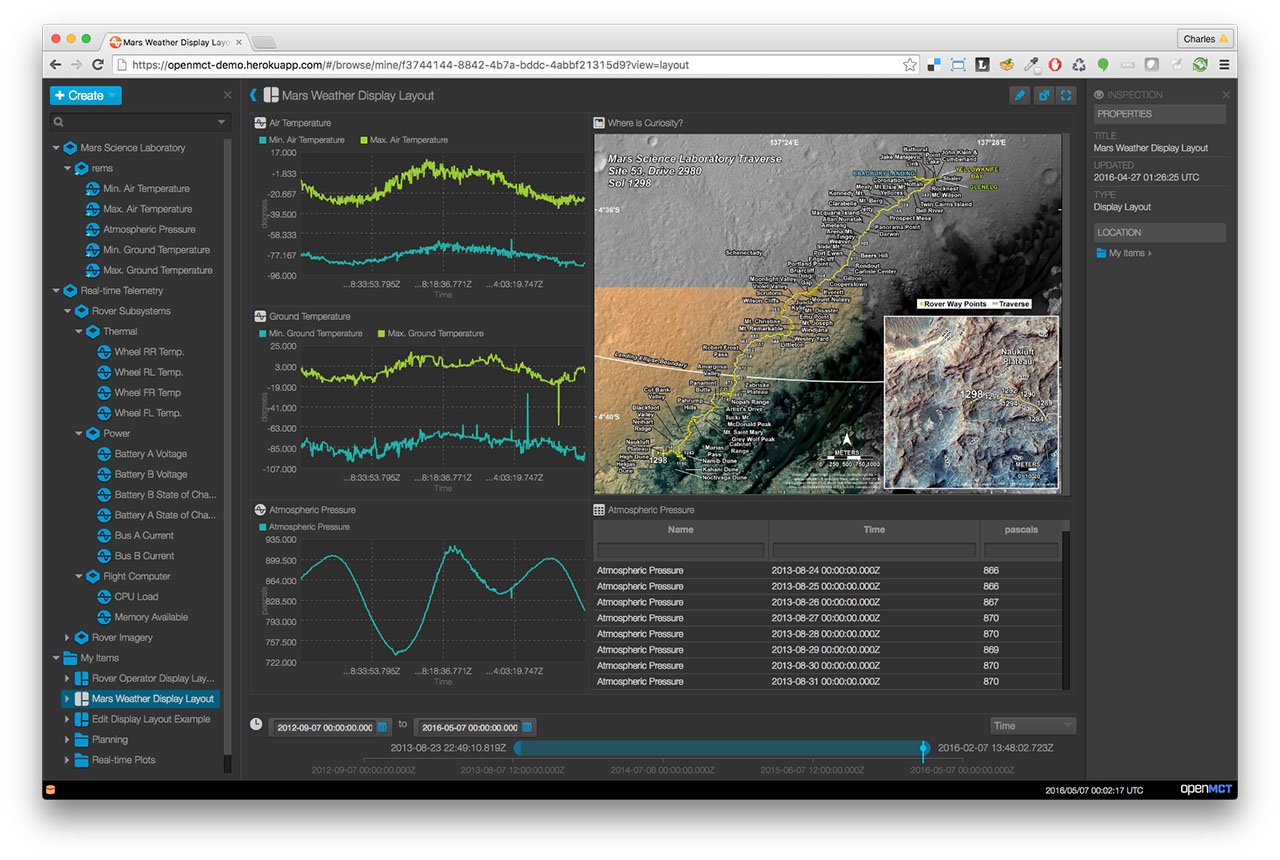
|
||||
|
||||
## New API
|
||||
|
||||
A simpler, [easier-to-use API](https://nasa.github.io/openmct/docs/api/)
|
||||
has been added to Open MCT. Changes in this
|
||||
API include a move away from a declarative system of JSON configuration files
|
||||
towards an imperative system based on function calls. Developers will be able
|
||||
to extend and build on Open MCT by making direct function calls to a public
|
||||
API. Open MCT is also being refactored to minimize the dependencies that using
|
||||
Open MCT imposes on developers, such as the current requirement to use
|
||||
AngularJS.
|
||||
|
||||
This new API has not yet been heavily used and is likely to contain defects.
|
||||
You can help by trying it out, and reporting any issues you encounter
|
||||
using our GitHub issue tracker. Such issues may include bugs, suggestions,
|
||||
missing documentation, or even just requests for help if you're having
|
||||
trouble.
|
||||
|
||||
We want Open MCT to be as easy to use, install, run, and develop for as
|
||||
possible, and your feedback will help us get there!
|
||||
|
||||
## Building and Running Open MCT Locally
|
||||
|
||||
Building and running Open MCT in your local dev environment is very easy. Be sure you have [Git](https://git-scm.com/downloads) and [Node.js](https://nodejs.org/) installed, then follow the directions below. Need additional information? Check out the [Getting Started](https://nasa.github.io/openmct/getting-started/) page on our website.
|
||||
(These instructions assume you are installing as a non-root user; developers have [reported issues](https://github.com/nasa/openmct/issues/1151) running these steps with root privileges.)
|
||||
|
||||
1. Clone the source code
|
||||
|
||||
`git clone https://github.com/nasa/openmct.git`
|
||||
|
||||
2. Install development dependencies
|
||||
|
||||
`npm install`
|
||||
|
||||
3. Run a local development server
|
||||
|
||||
`npm start`
|
||||
|
||||
Open MCT is now running, and can be accessed by pointing a web browser at [http://localhost:8080/](http://localhost:8080/)
|
||||
|
||||
## Documentation
|
||||
|
||||
Documentation is available on the [Open MCT website](https://nasa.github.io/openmct/documentation/). The documentation can also be built locally.
|
||||
|
||||
### Examples
|
||||
|
||||
The clearest examples for developing Open MCT plugins are in the
|
||||
[tutorials](https://nasa.github.io/openmct/docs/tutorials/) provided in
|
||||
our documentation.
|
||||
|
||||
For a practical example of a telemetry adapter, see David Hudson's
|
||||
[Kerbal Space Program plugin](https://github.com/hudsonfoo/kerbal-openmct),
|
||||
which allows [Kerbal Space Program](https://kerbalspaceprogram.com) players
|
||||
to build and use displays for their own missions in Open MCT.
|
||||
|
||||
Additional examples are available in the `examples` hierarchy of this
|
||||
repository; however, be aware that these examples are
|
||||
[not fully-documented](https://github.com/nasa/openmct/issues/846), so
|
||||
the tutorials will likely serve as a better starting point.
|
||||
|
||||
### Building the Open MCT Documentation Locally
|
||||
Open MCT's documentation is generated by an
|
||||
[npm](https://www.npmjs.com/)-based build. It has additional dependencies that
|
||||
may not be available on every platform and thus is not covered in the standard
|
||||
npm install. Ensure your system has [libcairo](http://cairographics.org/)
|
||||
installed and then run the following commands:
|
||||
|
||||
* `npm install`
|
||||
* `npm install canvas nomnoml`
|
||||
* `npm run docs`
|
||||
|
||||
Documentation will be generated in `target/docs`.
|
||||
|
||||
## Deploying Open MCT
|
||||
|
||||
Open MCT is built using [`npm`](http://npmjs.com/)
|
||||
and [`gulp`](http://gulpjs.com/).
|
||||
|
||||
To build Open MCT for deployment:
|
||||
|
||||
`npm run prepublish`
|
||||
|
||||
This will compile and minify JavaScript sources, as well as copy over assets.
|
||||
The contents of the `dist` folder will contain a runnable Open MCT
|
||||
instance (e.g. by starting an HTTP server in that directory), including:
|
||||
|
||||
* A `main.js` file containing Open MCT source code.
|
||||
* Various assets in the `example` and `platform` directories.
|
||||
* An `index.html` that runs Open MCT in its default configuration.
|
||||
|
||||
Additional `gulp` tasks are defined in [the gulpfile](gulpfile.js).
|
||||
|
||||
## Bundles
|
||||
|
||||
A bundle is a group of software components (including source code, declared
|
||||
as AMD modules, as well as resources such as images and HTML templates)
|
||||
that are intended to be added or removed as a single unit. A plug-in for
|
||||
that is intended to be added or removed as a single unit. A plug-in for
|
||||
Open MCT will be expressed as a bundle; platform components are also
|
||||
expressed as bundles.
|
||||
|
||||
@@ -54,39 +151,6 @@ To run:
|
||||
* `npm install`
|
||||
* `npm run all`
|
||||
|
||||
## Build
|
||||
|
||||
Open MCT is built using [`npm`](http://npmjs.com/)
|
||||
and [`gulp`](http://gulpjs.com/).
|
||||
|
||||
To build:
|
||||
|
||||
`npm run prepublish`
|
||||
|
||||
This will compile and minify JavaScript sources, as well as copy over assets.
|
||||
The contents of the `dist` folder will contain a runnable Open MCT
|
||||
instance (e.g. by starting an HTTP server in that directory), including:
|
||||
|
||||
* A `main.js` file containing Open MCT source code.
|
||||
* Various assets in the `example` and `platform` directories.
|
||||
* An `index.html` that runs Open MCT in its default configuration.
|
||||
|
||||
Additional `gulp` tasks are defined in [the gulpfile](gulpfile.js).
|
||||
|
||||
### Building Documentation
|
||||
|
||||
Open MCT's documentation is generated by an
|
||||
[npm](https://www.npmjs.com/)-based build. It has additional dependencies that
|
||||
may not be available on every platform and thus is not covered in the standard
|
||||
npm install. Ensure your system has [libcairo](http://cairographics.org/)
|
||||
installed and then run the following commands:
|
||||
|
||||
* `npm install`
|
||||
* `npm install canvas nomnoml`
|
||||
* `npm run docs`
|
||||
|
||||
Documentation will be generated in `target/docs`.
|
||||
|
||||
# Glossary
|
||||
|
||||
Certain terms are used throughout Open MCT with consistent meanings
|
||||
@@ -133,6 +197,6 @@ documentation, may presume an understanding of these terms.
|
||||
it, and it is thereafter considered the _navigated_ object (until the
|
||||
user makes another such choice.)
|
||||
* _space_: A name used to identify a persistence store. Interactions with
|
||||
persistence with generally involve a `space` parameter in some form, to
|
||||
persistence will generally involve a `space` parameter in some form, to
|
||||
distinguish multiple persistence stores from one another (for cases
|
||||
where there are multiple valid persistence locations available.)
|
||||
|
||||
10
app.js
10
app.js
@@ -42,6 +42,8 @@
|
||||
process.exit(0);
|
||||
}
|
||||
|
||||
app.disable('x-powered-by');
|
||||
|
||||
// Override bundles.json for HTTP requests
|
||||
app.use('/' + BUNDLE_FILE, function (req, res) {
|
||||
var bundles;
|
||||
@@ -75,6 +77,8 @@
|
||||
// Expose everything else as static files
|
||||
app.use(express['static'](options.directory));
|
||||
|
||||
// Finally, open the HTTP server
|
||||
app.listen(options.port);
|
||||
}());
|
||||
// Finally, open the HTTP server and log the instance to the console
|
||||
app.listen(options.port, function() {
|
||||
console.log('Open MCT application running at localhost:' + options.port)
|
||||
});
|
||||
}());
|
||||
|
||||
@@ -13,7 +13,7 @@
|
||||
"moment-duration-format": "^1.3.0",
|
||||
"requirejs": "~2.1.22",
|
||||
"text": "requirejs-text#^2.0.14",
|
||||
"es6-promise": "^3.0.2",
|
||||
"es6-promise": "^3.3.0",
|
||||
"screenfull": "^3.0.0",
|
||||
"node-uuid": "^1.4.7",
|
||||
"comma-separated-values": "^3.6.4",
|
||||
@@ -21,6 +21,8 @@
|
||||
"zepto": "^1.1.6",
|
||||
"eventemitter3": "^1.2.0",
|
||||
"lodash": "3.10.1",
|
||||
"almond": "~0.3.2"
|
||||
"almond": "~0.3.2",
|
||||
"d3": "~4.1.0",
|
||||
"html2canvas": "^0.4.1"
|
||||
}
|
||||
}
|
||||
|
||||
@@ -1,11 +1,11 @@
|
||||
#!/bin/bash
|
||||
|
||||
#*****************************************************************************
|
||||
#* Open MCT Web, Copyright (c) 2014-2015, United States Government
|
||||
#* Open MCT, Copyright (c) 2014-2016, United States Government
|
||||
#* as represented by the Administrator of the National Aeronautics and Space
|
||||
#* Administration. All rights reserved.
|
||||
#*
|
||||
#* Open MCT Web is licensed under the Apache License, Version 2.0 (the
|
||||
#* Open MCT is licensed under the Apache License, Version 2.0 (the
|
||||
#* "License"); you may not use this file except in compliance with the License.
|
||||
#* You may obtain a copy of the License at
|
||||
#* http://www.apache.org/licenses/LICENSE-2.0.
|
||||
@@ -16,7 +16,7 @@
|
||||
#* License for the specific language governing permissions and limitations
|
||||
#* under the License.
|
||||
#*
|
||||
#* Open MCT Web includes source code licensed under additional open source
|
||||
#* Open MCT includes source code licensed under additional open source
|
||||
#* licenses. See the Open Source Licenses file (LICENSES.md) included with
|
||||
#* this source code distribution or the Licensing information page available
|
||||
#* at runtime from the About dialog for additional information.
|
||||
@@ -24,7 +24,7 @@
|
||||
|
||||
# Script to build and deploy docs.
|
||||
|
||||
OUTPUT_DIRECTORY="target/docs"
|
||||
OUTPUT_DIRECTORY="dist/docs"
|
||||
# Docs, once built, are pushed to the private website repo
|
||||
REPOSITORY_URL="git@github.com:nasa/openmct-website.git"
|
||||
WEBSITE_DIRECTORY="website"
|
||||
@@ -32,7 +32,7 @@ WEBSITE_DIRECTORY="website"
|
||||
BUILD_SHA=`git rev-parse HEAD`
|
||||
|
||||
# A remote will be created for the git repository we are pushing to.
|
||||
# Don't worry, as this entire directory will get trashed inbetween builds.
|
||||
# Don't worry, as this entire directory will get trashed in between builds.
|
||||
REMOTE_NAME="documentation"
|
||||
WEBSITE_BRANCH="master"
|
||||
|
||||
@@ -45,8 +45,8 @@ npm run docs
|
||||
|
||||
echo "git clone $REPOSITORY_URL website"
|
||||
git clone $REPOSITORY_URL website || exit 1
|
||||
echo "cp -r $OUTPUT_DIRECTORY $WEBSITE_DIRECTORY/docs"
|
||||
cp -r $OUTPUT_DIRECTORY $WEBSITE_DIRECTORY/docs
|
||||
echo "cp -r $OUTPUT_DIRECTORY $WEBSITE_DIRECTORY"
|
||||
cp -r $OUTPUT_DIRECTORY $WEBSITE_DIRECTORY
|
||||
echo "cd $WEBSITE_DIRECTORY"
|
||||
cd $WEBSITE_DIRECTORY || exit 1
|
||||
|
||||
|
||||
@@ -1,65 +0,0 @@
|
||||
<!DOCTYPE html>
|
||||
<html>
|
||||
<head>
|
||||
<meta http-equiv="Content-type" content="text/html; charset=utf-8">
|
||||
<title>Implementing a composition provider</title>
|
||||
<script src="dist/main.js"></script>
|
||||
</head>
|
||||
<body>
|
||||
<script>
|
||||
|
||||
var widgetParts = ['foo', 'bar', 'baz', 'bing', 'frobnak']
|
||||
|
||||
function fabricateName() {
|
||||
return [
|
||||
widgetParts[Math.floor(Math.random() * widgetParts.length)],
|
||||
widgetParts[Math.floor(Math.random() * widgetParts.length)],
|
||||
Math.floor(Math.random() * 1000)
|
||||
].join('_');
|
||||
}
|
||||
|
||||
MCT.type('example.widget-factory', new MCT.Type({
|
||||
metadata: {
|
||||
label: "Widget Factory",
|
||||
glyph: "s",
|
||||
description: "A factory for making widgets"
|
||||
},
|
||||
initialize: function (object) {
|
||||
object.widgetCount = 5;
|
||||
object.composition = [];
|
||||
},
|
||||
creatable: true,
|
||||
form: [
|
||||
{
|
||||
name: "Widget Count",
|
||||
control: "textfield",
|
||||
key: "widgetCount",
|
||||
property: "widgetCount",
|
||||
required: true
|
||||
}
|
||||
]
|
||||
}));
|
||||
|
||||
MCT.Composition.addProvider({
|
||||
appliesTo: function (domainObject) {
|
||||
return domainObject.type === 'example.widget-factory';
|
||||
},
|
||||
load: function (domainObject) {
|
||||
var widgets = [];
|
||||
while (widgets.length < domainObject.widgetCount) {
|
||||
widgets.push({
|
||||
name: fabricateName(),
|
||||
key: {
|
||||
namespace: 'widget-factory',
|
||||
identifier: '' + widgets.length
|
||||
}
|
||||
});
|
||||
}
|
||||
return Promise.resolve(widgets);
|
||||
}
|
||||
});
|
||||
|
||||
MCT.run();
|
||||
</script>
|
||||
</body>
|
||||
</html>
|
||||
@@ -1,144 +0,0 @@
|
||||
<!DOCTYPE html>
|
||||
<html>
|
||||
<head>
|
||||
<meta http-equiv="Content-type" content="text/html; charset=utf-8">
|
||||
<title>Implementing a Custom Type and View </title>
|
||||
<script src="dist/main.js"></script>
|
||||
<script src="https://cdnjs.cloudflare.com/ajax/libs/react/15.2.1/react.js"></script>
|
||||
<script src="https://cdnjs.cloudflare.com/ajax/libs/react/15.2.1/react-dom.js"></script>
|
||||
<script src="https://cdnjs.cloudflare.com/ajax/libs/babel-core/5.8.34/browser.min.js"></script>
|
||||
</head>
|
||||
<body>
|
||||
<script type="text/babel">
|
||||
|
||||
// First, we're going to create the Todo List type, so that users can create
|
||||
// todo lists.
|
||||
|
||||
MCT.type('example.todo', new MCT.Type({
|
||||
metadata: {
|
||||
label: "To-Do List",
|
||||
glyph: "2",
|
||||
description: "A list of things that need to be done."
|
||||
},
|
||||
initialize: function (object) {
|
||||
object.tasks = [
|
||||
{ description: "This is a task." }
|
||||
];
|
||||
},
|
||||
creatable: true
|
||||
}));
|
||||
|
||||
/*
|
||||
Refresh the page, and you should be able to create new Todo Lists.
|
||||
unfortunately, when you navigate to a Todo list, you see a blank page. let's
|
||||
fix that by adding a main view for that todo list.
|
||||
|
||||
If you're wondering why this is commented out, well, it's because we'll
|
||||
write a new version later.
|
||||
*/
|
||||
|
||||
var Task = React.createClass({
|
||||
render: function() {
|
||||
return (
|
||||
<li>
|
||||
<input type="checkbox"
|
||||
checked={this.props.checked}/>
|
||||
<span>{this.props.description}</span>
|
||||
</li>
|
||||
);
|
||||
}
|
||||
});
|
||||
|
||||
var TaskList = React.createClass({
|
||||
render: function () {
|
||||
var taskNodes = this.props.tasks.map(function(task) {
|
||||
return (
|
||||
<Task checked={task.checked}
|
||||
description={task.description}/>
|
||||
);
|
||||
});
|
||||
return (
|
||||
<ul>
|
||||
{taskNodes}
|
||||
</ul>
|
||||
);
|
||||
}
|
||||
});
|
||||
|
||||
MCT.view(MCT.regions.main, {
|
||||
canView: function (domainObject) {
|
||||
return domainObject.type === 'example.todo';
|
||||
},
|
||||
view: function (domainObject) {
|
||||
var mutableObject = MCT.Objects.getMutable(domainObject);
|
||||
|
||||
return {
|
||||
show: function (container) {
|
||||
ReactDOM.render(
|
||||
<TaskList tasks={domainObject.tasks}/>,
|
||||
container
|
||||
);
|
||||
mutableObject.on('tasks', function (tasks) {
|
||||
ReactDOM.render(
|
||||
<TaskList tasks={tasks}/>,
|
||||
container
|
||||
);
|
||||
});
|
||||
}
|
||||
};
|
||||
}
|
||||
});
|
||||
|
||||
/*
|
||||
Refresh the page and you should see a todo list with checkboxes! Now let's
|
||||
Allow you to add tasks by mutating the object. We'll add a toolbar view to
|
||||
do this.
|
||||
*/
|
||||
|
||||
var TaskToolbar = React.createClass({
|
||||
render: function () {
|
||||
return (
|
||||
<button onClick={this.props.addTask}>Add Task</button>
|
||||
);
|
||||
}
|
||||
});
|
||||
|
||||
MCT.view(MCT.regions.toolbar, {
|
||||
canView: function (domainObject) {
|
||||
return domainObject.type === 'example.todo';
|
||||
},
|
||||
view: function (domainObject) {
|
||||
var mutableObject = MCT.Objects.getMutable(domainObject);
|
||||
|
||||
function addTask(event) {
|
||||
var description = prompt('Task description');
|
||||
var tasks = mutableObject.get('tasks');
|
||||
tasks.push({
|
||||
description: description,
|
||||
complete: false
|
||||
});
|
||||
mutableObject.set('tasks', tasks);
|
||||
}
|
||||
|
||||
return {
|
||||
show: function (container) {
|
||||
ReactDOM.render(
|
||||
<TaskToolbar addTask={addTask}/>,
|
||||
container
|
||||
);
|
||||
},
|
||||
}
|
||||
}
|
||||
});
|
||||
|
||||
/*
|
||||
Refresh the page, edit the todo list, and you'll have a button that allows
|
||||
you to add tasks! Unfortunately, new tasks don't show in the list. Why?
|
||||
Well, if your view should update on mutation, you need to set up the correct
|
||||
listeners. Let's update the TodoView we made earlier:
|
||||
*/
|
||||
|
||||
MCT.run();
|
||||
</script>
|
||||
</body>
|
||||
</html>
|
||||
160
custom-view.html
160
custom-view.html
@@ -1,160 +0,0 @@
|
||||
<!DOCTYPE html>
|
||||
<html>
|
||||
<head>
|
||||
<meta http-equiv="Content-type" content="text/html; charset=utf-8">
|
||||
<title>Implementing a Custom Type and View </title>
|
||||
<script src="dist/main.js"></script>
|
||||
</head>
|
||||
<body>
|
||||
<script>
|
||||
|
||||
// First, we're going to create the Todo List type, so that users can create
|
||||
// todo lists.
|
||||
|
||||
MCT.type('example.todo', new MCT.Type({
|
||||
metadata: {
|
||||
label: "To-Do List",
|
||||
glyph: "2",
|
||||
description: "A list of things that need to be done."
|
||||
},
|
||||
initialize: function (object) {
|
||||
object.tasks = [
|
||||
{ description: "This is a task." }
|
||||
];
|
||||
},
|
||||
creatable: true
|
||||
}));
|
||||
|
||||
/*
|
||||
Refresh the page, and you should be able to create new Todo Lists.
|
||||
unfortunately, when you navigate to a Todo list, you see a blank page. let's
|
||||
fix that by adding a main view for that todo list.
|
||||
|
||||
If you're wondering why this is commented out, well, it's because we'll
|
||||
write a new version later.
|
||||
*/
|
||||
|
||||
// MCT.view(MCT.regions.main, {
|
||||
// canView: function (domainObject) {
|
||||
// return domainObject.type === 'example.todo';
|
||||
// },
|
||||
// view: function (domainObject) {
|
||||
// function renderTask(task) {
|
||||
// return [
|
||||
// '<li>',
|
||||
// '<input type="checkbox"' + (task.complete ? ' checked="true"' : '') + '>',
|
||||
// '<span>' + task.description + '</span>',
|
||||
// '</li>'
|
||||
// ].join('');
|
||||
// };
|
||||
//
|
||||
// function renderTaskList() {
|
||||
// return [
|
||||
// '<ul>',
|
||||
// domainObject.tasks.map(renderTask).join(''),
|
||||
// '</ul>'
|
||||
// ].join('');
|
||||
// };
|
||||
//
|
||||
// return {
|
||||
// show: function (container) {
|
||||
// container.innerHTML = renderTaskList();
|
||||
// }
|
||||
// };
|
||||
// }
|
||||
// });
|
||||
|
||||
/*
|
||||
Refresh the page and you should see a todo list with checkboxes! Now let's
|
||||
Allow you to add tasks by mutating the object. We'll add a toolbar view to
|
||||
do this.
|
||||
*/
|
||||
|
||||
MCT.view(MCT.regions.toolbar, {
|
||||
canView: function (domainObject) {
|
||||
return domainObject.type === 'example.todo';
|
||||
},
|
||||
view: function (domainObject) {
|
||||
var mutableObject = MCT.Objects.getMutable(domainObject);
|
||||
|
||||
function addTask(event) {
|
||||
var description = prompt('Task description');
|
||||
var tasks = mutableObject.get('tasks');
|
||||
tasks.push({
|
||||
description: description,
|
||||
complete: false
|
||||
});
|
||||
mutableObject.set('tasks', tasks);
|
||||
}
|
||||
|
||||
return {
|
||||
show: function (container) {
|
||||
container.addEventListener('click', addTask);
|
||||
container.innerHTML = '<button>Add Task</button>';
|
||||
},
|
||||
destroy: function (container) {
|
||||
container.removeEventListener('click', addTask);
|
||||
}
|
||||
}
|
||||
}
|
||||
});
|
||||
|
||||
/*
|
||||
Refresh the page, edit the todo list, and you'll have a button that allows
|
||||
you to add tasks! Unfortunately, new tasks don't show in the list. Why?
|
||||
Well, if your view should update on mutation, you need to set up the correct
|
||||
listeners. Let's update the TodoView we made earlier:
|
||||
*/
|
||||
|
||||
MCT.view(MCT.regions.main, {
|
||||
canView: function(domainObject) {
|
||||
return domainObject.type === 'example.todo'
|
||||
},
|
||||
view: function (domainObject) {
|
||||
|
||||
var mutableObject = MCT.Objects.getMutable(domainObject);
|
||||
|
||||
function renderTask(task) {
|
||||
return [
|
||||
'<li>',
|
||||
'<input type="checkbox"' + (task.complete ? ' checked="true"' : '') + '>',
|
||||
'<span>' + task.description + '</span>',
|
||||
'</li>'
|
||||
].join('');
|
||||
}
|
||||
|
||||
function renderTaskList(tasks) {
|
||||
return [
|
||||
'<ul>',
|
||||
tasks.map(renderTask).join(''),
|
||||
'</ul>'
|
||||
].join('');
|
||||
}
|
||||
|
||||
function onCheckboxChange(event) {
|
||||
var checkbox = event.target;
|
||||
var taskEl = checkbox.parentNode;
|
||||
var taskList = taskEl.parentNode;
|
||||
var taskIndex = [].slice.apply(taskList.children).indexOf(taskEl);
|
||||
mutableObject.set('tasks[' + taskIndex + '].complete', checkbox.checked);
|
||||
}
|
||||
|
||||
return {
|
||||
show: function (container) {
|
||||
container.innerHTML = renderTaskList(domainObject.tasks);
|
||||
mutableObject.on('tasks', function (tasks) {
|
||||
container.innerHTML = renderTaskList(tasks);
|
||||
});
|
||||
container.addEventListener('change', onCheckboxChange);
|
||||
},
|
||||
destroy: function () {
|
||||
mutableObject.stopListening();
|
||||
}
|
||||
};
|
||||
}
|
||||
});
|
||||
|
||||
MCT.run();
|
||||
</script>
|
||||
</body>
|
||||
</html>
|
||||
@@ -1,9 +1,9 @@
|
||||
/*****************************************************************************
|
||||
* Open MCT Web, Copyright (c) 2014-2015, United States Government
|
||||
* Open MCT, Copyright (c) 2014-2016, United States Government
|
||||
* as represented by the Administrator of the National Aeronautics and Space
|
||||
* Administration. All rights reserved.
|
||||
*
|
||||
* Open MCT Web is licensed under the Apache License, Version 2.0 (the
|
||||
* Open MCT is licensed under the Apache License, Version 2.0 (the
|
||||
* "License"); you may not use this file except in compliance with the License.
|
||||
* You may obtain a copy of the License at
|
||||
* http://www.apache.org/licenses/LICENSE-2.0.
|
||||
@@ -14,7 +14,7 @@
|
||||
* License for the specific language governing permissions and limitations
|
||||
* under the License.
|
||||
*
|
||||
* Open MCT Web includes source code licensed under additional open source
|
||||
* Open MCT includes source code licensed under additional open source
|
||||
* licenses. See the Open Source Licenses file (LICENSES.md) included with
|
||||
* this source code distribution or the Licensing information page available
|
||||
* at runtime from the About dialog for additional information.
|
||||
|
||||
@@ -6,7 +6,7 @@ overall architecture of Open MCT.
|
||||
The target audience includes:
|
||||
|
||||
* _Platform maintainers_: Individuals involved in developing,
|
||||
extending, and maintaing capabilities of the platform.
|
||||
extending, and maintaining capabilities of the platform.
|
||||
* _Integration developers_: Individuals tasked with integrated
|
||||
Open MCT into a larger system, who need to understand
|
||||
its inner workings sufficiently to complete this integration.
|
||||
@@ -63,7 +63,7 @@ These layers are:
|
||||
application-specific knowledge; at this layer, we have only
|
||||
established an abstraction by which different software components
|
||||
may communicate and/or interact.
|
||||
* [_Platform_](platform.md): The platform layer defines the general look,
|
||||
* [_Platform_](platform.md): The platform layer defines the general look,
|
||||
feel, and behavior of Open MCT. This includes user-facing components like
|
||||
Browse mode and Edit mode, as well as underlying elements of the
|
||||
information model and the general service infrastructure.
|
||||
@@ -74,5 +74,3 @@ These layers are:
|
||||
typically consists of a mix of custom plug-ins to Open MCT,
|
||||
as well as optional features (such as Plot view) included alongside
|
||||
the platform.
|
||||
|
||||
|
||||
|
||||
@@ -1,6 +1,6 @@
|
||||
# Overview
|
||||
|
||||
The Open MCT platform utilizes the [framework layer](Framework.md)
|
||||
The Open MCT platform utilizes the [framework layer](framework.md)
|
||||
to provide an extensible baseline for applications which includes:
|
||||
|
||||
* A common user interface (and user interface paradigm) for dealing with
|
||||
@@ -38,7 +38,7 @@ in __any of these tiers__.
|
||||
are initiated from here and invoke behavior in the presentation layer. HTML
|
||||
templates are written in Angular’s template syntax; see the [Angular documentation on templates](https://docs.angularjs.org/guide/templates).
|
||||
These describe the page as actually seen by the user. Conceptually,
|
||||
stylesheets (controlling the lookandfeel of the rendered templates) belong
|
||||
stylesheets (controlling the look-and-feel of the rendered templates) belong
|
||||
in this grouping as well.
|
||||
* [_Presentation layer_](#presentation-layer): The presentation layer
|
||||
is responsible for updating (and providing information to update)
|
||||
@@ -48,7 +48,7 @@ in __any of these tiers__.
|
||||
display.
|
||||
* [_Information model_](#information-model): Provides a common (within Open MCT
|
||||
Web) set of interfaces for dealing with “things” domain objects within the
|
||||
system. Userfacing concerns in a Open MCT Web application are expressed as
|
||||
system. User-facing concerns in a Open MCT Web application are expressed as
|
||||
domain objects; examples include folders (used to organize other domain
|
||||
objects), layouts (used to build displays), or telemetry points (used as
|
||||
handles for streams of remote measurements.) These domain objects expose a
|
||||
@@ -616,7 +616,7 @@ follows:
|
||||
part of an action's extension definition.
|
||||
* `CreateActionProvider` provides the various Create actions which
|
||||
populate the Create menu. These are driven by the available types,
|
||||
so do not map easily ot extension category `actions`; instead, these
|
||||
so do not map easily to extension category `actions`; instead, these
|
||||
are generated after looking up which actions are available from the
|
||||
[`TypeService`](#type-service).
|
||||
* `ActionAggregator` merges together actions from multiple providers.
|
||||
|
||||
@@ -1,7 +1,7 @@
|
||||
# API Refactoring
|
||||
|
||||
This document summarizes a path toward implementing API changes
|
||||
from the [API Redesign](../proposals/APIRedesign.md) for Open MCT Web
|
||||
from the [API Redesign](../proposals/APIRedesign.md) for Open MCT
|
||||
v1.0.0.
|
||||
|
||||
# Goals
|
||||
@@ -161,7 +161,7 @@ be included in a straightforward fashion.
|
||||
|
||||
Some goals for this build step:
|
||||
|
||||
* Compile (and, preferably, optimize/minify) Open MCT Web
|
||||
* Compile (and, preferably, optimize/minify) Open MCT
|
||||
sources into a single `.js` file.
|
||||
* It is desirable to do the same for HTML sources, but
|
||||
may wish to defer this until a subsequent refactoring
|
||||
@@ -170,7 +170,7 @@ Some goals for this build step:
|
||||
derivative projects in a straightforward fashion.
|
||||
|
||||
Should also consider which dependency/packaging manager should
|
||||
be used by dependent projects to obtain Open MCT Web. Approaches
|
||||
be used by dependent projects to obtain Open MCT. Approaches
|
||||
include:
|
||||
|
||||
1. Plain `npm`. Dependents then declare their dependency with
|
||||
@@ -203,7 +203,7 @@ to use for asset generation/management and compilation/minification/etc.
|
||||
|
||||
## Step 3. Separate repositories
|
||||
|
||||
Refactor existing applications built on Open MCT Web such that they
|
||||
Refactor existing applications built on Open MCT such that they
|
||||
are no longer forks, but instead separate projects with a dependency
|
||||
on the built artifacts from Step 2.
|
||||
|
||||
@@ -211,7 +211,7 @@ Note that this is achievable already using `bower` (see `warp-bower`
|
||||
branch at http://developer.nasa.gov/mct/warp for an example.)
|
||||
However, changes involved in switching to an imperative API and
|
||||
introducing a build process may change (and should simplify) the
|
||||
approach used to utilize Open MCT Web as a dependency, so these
|
||||
approach used to utilize Open MCT as a dependency, so these
|
||||
changes should be introduced first.
|
||||
|
||||
## Step 4. Design registration API
|
||||
@@ -287,7 +287,7 @@ or separately in parallel) and should involve a tight cycle of:
|
||||
planning should be done to spread out the changes incrementally.
|
||||
|
||||
By necessity, these changes may break functionality in applications
|
||||
built using Open MCT Web. On a case-by-case basis, should consider
|
||||
built using Open MCT. On a case-by-case basis, should consider
|
||||
providing temporary "legacy support" to allow downstream updates
|
||||
to occur as a separate task; the relevant trade here is between
|
||||
waste/effort required to maintain legacy support, versus the
|
||||
@@ -299,11 +299,11 @@ across several repositories.
|
||||
|
||||
Update bundles to remove any usages of legacy support for bundles
|
||||
(including that used by dependent projects.) Then, remove legacy
|
||||
support from Open MCT Web.
|
||||
support from Open MCT.
|
||||
|
||||
## Step 8. Release candidacy
|
||||
|
||||
Once API changes are complete, Open MCT Web should enter a release
|
||||
Once API changes are complete, Open MCT should enter a release
|
||||
candidacy cycle. Important things to look at here:
|
||||
|
||||
* Are changes really complete?
|
||||
|
||||
@@ -1,6 +1,6 @@
|
||||
# Overview
|
||||
|
||||
The purpose of this document is to review feedback on Open MCT Web's
|
||||
The purpose of this document is to review feedback on Open MCT's
|
||||
current API and propose improvements to the API, particularly for a
|
||||
1.0.0 release.
|
||||
|
||||
@@ -64,7 +64,7 @@ useful, powerful interfaces.
|
||||
## Developer Intern Feedback
|
||||
|
||||
This feedback comes from interns who worked closely with
|
||||
Open MCT Web as their primary task over the Summer of 2015.
|
||||
Open MCT as their primary task over the Summer of 2015.
|
||||
|
||||
### Developer Intern 1
|
||||
|
||||
@@ -98,13 +98,13 @@ Worked on bug fixes in the platform and a plugin for search.
|
||||
It is hard to figure out what the difference between the various ways of
|
||||
dealing with telemetry are. e.g., what is the difference between just
|
||||
"Telemetry" and the "Telemetry Service"? There are many
|
||||
"Telemetry Thing"s which seem related, but in an unclear way.
|
||||
"Telemetry Things" which seem related, but in an unclear way.
|
||||
|
||||
### Developer Intern 2
|
||||
|
||||
Worked on platform bug fixes and mobile support.
|
||||
|
||||
* No guide for the UI and front end for the HTML/CSS part of Open MCT Web.
|
||||
* No guide for the UI and front end for the HTML/CSS part of Open MCT.
|
||||
Not sure if this is applicable or needed for developers, however would
|
||||
be helpful to any front end development
|
||||
* Found it difficult to follow the plot controller & subplot
|
||||
@@ -118,11 +118,11 @@ Worked on platform bug fixes and mobile support.
|
||||
## Plugin Developer Feedback
|
||||
|
||||
This feedback comes from developers who have worked on plugins for
|
||||
Open MCT Web, but have not worked on the platform.
|
||||
Open MCT, but have not worked on the platform.
|
||||
|
||||
### Plugin Developer 1
|
||||
|
||||
Used Open MCT Web over the course of several months (on a
|
||||
Used Open MCT over the course of several months (on a
|
||||
less-than-half-time basis) to develop a
|
||||
spectrum visualization plugin.
|
||||
|
||||
@@ -138,7 +138,7 @@ spectrum visualization plugin.
|
||||
|
||||
### Plugin Developer 2
|
||||
|
||||
Used Open MCT Web over the course of several weeks (on a half-time basis)
|
||||
Used Open MCT over the course of several weeks (on a half-time basis)
|
||||
to develop a tabular visualization plugin.
|
||||
|
||||
* Pain points
|
||||
@@ -180,7 +180,7 @@ to develop a tabular visualization plugin.
|
||||
* Add a model property to the bundle.json to take in "Hello World"
|
||||
as a parameter and pass through to the controller/view
|
||||
|
||||
### Open Source Contributer
|
||||
### Open Source Contributor
|
||||
|
||||
* [Failures are non-graceful when services are missing.](
|
||||
https://github.com/nasa/openmctweb/issues/79)
|
||||
@@ -197,7 +197,7 @@ to develop a tabular visualization plugin.
|
||||
## Long-term Developer Notes
|
||||
|
||||
The following notes are from original platform developer, with long
|
||||
term experience using Open MCT Web.
|
||||
term experience using Open MCT.
|
||||
|
||||
* Bundle mechanism allows for grouping related components across concerns,
|
||||
and adding and removing these easily. (e.g. model and view components of
|
||||
@@ -214,13 +214,13 @@ to an entirely different framework.
|
||||
|
||||
We can expect AngularJS 1.x to reach end-of-life reasonably soon thereafter.
|
||||
|
||||
Our API is currently a superset of Angular's API, so this directly effects
|
||||
Our API is currently a superset of Angular's API, so this directly affects
|
||||
our API. Specifically, API changes should be oriented towards removing
|
||||
or reducing the Angular dependency.
|
||||
|
||||
### Angular's Role
|
||||
|
||||
Angular is Open MCT Web's:
|
||||
Angular is Open MCT's:
|
||||
|
||||
* Dependency injection framework.
|
||||
* Template rendering.
|
||||
@@ -268,7 +268,7 @@ by experience:
|
||||
|
||||
* Feedback from new developers is that Angular was a hindrance to
|
||||
training, not a benefit. ("One more thing to learn.") Significant
|
||||
documentation remains necessary for Open MCT Web.
|
||||
documentation remains necessary for Open MCT.
|
||||
* Expected enhancements to maintainability will be effectively
|
||||
invalidated by an expected Angular end-of-life.
|
||||
* Data binding and automatic view updates do save development effort,
|
||||
@@ -456,7 +456,7 @@ Instead, propose that:
|
||||
For parity with actions, a `View` would be a constructor which
|
||||
takes an `ActionContext` as a parameter (with similarly-defined
|
||||
properties) and exposes a method to retrieve the HTML elements
|
||||
associateed with it.
|
||||
associated with it.
|
||||
|
||||
The platform would then additionally expose an `AngularView`
|
||||
implementation to improve compatibility with existing
|
||||
@@ -526,7 +526,7 @@ subset of `$http`'s functionality.
|
||||
|
||||
### Detriments
|
||||
|
||||
* Increases the number of interfaces in Open MCT Web. (Arguably,
|
||||
* Increases the number of interfaces in Open MCT. (Arguably,
|
||||
not really, since the same interfaces would exist if exposed
|
||||
by Angular.)
|
||||
|
||||
@@ -574,7 +574,7 @@ This would also allow for "composite bundles" which serve as
|
||||
proxies for multiple bundles. The `BundleContext` could contain
|
||||
(or later be amended to contain) filtering rules to ignore
|
||||
other bundles and so forth (this has been useful for administering
|
||||
Open MCT Web in subtly different configurations in the past.)
|
||||
Open MCT in subtly different configurations in the past.)
|
||||
|
||||
### Benefits
|
||||
|
||||
@@ -827,7 +827,7 @@ This could be resolved by:
|
||||
|
||||
## Nomenclature Change
|
||||
|
||||
Instead of presenting Open MCT Web as a "framework" or
|
||||
Instead of presenting Open MCT as a "framework" or
|
||||
"platform", present it as an "extensible application."
|
||||
|
||||
This is mostly a change for the developer guide. A
|
||||
@@ -1040,7 +1040,7 @@ This is a more specific variant of
|
||||
* Removes a whole category of API (bundle definitions), reducing
|
||||
learning curve associated with the software.
|
||||
* Closer to Angular style, reducing disconnect between learning
|
||||
Angular and learning Open MCT Web (reducing burden of having
|
||||
Angular and learning Open MCT (reducing burden of having
|
||||
to learn multiple paradigms.)
|
||||
* Clarifies "what can be found where" (albeit not perfectly)
|
||||
since you can look to module dependencies and follow back from there.
|
||||
|
||||
@@ -3,7 +3,7 @@
|
||||
**Table of Contents** *generated with [DocToc](https://github.com/thlorenz/doctoc)*
|
||||
|
||||
- [Reducing interface depth (the bundle.json version)](#reducing-interface-depth-the-bundlejson-version)
|
||||
- [Imperitive component registries](#imperitive-component-registries)
|
||||
- [Imperitive component registries](#imperative-component-registries)
|
||||
- [Get rid of "extension category" concept.](#get-rid-of-extension-category-concept)
|
||||
- [Reduce number and depth of extension points](#reduce-number-and-depth-of-extension-points)
|
||||
- [Composite services should not be the default](#composite-services-should-not-be-the-default)
|
||||
@@ -30,11 +30,11 @@
|
||||
|
||||
# Reducing interface depth (the bundle.json version)
|
||||
|
||||
## Imperitive component registries
|
||||
## Imperative component registries
|
||||
|
||||
Transition component registries to javascript, get rid of bundle.json and bundles.json. Prescribe a method for application configuration, but allow flexibility in how application configuration is defined.
|
||||
|
||||
Register components in an imperitive fashion, see angularApp.factory, angularApp.controller, etc. Alternatively, implement our own application object with new registries and it's own form of registering objects.
|
||||
Register components in an imperative fashion, see angularApp.factory, angularApp.controller, etc. Alternatively, implement our own application object with new registries and it's own form of registering objects.
|
||||
|
||||
## Get rid of "extension category" concept.
|
||||
|
||||
@@ -99,7 +99,7 @@ To reduce interface depth, we can replace our own provider and registry patterns
|
||||
|
||||
## More angular: for all services
|
||||
|
||||
Increasing our commitment to angular would mean using more of the angular factorys, services, etc, and less of our home grown tools. We'd implement our services and extension points as angular providers, and make them configurable via app.config.
|
||||
Increasing our commitment to angular would mean using more of the angular factories, services, etc, and less of our home grown tools. We'd implement our services and extension points as angular providers, and make them configurable via app.config.
|
||||
|
||||
As an example, registering a specific type of model provider in angular would look like:
|
||||
|
||||
@@ -126,9 +126,9 @@ Allow developers to use whatever module loading system they'd like to use, while
|
||||
|
||||
## Use gulp or grunt for standard tooling
|
||||
|
||||
Using gulp or grunt as a task runner would bring us in line with standard web developer workflows and help standardize rendering, deployment, and packaging. Additional tools can be added to the workflow at low cost, simplifying the set up of developer environments.
|
||||
Using gulp or grunt as a task runner would bring us in line with standard web developer workflows and help standardize rendering, deployment, and packaging. Additional tools can be added to the workflow at low cost, simplifying the setup of developer environments.
|
||||
|
||||
Gulp and grunt provide useful developer tooling such as live reload, automatic scss/less/etc compiliation, and ease of extensibility for standard production build processes. They're key in decoupling code.
|
||||
Gulp and grunt provide useful developer tooling such as live reload, automatic scss/less/etc compilation, and ease of extensibility for standard production build processes. They're key in decoupling code.
|
||||
|
||||
## Package openmctweb as single versioned file.
|
||||
|
||||
|
||||
@@ -643,7 +643,7 @@ to be passed along by other services.
|
||||
## Domain Objects
|
||||
|
||||
Domain objects are the most fundamental component of Open MCT's information
|
||||
model. A domain object is some distinct thing relevant to a user's work flow,
|
||||
model. A domain object is some distinct thing relevant to a user's workflow,
|
||||
such as a telemetry channel, display, or similar. Open MCT is a tool for
|
||||
viewing, browsing, manipulating, and otherwise interacting with a graph of
|
||||
domain objects.
|
||||
@@ -933,7 +933,7 @@ Note that `templateUrl` is not supported for `containers`.
|
||||
|
||||
Controls provide options for the `mct-control` directive.
|
||||
|
||||
Six standard control types are included in the forms bundle:
|
||||
Ten standard control types are included in the forms bundle:
|
||||
|
||||
* `textfield`: An area to enter plain text.
|
||||
* `select`: A drop-down list of options.
|
||||
@@ -941,7 +941,13 @@ Six standard control types are included in the forms bundle:
|
||||
* `color`: A color picker.
|
||||
* `button`: A button.
|
||||
* `datetime`: An input for UTC date/time entry; gives result as a UNIX
|
||||
timestamp, in milliseconds since start of 1970, UTC.
|
||||
timestamp, in milliseconds since start of 1970, UTC.
|
||||
* `composite`: A control parenting an array of other controls.
|
||||
* `menu-button`: A drop-down list of items supporting custom behavior
|
||||
on click.
|
||||
* `dialog-button`: A button which opens a dialog allowing a single property
|
||||
to be edited.
|
||||
* `radio`: A radio button.
|
||||
|
||||
New controls may be added as extensions of the controls category. Extensions of
|
||||
this category have two properties:
|
||||
@@ -981,7 +987,7 @@ Examples of gestures included in the platform are:
|
||||
composition.
|
||||
* `drop`: For representations that can be drop targets for drag-and-drop
|
||||
composition.
|
||||
* `menu`: For representations that can be used to pop up a context menu.
|
||||
* `menu`: For representations that can be used to popup a context menu.
|
||||
|
||||
Gesture definitions have a property `key` which is used as a machine-readable
|
||||
identifier for the gesture (e.g. `drag`, `drop`, `menu` above.)
|
||||
@@ -1153,7 +1159,7 @@ For example, the _My Items_ folder is added as an extension of this category.
|
||||
|
||||
Extensions of this category should have the following properties:
|
||||
|
||||
* `id`: The machine-readable identifier for the domaiwn object being exposed.
|
||||
* `id`: The machine-readable identifier for the domain object being exposed.
|
||||
* `model`: The model, as a JSON object, for the domain object being exposed.
|
||||
|
||||
## Stylesheets Category
|
||||
|
||||
@@ -9,26 +9,29 @@
|
||||
|
||||
Open MCT provides functionality out of the box, but it's also a platform for
|
||||
building rich mission operations applications based on modern web technology.
|
||||
The platform is configured declaratively, and defines conventions for
|
||||
building on the provided capabilities by creating modular 'bundles' that
|
||||
extend the platform at a variety of extension points. The details of how to
|
||||
The platform is configured by plugins which extend the platform at a variety
|
||||
of extension points. The details of how to
|
||||
extend the platform are provided in the following documentation.
|
||||
|
||||
## Sections
|
||||
|
||||
* The [Architecture Overview](architecture/) describes the concepts used
|
||||
throughout Open MCT, and gives a high level overview of the platform's design.
|
||||
|
||||
* The [Developer's Guide](guide/) goes into more detail about how to use the
|
||||
platform and the functionality that it provides.
|
||||
|
||||
* The [Tutorials](tutorials/) give examples of extending the platform to add
|
||||
functionality,
|
||||
and integrate with data sources.
|
||||
|
||||
* The [API](api/) document is generated from inline documentation
|
||||
using [JSDoc](http://usejsdoc.org/), and describes the JavaScript objects and
|
||||
functions that make up the software platform.
|
||||
|
||||
* Finally, the [Development Process](process/) document describes the
|
||||
* The [Development Process](process/) document describes the
|
||||
Open MCT software development cycle.
|
||||
|
||||
## Legacy Documentation
|
||||
|
||||
As we transition to a new API, the following documentation for the old API
|
||||
(which is supported during the transtion) may be useful as well:
|
||||
|
||||
* The [Architecture Overview](architecture/) describes the concepts used
|
||||
throughout Open MCT, and gives a high level overview of the platform's design.
|
||||
|
||||
* The [Developer's Guide](guide/) goes into more detail about how to use the
|
||||
platform and the functionality that it provides.
|
||||
|
||||
* The [Tutorials](tutorials/) give examples of extending the platform to add
|
||||
functionality, and integrate with data sources.
|
||||
|
||||
@@ -102,7 +102,7 @@ perform:
|
||||
|
||||
* A relevant subset of [_user testing_](procedures.md#user-test-procedures)
|
||||
identified by the acting [project manager](../cycle.md#roles).
|
||||
* [_Long-duration testing_](procedures.md#long-duration-testng)
|
||||
* [_Long-duration testing_](procedures.md#long-duration-testing)
|
||||
(specifically, for 24 hours.)
|
||||
|
||||
Issues are reported as a product of both forms of testing.
|
||||
|
||||
@@ -48,17 +48,17 @@ for a more general overview of how to run and deploy a Open MCT application.
|
||||
|
||||
First step is to check out Open MCT from the source repository.
|
||||
|
||||
`git clone https://github.com/nasa/openmctweb.git openmctweb`
|
||||
`git clone https://github.com/nasa/openmct.git openmct`
|
||||
|
||||
This will create a copy of the Open MCT source code repository in the folder
|
||||
`openmctweb` (relative to the path from which you ran the command.)
|
||||
`openmct` (relative to the path from which you ran the command.)
|
||||
If you have a repository URL, use that as the "path to repo" above. Alternately,
|
||||
if you received Open MCT as a git bundle, the path to that bundle on the
|
||||
local filesystem can be used instead.
|
||||
At this point, it will also be useful to branch off of Open MCT v0.6.2
|
||||
(which was used when writing these tutorials) to begin adding plugins.
|
||||
|
||||
cd openmctweb
|
||||
cd openmct
|
||||
git branch <my branch name> open-v0.6.2
|
||||
git checkout <my branch name>
|
||||
|
||||
@@ -79,7 +79,7 @@ changes to stylesheets, or you are running the minified version of the app
|
||||
|
||||
The next step is to run a web server so that you can view the Open MCT
|
||||
client (including the plugins you add to it) in browser. Any web server can
|
||||
be used for hosting OpenMCTWeb, and a trivial web server is provided in this
|
||||
be used for hosting Open MCT, and a trivial web server is provided in this
|
||||
package for the purposes of running the tutorials. The provided web server
|
||||
should not be used in a production environment
|
||||
|
||||
@@ -91,7 +91,7 @@ To run the tutorial web server
|
||||
|
||||
Once running, you should be able to view Open MCT from your browser at
|
||||
http://localhost:8080/ (assuming the web server is running on port 8080,
|
||||
and OpenMCTWeb is installed at the server's root path).
|
||||
and Open MCT is installed at the server's root path).
|
||||
[Google Chrome](https://www.google.com/chrome/) is recommended for these
|
||||
tutorials, as Chrome is Open MCT's "test-to" browser. The browser cache
|
||||
can sometimes interfere with development (masking changes by
|
||||
@@ -130,7 +130,6 @@ to this plugin as tutorials/todo as well.) We will start with an "empty bundle",
|
||||
one which exposes no extensions - which looks like:
|
||||
|
||||
```diff
|
||||
|
||||
define([
|
||||
'legacyRegistry'
|
||||
], function (
|
||||
@@ -144,7 +143,6 @@ define([
|
||||
}
|
||||
});
|
||||
});
|
||||
|
||||
```
|
||||
__tutorials/todo/bundle.js__
|
||||
|
||||
@@ -348,7 +346,8 @@ deeper explanation of domain objects, see the Open MCT Developer Guide.)
|
||||
In the case of our to-do list feature, the to-do list itself is the thing we'll
|
||||
want users to be able to create and edit. So, we will add that as a new type in
|
||||
our bundle definition:
|
||||
```diff
|
||||
|
||||
```diff
|
||||
define([
|
||||
'legacyRegistry'
|
||||
], function (
|
||||
@@ -370,7 +369,6 @@ define([
|
||||
+ ]}
|
||||
});
|
||||
});
|
||||
|
||||
```
|
||||
__tutorials/todo/bundle.js__
|
||||
|
||||
@@ -427,7 +425,6 @@ are stored by convention.)
|
||||
</li>
|
||||
</ul>
|
||||
```
|
||||
|
||||
__tutorials/todo/res/templates/todo.html__
|
||||
|
||||
A summary of what's included:
|
||||
@@ -573,6 +570,7 @@ We will define that in an AMD module (see http://requirejs.org/docs/whyamd.html)
|
||||
in the directory `tutorials/todo/src/controllers` (`src` is, by default, the
|
||||
directory where bundle-related source code is kept, and controllers is where
|
||||
Angular controllers are stored by convention.)
|
||||
|
||||
```diff
|
||||
define(function () {
|
||||
function TodoController($scope) {
|
||||
@@ -971,6 +969,7 @@ by the tool bar we've defined.
|
||||
Additionally, we need to make changes to our template to select specific tasks
|
||||
in response to some user gesture. Here, we will select tasks when a user clicks
|
||||
the description.
|
||||
|
||||
```diff
|
||||
<div ng-controller="TodoController">
|
||||
<div>
|
||||
@@ -996,6 +995,7 @@ __tutorials/todo/res/templates/todo.html__
|
||||
|
||||
Finally, the `TodoController` uses the `dialogService` now, so we need to
|
||||
declare that dependency in its extension definition:
|
||||
|
||||
```diff
|
||||
define([
|
||||
'legacyRegistry',
|
||||
@@ -1248,7 +1248,6 @@ another file to the res directory of our bundle; this time, it is `css/todo.css`
|
||||
font-style: italic;
|
||||
}
|
||||
```
|
||||
|
||||
__tutorials/todo/res/css/todo.css__
|
||||
|
||||
Here, we have defined classes and appearances for:
|
||||
@@ -1261,6 +1260,7 @@ Here, we have defined classes and appearances for:
|
||||
To include this CSS file in our running instance of Open MCT, we need to
|
||||
declare it in our bundle definition, this time as an extension of category
|
||||
`stylesheets`:
|
||||
|
||||
```diff
|
||||
define([
|
||||
'legacyRegistry',
|
||||
@@ -1430,7 +1430,6 @@ define([
|
||||
});
|
||||
});
|
||||
```
|
||||
|
||||
__tutorials/bargraph/bundle.js__
|
||||
|
||||
The view definition should look familiar after the To-Do List tutorial, with
|
||||
@@ -1499,6 +1498,7 @@ The third is for labels along the horizontal axis, which will indicate which
|
||||
bar corresponds to which telemetry point. Inline `style` attributes are used
|
||||
wherever dynamic positioning (handled by a script) is anticipated.
|
||||
The corresponding CSS file which styles and positions these elements:
|
||||
|
||||
```diff
|
||||
.example-bargraph {
|
||||
position: absolute;
|
||||
@@ -1596,6 +1596,7 @@ actual telemetry data in subsequent steps.)
|
||||
Notably, we will not try to show telemetry data after this step.
|
||||
|
||||
To support this, we will add a new controller which supports our Bar Graph view:
|
||||
|
||||
```diff
|
||||
define(function () {
|
||||
function BarGraphController($scope, telemetryHandler) {
|
||||
@@ -1647,6 +1648,7 @@ Whenever the telemetry handler invokes its callbacks, we update the set of
|
||||
telemetry objects in view, as well as the width for each bar.
|
||||
|
||||
We will also utilize this from our template:
|
||||
|
||||
```diff
|
||||
+ <div class="example-bargraph" ng-controller="BarGraphController">
|
||||
<div class="example-tick-labels">
|
||||
@@ -2346,6 +2348,7 @@ add a top-level object which will serve as a container; in the next step, we
|
||||
will populate this with the contents of the telemetry dictionary (which we
|
||||
will retrieve from the server.)
|
||||
|
||||
```diff
|
||||
define([
|
||||
'legacyRegistry'
|
||||
], function (
|
||||
@@ -2375,6 +2378,7 @@ define([
|
||||
}
|
||||
});
|
||||
});
|
||||
```
|
||||
__tutorials/telemetry/bundle.js__
|
||||
|
||||
Here, we've created our initial telemetry plugin. This exposes a new domain
|
||||
@@ -2469,7 +2473,6 @@ define([
|
||||
};
|
||||
});
|
||||
```
|
||||
|
||||
__main.js__
|
||||
|
||||
...we will be able to reload Open MCT and see that it is present:
|
||||
@@ -2486,43 +2489,45 @@ server. Our first step will be to add a service that will handle interactions
|
||||
with the server; this will not be used by Open MCT directly, but will be
|
||||
used by subsequent components we add.
|
||||
|
||||
/*global define,WebSocket*/
|
||||
|
||||
define(
|
||||
[],
|
||||
function () {
|
||||
"use strict";
|
||||
|
||||
function ExampleTelemetryServerAdapter($q, wsUrl) {
|
||||
var ws = new WebSocket(wsUrl),
|
||||
dictionary = $q.defer();
|
||||
|
||||
// Handle an incoming message from the server
|
||||
ws.onmessage = function (event) {
|
||||
var message = JSON.parse(event.data);
|
||||
|
||||
switch (message.type) {
|
||||
case "dictionary":
|
||||
dictionary.resolve(message.value);
|
||||
break;
|
||||
}
|
||||
};
|
||||
|
||||
// Request dictionary once connection is established
|
||||
ws.onopen = function () {
|
||||
ws.send("dictionary");
|
||||
};
|
||||
|
||||
return {
|
||||
dictionary: function () {
|
||||
return dictionary.promise;
|
||||
}
|
||||
};
|
||||
}
|
||||
|
||||
return ExampleTelemetryServerAdapter;
|
||||
```diff
|
||||
/*global define,WebSocket*/
|
||||
|
||||
define(
|
||||
[],
|
||||
function () {
|
||||
"use strict";
|
||||
|
||||
function ExampleTelemetryServerAdapter($q, wsUrl) {
|
||||
var ws = new WebSocket(wsUrl),
|
||||
dictionary = $q.defer();
|
||||
|
||||
// Handle an incoming message from the server
|
||||
ws.onmessage = function (event) {
|
||||
var message = JSON.parse(event.data);
|
||||
|
||||
switch (message.type) {
|
||||
case "dictionary":
|
||||
dictionary.resolve(message.value);
|
||||
break;
|
||||
}
|
||||
};
|
||||
|
||||
// Request dictionary once connection is established
|
||||
ws.onopen = function () {
|
||||
ws.send("dictionary");
|
||||
};
|
||||
|
||||
return {
|
||||
dictionary: function () {
|
||||
return dictionary.promise;
|
||||
}
|
||||
};
|
||||
}
|
||||
);
|
||||
|
||||
return ExampleTelemetryServerAdapter;
|
||||
}
|
||||
);
|
||||
```
|
||||
__tutorials/telemetry/src/ExampleTelemetryServerAdapter.js__
|
||||
|
||||
When created, this service initiates a connection to the server, and begins
|
||||
@@ -2539,86 +2544,88 @@ subsystems. This means that we need to convert the data from the dictionary
|
||||
into domain object models, and expose these to Open MCT via a
|
||||
`modelService`.
|
||||
|
||||
/*global define*/
|
||||
|
||||
define(
|
||||
function () {
|
||||
"use strict";
|
||||
|
||||
var PREFIX = "example_tlm:",
|
||||
FORMAT_MAPPINGS = {
|
||||
float: "number",
|
||||
integer: "number",
|
||||
string: "string"
|
||||
};
|
||||
|
||||
function ExampleTelemetryModelProvider(adapter, $q) {
|
||||
var modelPromise, empty = $q.when({});
|
||||
|
||||
// Check if this model is in our dictionary (by prefix)
|
||||
function isRelevant(id) {
|
||||
return id.indexOf(PREFIX) === 0;
|
||||
}
|
||||
|
||||
// Build a domain object identifier by adding a prefix
|
||||
function makeId(element) {
|
||||
return PREFIX + element.identifier;
|
||||
}
|
||||
|
||||
// Create domain object models from this dictionary
|
||||
function buildTaxonomy(dictionary) {
|
||||
var models = {};
|
||||
|
||||
// Create & store a domain object model for a measurement
|
||||
function addMeasurement(measurement) {
|
||||
var format = FORMAT_MAPPINGS[measurement.type];
|
||||
models[makeId(measurement)] = {
|
||||
type: "example.measurement",
|
||||
name: measurement.name,
|
||||
telemetry: {
|
||||
key: measurement.identifier,
|
||||
ranges: [{
|
||||
key: "value",
|
||||
name: "Value",
|
||||
units: measurement.units,
|
||||
format: format
|
||||
}]
|
||||
}
|
||||
};
|
||||
}
|
||||
|
||||
// Create & store a domain object model for a subsystem
|
||||
function addSubsystem(subsystem) {
|
||||
var measurements =
|
||||
(subsystem.measurements || []);
|
||||
models[makeId(subsystem)] = {
|
||||
type: "example.subsystem",
|
||||
name: subsystem.name,
|
||||
composition: measurements.map(makeId)
|
||||
};
|
||||
measurements.forEach(addMeasurement);
|
||||
}
|
||||
|
||||
(dictionary.subsystems || []).forEach(addSubsystem);
|
||||
|
||||
return models;
|
||||
}
|
||||
|
||||
// Begin generating models once the dictionary is available
|
||||
modelPromise = adapter.dictionary().then(buildTaxonomy);
|
||||
|
||||
return {
|
||||
getModels: function (ids) {
|
||||
// Return models for the dictionary only when they
|
||||
// are relevant to the request.
|
||||
return ids.some(isRelevant) ? modelPromise : empty;
|
||||
}
|
||||
};
|
||||
```diff
|
||||
/*global define*/
|
||||
|
||||
define(
|
||||
function () {
|
||||
"use strict";
|
||||
|
||||
var PREFIX = "example_tlm:",
|
||||
FORMAT_MAPPINGS = {
|
||||
float: "number",
|
||||
integer: "number",
|
||||
string: "string"
|
||||
};
|
||||
|
||||
function ExampleTelemetryModelProvider(adapter, $q) {
|
||||
var modelPromise, empty = $q.when({});
|
||||
|
||||
// Check if this model is in our dictionary (by prefix)
|
||||
function isRelevant(id) {
|
||||
return id.indexOf(PREFIX) === 0;
|
||||
}
|
||||
|
||||
return ExampleTelemetryModelProvider;
|
||||
|
||||
// Build a domain object identifier by adding a prefix
|
||||
function makeId(element) {
|
||||
return PREFIX + element.identifier;
|
||||
}
|
||||
|
||||
// Create domain object models from this dictionary
|
||||
function buildTaxonomy(dictionary) {
|
||||
var models = {};
|
||||
|
||||
// Create & store a domain object model for a measurement
|
||||
function addMeasurement(measurement) {
|
||||
var format = FORMAT_MAPPINGS[measurement.type];
|
||||
models[makeId(measurement)] = {
|
||||
type: "example.measurement",
|
||||
name: measurement.name,
|
||||
telemetry: {
|
||||
key: measurement.identifier,
|
||||
ranges: [{
|
||||
key: "value",
|
||||
name: "Value",
|
||||
units: measurement.units,
|
||||
format: format
|
||||
}]
|
||||
}
|
||||
};
|
||||
}
|
||||
|
||||
// Create & store a domain object model for a subsystem
|
||||
function addSubsystem(subsystem) {
|
||||
var measurements =
|
||||
(subsystem.measurements || []);
|
||||
models[makeId(subsystem)] = {
|
||||
type: "example.subsystem",
|
||||
name: subsystem.name,
|
||||
composition: measurements.map(makeId)
|
||||
};
|
||||
measurements.forEach(addMeasurement);
|
||||
}
|
||||
|
||||
(dictionary.subsystems || []).forEach(addSubsystem);
|
||||
|
||||
return models;
|
||||
}
|
||||
|
||||
// Begin generating models once the dictionary is available
|
||||
modelPromise = adapter.dictionary().then(buildTaxonomy);
|
||||
|
||||
return {
|
||||
getModels: function (ids) {
|
||||
// Return models for the dictionary only when they
|
||||
// are relevant to the request.
|
||||
return ids.some(isRelevant) ? modelPromise : empty;
|
||||
}
|
||||
};
|
||||
}
|
||||
);
|
||||
|
||||
return ExampleTelemetryModelProvider;
|
||||
}
|
||||
);
|
||||
```
|
||||
__tutorials/telemetry/src/ExampleTelemetryModelProvider.js__
|
||||
|
||||
This script implements a `provider` for `modelService`; the `modelService` is a
|
||||
@@ -2671,55 +2678,57 @@ This allows our telemetry dictionary to be expressed as domain object models
|
||||
fix this, we will need another script which will add these subsystems to the
|
||||
root-level object we added in Step 1.
|
||||
|
||||
/*global define*/
|
||||
|
||||
define(
|
||||
function () {
|
||||
"use strict";
|
||||
|
||||
var TAXONOMY_ID = "example:sc",
|
||||
PREFIX = "example_tlm:";
|
||||
|
||||
function ExampleTelemetryInitializer(adapter, objectService) {
|
||||
// Generate a domain object identifier for a dictionary element
|
||||
function makeId(element) {
|
||||
return PREFIX + element.identifier;
|
||||
}
|
||||
|
||||
// When the dictionary is available, add all subsystems
|
||||
// to the composition of My Spacecraft
|
||||
function initializeTaxonomy(dictionary) {
|
||||
// Get the top-level container for dictionary objects
|
||||
// from a group of domain objects.
|
||||
function getTaxonomyObject(domainObjects) {
|
||||
return domainObjects[TAXONOMY_ID];
|
||||
}
|
||||
|
||||
// Populate
|
||||
function populateModel(taxonomyObject) {
|
||||
return taxonomyObject.useCapability(
|
||||
"mutation",
|
||||
function (model) {
|
||||
model.name =
|
||||
dictionary.name;
|
||||
model.composition =
|
||||
dictionary.subsystems.map(makeId);
|
||||
}
|
||||
);
|
||||
}
|
||||
|
||||
// Look up My Spacecraft, and populate it accordingly.
|
||||
objectService.getObjects([TAXONOMY_ID])
|
||||
.then(getTaxonomyObject)
|
||||
.then(populateModel);
|
||||
}
|
||||
|
||||
adapter.dictionary().then(initializeTaxonomy);
|
||||
```diff
|
||||
/*global define*/
|
||||
|
||||
define(
|
||||
function () {
|
||||
"use strict";
|
||||
|
||||
var TAXONOMY_ID = "example:sc",
|
||||
PREFIX = "example_tlm:";
|
||||
|
||||
function ExampleTelemetryInitializer(adapter, objectService) {
|
||||
// Generate a domain object identifier for a dictionary element
|
||||
function makeId(element) {
|
||||
return PREFIX + element.identifier;
|
||||
}
|
||||
|
||||
return ExampleTelemetryInitializer;
|
||||
|
||||
// When the dictionary is available, add all subsystems
|
||||
// to the composition of My Spacecraft
|
||||
function initializeTaxonomy(dictionary) {
|
||||
// Get the top-level container for dictionary objects
|
||||
// from a group of domain objects.
|
||||
function getTaxonomyObject(domainObjects) {
|
||||
return domainObjects[TAXONOMY_ID];
|
||||
}
|
||||
|
||||
// Populate
|
||||
function populateModel(taxonomyObject) {
|
||||
return taxonomyObject.useCapability(
|
||||
"mutation",
|
||||
function (model) {
|
||||
model.name =
|
||||
dictionary.name;
|
||||
model.composition =
|
||||
dictionary.subsystems.map(makeId);
|
||||
}
|
||||
);
|
||||
}
|
||||
|
||||
// Look up My Spacecraft, and populate it accordingly.
|
||||
objectService.getObjects([TAXONOMY_ID])
|
||||
.then(getTaxonomyObject)
|
||||
.then(populateModel);
|
||||
}
|
||||
|
||||
adapter.dictionary().then(initializeTaxonomy);
|
||||
}
|
||||
);
|
||||
|
||||
return ExampleTelemetryInitializer;
|
||||
}
|
||||
);
|
||||
```
|
||||
__tutorials/telemetry/src/ExampleTelemetryInitializer.js__
|
||||
|
||||
At the conclusion of Step 1, the top-level My Spacecraft object was empty. This
|
||||
@@ -2737,14 +2746,14 @@ with the platform):
|
||||
```diff
|
||||
define([
|
||||
'legacyRegistry',
|
||||
'./src/ExampleTelemetryServerAdapter',
|
||||
'./src/ExampleTelemetryInitializer',
|
||||
'./src/ExampleTelemetryModelProvider'
|
||||
+ './src/ExampleTelemetryServerAdapter',
|
||||
+ './src/ExampleTelemetryInitializer',
|
||||
+ './src/ExampleTelemetryModelProvider'
|
||||
], function (
|
||||
legacyRegistry,
|
||||
ExampleTelemetryServerAdapter,
|
||||
ExampleTelemetryInitializer,
|
||||
ExampleTelemetryModelProvider
|
||||
+ ExampleTelemetryServerAdapter,
|
||||
+ ExampleTelemetryInitializer,
|
||||
+ ExampleTelemetryModelProvider
|
||||
) {
|
||||
legacyRegistry.register("tutorials/telemetry", {
|
||||
"name": "Example Telemetry Adapter",
|
||||
@@ -2755,7 +2764,7 @@ define([
|
||||
"key": "example.spacecraft",
|
||||
"glyph": "o"
|
||||
},
|
||||
{
|
||||
+ {
|
||||
+ "name": "Subsystem",
|
||||
+ "key": "example.subsystem",
|
||||
+ "glyph": "o",
|
||||
@@ -2934,6 +2943,7 @@ identifier, the pending promise is resolved.
|
||||
|
||||
This `history` method will be used by a `telemetryService` provider which we
|
||||
will implement:
|
||||
|
||||
```diff
|
||||
/*global define*/
|
||||
|
||||
@@ -3019,6 +3029,7 @@ Finally, note that we also have a `subscribe` method, to satisfy the interface o
|
||||
`telemetryService`, but this `subscribe` method currently does nothing.
|
||||
|
||||
This script uses an `ExampleTelemetrySeries` class, which looks like:
|
||||
|
||||
```diff
|
||||
/*global define*/
|
||||
|
||||
@@ -3050,6 +3061,7 @@ This takes the array of telemetry values (as returned by the server) and wraps
|
||||
it with the interface expected by the platform (the methods shown.)
|
||||
|
||||
Finally, we expose this `telemetryService` provider declaratively:
|
||||
|
||||
```diff
|
||||
define([
|
||||
'legacyRegistry',
|
||||
@@ -3226,7 +3238,7 @@ define(
|
||||
__tutorials/telemetry/src/ExampleTelemetryServerAdapter.js__
|
||||
|
||||
Here, we have added `subscribe` and `unsubscribe` methods which issue the
|
||||
corresponding requests to the server. Seperately, we introduce the ability to
|
||||
corresponding requests to the server. Separately, we introduce the ability to
|
||||
listen for `data` messages as they come in: These will contain the data associated
|
||||
with these subscriptions.
|
||||
|
||||
@@ -3316,7 +3328,6 @@ define(
|
||||
}
|
||||
);
|
||||
```
|
||||
|
||||
__tutorials/telemetry/src/ExampleTelemetryProvider.js__
|
||||
|
||||
A quick summary of these changes:
|
||||
|
||||
@@ -1,2 +1,2 @@
|
||||
This directory is for example bundles, which are intended to illustrate
|
||||
how to author new software components using Open MCT Web.
|
||||
how to author new software components using Open MCT.
|
||||
|
||||
@@ -1,9 +1,9 @@
|
||||
/*****************************************************************************
|
||||
* Open MCT Web, Copyright (c) 2014-2015, United States Government
|
||||
* Open MCT, Copyright (c) 2014-2016, United States Government
|
||||
* as represented by the Administrator of the National Aeronautics and Space
|
||||
* Administration. All rights reserved.
|
||||
*
|
||||
* Open MCT Web is licensed under the Apache License, Version 2.0 (the
|
||||
* Open MCT is licensed under the Apache License, Version 2.0 (the
|
||||
* "License"); you may not use this file except in compliance with the License.
|
||||
* You may obtain a copy of the License at
|
||||
* http://www.apache.org/licenses/LICENSE-2.0.
|
||||
@@ -14,7 +14,7 @@
|
||||
* License for the specific language governing permissions and limitations
|
||||
* under the License.
|
||||
*
|
||||
* Open MCT Web includes source code licensed under additional open source
|
||||
* Open MCT includes source code licensed under additional open source
|
||||
* licenses. See the Open Source Licenses file (LICENSES.md) included with
|
||||
* this source code distribution or the Licensing information page available
|
||||
* at runtime from the About dialog for additional information.
|
||||
|
||||
@@ -1,9 +1,9 @@
|
||||
<!--
|
||||
Open MCT Web, Copyright (c) 2014-2015, United States Government
|
||||
Open MCT, Copyright (c) 2014-2016, United States Government
|
||||
as represented by the Administrator of the National Aeronautics and Space
|
||||
Administration. All rights reserved.
|
||||
|
||||
Open MCT Web is licensed under the Apache License, Version 2.0 (the
|
||||
Open MCT is licensed under the Apache License, Version 2.0 (the
|
||||
"License"); you may not use this file except in compliance with the License.
|
||||
You may obtain a copy of the License at
|
||||
http://www.apache.org/licenses/LICENSE-2.0.
|
||||
@@ -14,7 +14,7 @@
|
||||
License for the specific language governing permissions and limitations
|
||||
under the License.
|
||||
|
||||
Open MCT Web includes source code licensed under additional open source
|
||||
Open MCT includes source code licensed under additional open source
|
||||
licenses. See the Open Source Licenses file (LICENSES.md) included with
|
||||
this source code distribution or the Licensing information page available
|
||||
at runtime from the About dialog for additional information.
|
||||
|
||||
@@ -1,9 +1,9 @@
|
||||
/*****************************************************************************
|
||||
* Open MCT Web, Copyright (c) 2014-2015, United States Government
|
||||
* Open MCT, Copyright (c) 2014-2016, United States Government
|
||||
* as represented by the Administrator of the National Aeronautics and Space
|
||||
* Administration. All rights reserved.
|
||||
*
|
||||
* Open MCT Web is licensed under the Apache License, Version 2.0 (the
|
||||
* Open MCT is licensed under the Apache License, Version 2.0 (the
|
||||
* "License"); you may not use this file except in compliance with the License.
|
||||
* You may obtain a copy of the License at
|
||||
* http://www.apache.org/licenses/LICENSE-2.0.
|
||||
@@ -14,7 +14,7 @@
|
||||
* License for the specific language governing permissions and limitations
|
||||
* under the License.
|
||||
*
|
||||
* Open MCT Web includes source code licensed under additional open source
|
||||
* Open MCT includes source code licensed under additional open source
|
||||
* licenses. See the Open Source Licenses file (LICENSES.md) included with
|
||||
* this source code distribution or the Licensing information page available
|
||||
* at runtime from the About dialog for additional information.
|
||||
|
||||
@@ -1,9 +1,9 @@
|
||||
/*****************************************************************************
|
||||
* Open MCT Web, Copyright (c) 2014-2015, United States Government
|
||||
* Open MCT, Copyright (c) 2014-2016, United States Government
|
||||
* as represented by the Administrator of the National Aeronautics and Space
|
||||
* Administration. All rights reserved.
|
||||
*
|
||||
* Open MCT Web is licensed under the Apache License, Version 2.0 (the
|
||||
* Open MCT is licensed under the Apache License, Version 2.0 (the
|
||||
* "License"); you may not use this file except in compliance with the License.
|
||||
* You may obtain a copy of the License at
|
||||
* http://www.apache.org/licenses/LICENSE-2.0.
|
||||
@@ -14,7 +14,7 @@
|
||||
* License for the specific language governing permissions and limitations
|
||||
* under the License.
|
||||
*
|
||||
* Open MCT Web includes source code licensed under additional open source
|
||||
* Open MCT includes source code licensed under additional open source
|
||||
* licenses. See the Open Source Licenses file (LICENSES.md) included with
|
||||
* this source code distribution or the Licensing information page available
|
||||
* at runtime from the About dialog for additional information.
|
||||
|
||||
@@ -1,9 +1,9 @@
|
||||
/*****************************************************************************
|
||||
* Open MCT Web, Copyright (c) 2014-2015, United States Government
|
||||
* Open MCT, Copyright (c) 2014-2016, United States Government
|
||||
* as represented by the Administrator of the National Aeronautics and Space
|
||||
* Administration. All rights reserved.
|
||||
*
|
||||
* Open MCT Web is licensed under the Apache License, Version 2.0 (the
|
||||
* Open MCT is licensed under the Apache License, Version 2.0 (the
|
||||
* "License"); you may not use this file except in compliance with the License.
|
||||
* You may obtain a copy of the License at
|
||||
* http://www.apache.org/licenses/LICENSE-2.0.
|
||||
@@ -14,7 +14,7 @@
|
||||
* License for the specific language governing permissions and limitations
|
||||
* under the License.
|
||||
*
|
||||
* Open MCT Web includes source code licensed under additional open source
|
||||
* Open MCT includes source code licensed under additional open source
|
||||
* licenses. See the Open Source Licenses file (LICENSES.md) included with
|
||||
* this source code distribution or the Licensing information page available
|
||||
* at runtime from the About dialog for additional information.
|
||||
|
||||
@@ -1,9 +1,9 @@
|
||||
/*****************************************************************************
|
||||
* Open MCT Web, Copyright (c) 2014-2015, United States Government
|
||||
* Open MCT, Copyright (c) 2014-2016, United States Government
|
||||
* as represented by the Administrator of the National Aeronautics and Space
|
||||
* Administration. All rights reserved.
|
||||
*
|
||||
* Open MCT Web is licensed under the Apache License, Version 2.0 (the
|
||||
* Open MCT is licensed under the Apache License, Version 2.0 (the
|
||||
* "License"); you may not use this file except in compliance with the License.
|
||||
* You may obtain a copy of the License at
|
||||
* http://www.apache.org/licenses/LICENSE-2.0.
|
||||
@@ -14,7 +14,7 @@
|
||||
* License for the specific language governing permissions and limitations
|
||||
* under the License.
|
||||
*
|
||||
* Open MCT Web includes source code licensed under additional open source
|
||||
* Open MCT includes source code licensed under additional open source
|
||||
* licenses. See the Open Source Licenses file (LICENSES.md) included with
|
||||
* this source code distribution or the Licensing information page available
|
||||
* at runtime from the About dialog for additional information.
|
||||
|
||||
@@ -1,9 +1,9 @@
|
||||
/*****************************************************************************
|
||||
* Open MCT Web, Copyright (c) 2014-2015, United States Government
|
||||
* Open MCT, Copyright (c) 2014-2016, United States Government
|
||||
* as represented by the Administrator of the National Aeronautics and Space
|
||||
* Administration. All rights reserved.
|
||||
*
|
||||
* Open MCT Web is licensed under the Apache License, Version 2.0 (the
|
||||
* Open MCT is licensed under the Apache License, Version 2.0 (the
|
||||
* "License"); you may not use this file except in compliance with the License.
|
||||
* You may obtain a copy of the License at
|
||||
* http://www.apache.org/licenses/LICENSE-2.0.
|
||||
@@ -14,7 +14,7 @@
|
||||
* License for the specific language governing permissions and limitations
|
||||
* under the License.
|
||||
*
|
||||
* Open MCT Web includes source code licensed under additional open source
|
||||
* Open MCT includes source code licensed under additional open source
|
||||
* licenses. See the Open Source Licenses file (LICENSES.md) included with
|
||||
* this source code distribution or the Licensing information page available
|
||||
* at runtime from the About dialog for additional information.
|
||||
|
||||
@@ -1,9 +1,9 @@
|
||||
/*****************************************************************************
|
||||
* Open MCT Web, Copyright (c) 2014-2015, United States Government
|
||||
* Open MCT, Copyright (c) 2014-2016, United States Government
|
||||
* as represented by the Administrator of the National Aeronautics and Space
|
||||
* Administration. All rights reserved.
|
||||
*
|
||||
* Open MCT Web is licensed under the Apache License, Version 2.0 (the
|
||||
* Open MCT is licensed under the Apache License, Version 2.0 (the
|
||||
* "License"); you may not use this file except in compliance with the License.
|
||||
* You may obtain a copy of the License at
|
||||
* http://www.apache.org/licenses/LICENSE-2.0.
|
||||
@@ -14,7 +14,7 @@
|
||||
* License for the specific language governing permissions and limitations
|
||||
* under the License.
|
||||
*
|
||||
* Open MCT Web includes source code licensed under additional open source
|
||||
* Open MCT includes source code licensed under additional open source
|
||||
* licenses. See the Open Source Licenses file (LICENSES.md) included with
|
||||
* this source code distribution or the Licensing information page available
|
||||
* at runtime from the About dialog for additional information.
|
||||
|
||||
@@ -1,9 +1,9 @@
|
||||
/*****************************************************************************
|
||||
* Open MCT Web, Copyright (c) 2014-2015, United States Government
|
||||
* Open MCT, Copyright (c) 2014-2016, United States Government
|
||||
* as represented by the Administrator of the National Aeronautics and Space
|
||||
* Administration. All rights reserved.
|
||||
*
|
||||
* Open MCT Web is licensed under the Apache License, Version 2.0 (the
|
||||
* Open MCT is licensed under the Apache License, Version 2.0 (the
|
||||
* "License"); you may not use this file except in compliance with the License.
|
||||
* You may obtain a copy of the License at
|
||||
* http://www.apache.org/licenses/LICENSE-2.0.
|
||||
@@ -14,7 +14,7 @@
|
||||
* License for the specific language governing permissions and limitations
|
||||
* under the License.
|
||||
*
|
||||
* Open MCT Web includes source code licensed under additional open source
|
||||
* Open MCT includes source code licensed under additional open source
|
||||
* licenses. See the Open Source Licenses file (LICENSES.md) included with
|
||||
* this source code distribution or the Licensing information page available
|
||||
* at runtime from the About dialog for additional information.
|
||||
|
||||
@@ -1,9 +1,9 @@
|
||||
/*****************************************************************************
|
||||
* Open MCT Web, Copyright (c) 2014-2015, United States Government
|
||||
* Open MCT, Copyright (c) 2014-2016, United States Government
|
||||
* as represented by the Administrator of the National Aeronautics and Space
|
||||
* Administration. All rights reserved.
|
||||
*
|
||||
* Open MCT Web is licensed under the Apache License, Version 2.0 (the
|
||||
* Open MCT is licensed under the Apache License, Version 2.0 (the
|
||||
* "License"); you may not use this file except in compliance with the License.
|
||||
* You may obtain a copy of the License at
|
||||
* http://www.apache.org/licenses/LICENSE-2.0.
|
||||
@@ -14,7 +14,7 @@
|
||||
* License for the specific language governing permissions and limitations
|
||||
* under the License.
|
||||
*
|
||||
* Open MCT Web includes source code licensed under additional open source
|
||||
* Open MCT includes source code licensed under additional open source
|
||||
* licenses. See the Open Source Licenses file (LICENSES.md) included with
|
||||
* this source code distribution or the Licensing information page available
|
||||
* at runtime from the About dialog for additional information.
|
||||
|
||||
@@ -1,9 +1,9 @@
|
||||
/*****************************************************************************
|
||||
* Open MCT Web, Copyright (c) 2014-2015, United States Government
|
||||
* Open MCT, Copyright (c) 2014-2016, United States Government
|
||||
* as represented by the Administrator of the National Aeronautics and Space
|
||||
* Administration. All rights reserved.
|
||||
*
|
||||
* Open MCT Web is licensed under the Apache License, Version 2.0 (the
|
||||
* Open MCT is licensed under the Apache License, Version 2.0 (the
|
||||
* "License"); you may not use this file except in compliance with the License.
|
||||
* You may obtain a copy of the License at
|
||||
* http://www.apache.org/licenses/LICENSE-2.0.
|
||||
@@ -14,7 +14,7 @@
|
||||
* License for the specific language governing permissions and limitations
|
||||
* under the License.
|
||||
*
|
||||
* Open MCT Web includes source code licensed under additional open source
|
||||
* Open MCT includes source code licensed under additional open source
|
||||
* licenses. See the Open Source Licenses file (LICENSES.md) included with
|
||||
* this source code distribution or the Licensing information page available
|
||||
* at runtime from the About dialog for additional information.
|
||||
|
||||
@@ -1,9 +1,9 @@
|
||||
/*****************************************************************************
|
||||
* Open MCT Web, Copyright (c) 2014-2015, United States Government
|
||||
* Open MCT, Copyright (c) 2014-2016, United States Government
|
||||
* as represented by the Administrator of the National Aeronautics and Space
|
||||
* Administration. All rights reserved.
|
||||
*
|
||||
* Open MCT Web is licensed under the Apache License, Version 2.0 (the
|
||||
* Open MCT is licensed under the Apache License, Version 2.0 (the
|
||||
* "License"); you may not use this file except in compliance with the License.
|
||||
* You may obtain a copy of the License at
|
||||
* http://www.apache.org/licenses/LICENSE-2.0.
|
||||
@@ -14,7 +14,7 @@
|
||||
* License for the specific language governing permissions and limitations
|
||||
* under the License.
|
||||
*
|
||||
* Open MCT Web includes source code licensed under additional open source
|
||||
* Open MCT includes source code licensed under additional open source
|
||||
* licenses. See the Open Source Licenses file (LICENSES.md) included with
|
||||
* this source code distribution or the Licensing information page available
|
||||
* at runtime from the About dialog for additional information.
|
||||
|
||||
@@ -1,9 +1,9 @@
|
||||
/*****************************************************************************
|
||||
* Open MCT Web, Copyright (c) 2014-2015, United States Government
|
||||
* Open MCT, Copyright (c) 2014-2016, United States Government
|
||||
* as represented by the Administrator of the National Aeronautics and Space
|
||||
* Administration. All rights reserved.
|
||||
*
|
||||
* Open MCT Web is licensed under the Apache License, Version 2.0 (the
|
||||
* Open MCT is licensed under the Apache License, Version 2.0 (the
|
||||
* "License"); you may not use this file except in compliance with the License.
|
||||
* You may obtain a copy of the License at
|
||||
* http://www.apache.org/licenses/LICENSE-2.0.
|
||||
@@ -14,7 +14,7 @@
|
||||
* License for the specific language governing permissions and limitations
|
||||
* under the License.
|
||||
*
|
||||
* Open MCT Web includes source code licensed under additional open source
|
||||
* Open MCT includes source code licensed under additional open source
|
||||
* licenses. See the Open Source Licenses file (LICENSES.md) included with
|
||||
* this source code distribution or the Licensing information page available
|
||||
* at runtime from the About dialog for additional information.
|
||||
@@ -49,7 +49,7 @@ define([
|
||||
{
|
||||
"key": "eventGenerator",
|
||||
"name": "Event Message Generator",
|
||||
"glyph": "\u0066",
|
||||
"cssclass": "icon-folder-new",
|
||||
"description": "For development use. Creates sample event message data that mimics a live data stream.",
|
||||
"priority": 10,
|
||||
"features": "creation",
|
||||
|
||||
@@ -10,7 +10,7 @@
|
||||
"LMP: 47 degrees.",
|
||||
"CC: Eagle, looking great. You're GO.",
|
||||
"CC: Roger. 1202. We copy it.",
|
||||
"O1: LMP 35 degrees. 35 degrees. 750. Coming aown to 23.fl",
|
||||
"O1: LMP 35 degrees. 35 degrees. 750. Coming down to 23.fl",
|
||||
"LMP: 700 feet, 21 down, 33 degrees.",
|
||||
"LMP: 600 feet, down at 19.",
|
||||
"LMP: 540 feet, down at - 30. Down at 15.",
|
||||
|
||||
@@ -1,9 +1,9 @@
|
||||
/*****************************************************************************
|
||||
* Open MCT Web, Copyright (c) 2014-2015, United States Government
|
||||
* Open MCT, Copyright (c) 2014-2016, United States Government
|
||||
* as represented by the Administrator of the National Aeronautics and Space
|
||||
* Administration. All rights reserved.
|
||||
*
|
||||
* Open MCT Web is licensed under the Apache License, Version 2.0 (the
|
||||
* Open MCT is licensed under the Apache License, Version 2.0 (the
|
||||
* "License"); you may not use this file except in compliance with the License.
|
||||
* You may obtain a copy of the License at
|
||||
* http://www.apache.org/licenses/LICENSE-2.0.
|
||||
@@ -14,7 +14,7 @@
|
||||
* License for the specific language governing permissions and limitations
|
||||
* under the License.
|
||||
*
|
||||
* Open MCT Web includes source code licensed under additional open source
|
||||
* Open MCT includes source code licensed under additional open source
|
||||
* licenses. See the Open Source Licenses file (LICENSES.md) included with
|
||||
* this source code distribution or the Licensing information page available
|
||||
* at runtime from the About dialog for additional information.
|
||||
|
||||
@@ -1,9 +1,9 @@
|
||||
/*****************************************************************************
|
||||
* Open MCT Web, Copyright (c) 2014-2015, United States Government
|
||||
* Open MCT, Copyright (c) 2014-2016, United States Government
|
||||
* as represented by the Administrator of the National Aeronautics and Space
|
||||
* Administration. All rights reserved.
|
||||
*
|
||||
* Open MCT Web is licensed under the Apache License, Version 2.0 (the
|
||||
* Open MCT is licensed under the Apache License, Version 2.0 (the
|
||||
* "License"); you may not use this file except in compliance with the License.
|
||||
* You may obtain a copy of the License at
|
||||
* http://www.apache.org/licenses/LICENSE-2.0.
|
||||
@@ -14,7 +14,7 @@
|
||||
* License for the specific language governing permissions and limitations
|
||||
* under the License.
|
||||
*
|
||||
* Open MCT Web includes source code licensed under additional open source
|
||||
* Open MCT includes source code licensed under additional open source
|
||||
* licenses. See the Open Source Licenses file (LICENSES.md) included with
|
||||
* this source code distribution or the Licensing information page available
|
||||
* at runtime from the About dialog for additional information.
|
||||
|
||||
@@ -1,9 +1,9 @@
|
||||
/*****************************************************************************
|
||||
* Open MCT Web, Copyright (c) 2014-2015, United States Government
|
||||
* Open MCT, Copyright (c) 2014-2016, United States Government
|
||||
* as represented by the Administrator of the National Aeronautics and Space
|
||||
* Administration. All rights reserved.
|
||||
*
|
||||
* Open MCT Web is licensed under the Apache License, Version 2.0 (the
|
||||
* Open MCT is licensed under the Apache License, Version 2.0 (the
|
||||
* "License"); you may not use this file except in compliance with the License.
|
||||
* You may obtain a copy of the License at
|
||||
* http://www.apache.org/licenses/LICENSE-2.0.
|
||||
@@ -14,7 +14,7 @@
|
||||
* License for the specific language governing permissions and limitations
|
||||
* under the License.
|
||||
*
|
||||
* Open MCT Web includes source code licensed under additional open source
|
||||
* Open MCT includes source code licensed under additional open source
|
||||
* licenses. See the Open Source Licenses file (LICENSES.md) included with
|
||||
* this source code distribution or the Licensing information page available
|
||||
* at runtime from the About dialog for additional information.
|
||||
|
||||
@@ -1,9 +1,9 @@
|
||||
/*****************************************************************************
|
||||
* Open MCT Web, Copyright (c) 2014-2015, United States Government
|
||||
* Open MCT, Copyright (c) 2014-2016, United States Government
|
||||
* as represented by the Administrator of the National Aeronautics and Space
|
||||
* Administration. All rights reserved.
|
||||
*
|
||||
* Open MCT Web is licensed under the Apache License, Version 2.0 (the
|
||||
* Open MCT is licensed under the Apache License, Version 2.0 (the
|
||||
* "License"); you may not use this file except in compliance with the License.
|
||||
* You may obtain a copy of the License at
|
||||
* http://www.apache.org/licenses/LICENSE-2.0.
|
||||
@@ -14,7 +14,7 @@
|
||||
* License for the specific language governing permissions and limitations
|
||||
* under the License.
|
||||
*
|
||||
* Open MCT Web includes source code licensed under additional open source
|
||||
* Open MCT includes source code licensed under additional open source
|
||||
* licenses. See the Open Source Licenses file (LICENSES.md) included with
|
||||
* this source code distribution or the Licensing information page available
|
||||
* at runtime from the About dialog for additional information.
|
||||
@@ -36,7 +36,7 @@ define([
|
||||
"name": "Export Telemetry as CSV",
|
||||
"implementation": ExportTelemetryAsCSVAction,
|
||||
"category": "contextual",
|
||||
"glyph": "\u0033",
|
||||
"cssclass": "icon-download",
|
||||
"depends": [ "exportService" ]
|
||||
}
|
||||
]
|
||||
|
||||
@@ -1,9 +1,9 @@
|
||||
/*****************************************************************************
|
||||
* Open MCT Web, Copyright (c) 2014-2015, United States Government
|
||||
* Open MCT, Copyright (c) 2014-2016, United States Government
|
||||
* as represented by the Administrator of the National Aeronautics and Space
|
||||
* Administration. All rights reserved.
|
||||
*
|
||||
* Open MCT Web is licensed under the Apache License, Version 2.0 (the
|
||||
* Open MCT is licensed under the Apache License, Version 2.0 (the
|
||||
* "License"); you may not use this file except in compliance with the License.
|
||||
* You may obtain a copy of the License at
|
||||
* http://www.apache.org/licenses/LICENSE-2.0.
|
||||
@@ -14,7 +14,7 @@
|
||||
* License for the specific language governing permissions and limitations
|
||||
* under the License.
|
||||
*
|
||||
* Open MCT Web includes source code licensed under additional open source
|
||||
* Open MCT includes source code licensed under additional open source
|
||||
* licenses. See the Open Source Licenses file (LICENSES.md) included with
|
||||
* this source code distribution or the Licensing information page available
|
||||
* at runtime from the About dialog for additional information.
|
||||
|
||||
@@ -1,9 +1,9 @@
|
||||
/*****************************************************************************
|
||||
* Open MCT Web, Copyright (c) 2014-2015, United States Government
|
||||
* Open MCT, Copyright (c) 2014-2016, United States Government
|
||||
* as represented by the Administrator of the National Aeronautics and Space
|
||||
* Administration. All rights reserved.
|
||||
*
|
||||
* Open MCT Web is licensed under the Apache License, Version 2.0 (the
|
||||
* Open MCT is licensed under the Apache License, Version 2.0 (the
|
||||
* "License"); you may not use this file except in compliance with the License.
|
||||
* You may obtain a copy of the License at
|
||||
* http://www.apache.org/licenses/LICENSE-2.0.
|
||||
@@ -14,7 +14,7 @@
|
||||
* License for the specific language governing permissions and limitations
|
||||
* under the License.
|
||||
*
|
||||
* Open MCT Web includes source code licensed under additional open source
|
||||
* Open MCT includes source code licensed under additional open source
|
||||
* licenses. See the Open Source Licenses file (LICENSES.md) included with
|
||||
* this source code distribution or the Licensing information page available
|
||||
* at runtime from the About dialog for additional information.
|
||||
|
||||
@@ -1,9 +1,9 @@
|
||||
/*****************************************************************************
|
||||
* Open MCT Web, Copyright (c) 2014-2015, United States Government
|
||||
* Open MCT, Copyright (c) 2014-2016, United States Government
|
||||
* as represented by the Administrator of the National Aeronautics and Space
|
||||
* Administration. All rights reserved.
|
||||
*
|
||||
* Open MCT Web is licensed under the Apache License, Version 2.0 (the
|
||||
* Open MCT is licensed under the Apache License, Version 2.0 (the
|
||||
* "License"); you may not use this file except in compliance with the License.
|
||||
* You may obtain a copy of the License at
|
||||
* http://www.apache.org/licenses/LICENSE-2.0.
|
||||
@@ -14,7 +14,7 @@
|
||||
* License for the specific language governing permissions and limitations
|
||||
* under the License.
|
||||
*
|
||||
* Open MCT Web includes source code licensed under additional open source
|
||||
* Open MCT includes source code licensed under additional open source
|
||||
* licenses. See the Open Source Licenses file (LICENSES.md) included with
|
||||
* this source code distribution or the Licensing information page available
|
||||
* at runtime from the About dialog for additional information.
|
||||
|
||||
@@ -1,9 +1,9 @@
|
||||
<!--
|
||||
Open MCT Web, Copyright (c) 2014-2015, United States Government
|
||||
Open MCT, Copyright (c) 2014-2016, United States Government
|
||||
as represented by the Administrator of the National Aeronautics and Space
|
||||
Administration. All rights reserved.
|
||||
|
||||
Open MCT Web is licensed under the Apache License, Version 2.0 (the
|
||||
Open MCT is licensed under the Apache License, Version 2.0 (the
|
||||
"License"); you may not use this file except in compliance with the License.
|
||||
You may obtain a copy of the License at
|
||||
http://www.apache.org/licenses/LICENSE-2.0.
|
||||
@@ -14,18 +14,20 @@
|
||||
License for the specific language governing permissions and limitations
|
||||
under the License.
|
||||
|
||||
Open MCT Web includes source code licensed under additional open source
|
||||
Open MCT includes source code licensed under additional open source
|
||||
licenses. See the Open Source Licenses file (LICENSES.md) included with
|
||||
this source code distribution or the Licensing information page available
|
||||
at runtime from the About dialog for additional information.
|
||||
-->
|
||||
<div ng-controller="ExampleFormController">
|
||||
<mct-toolbar structure="toolbar" ng-model="state" name="aToolbar">
|
||||
</mct-toolbar>
|
||||
|
||||
<mct-form structure="form" ng-model="state" name="aForm">
|
||||
</mct-form>
|
||||
<mct-toolbar structure="toolbar"
|
||||
ng-model="state"
|
||||
name="aToolbar"></mct-toolbar>
|
||||
|
||||
<mct-form structure="form"
|
||||
ng-model="state"
|
||||
class="validates"
|
||||
name="aForm"></mct-form>
|
||||
|
||||
<ul>
|
||||
<li>Dirty: {{aForm.$dirty}}</li>
|
||||
@@ -33,11 +35,8 @@
|
||||
</ul>
|
||||
|
||||
<pre>
|
||||
|
||||
|
||||
<textarea>
|
||||
{{state | json}}
|
||||
</textarea>
|
||||
|
||||
<textarea>
|
||||
{{state | json}}
|
||||
</textarea>
|
||||
</pre>
|
||||
</div>
|
||||
@@ -1,9 +1,9 @@
|
||||
/*****************************************************************************
|
||||
* Open MCT Web, Copyright (c) 2014-2015, United States Government
|
||||
* Open MCT, Copyright (c) 2014-2016, United States Government
|
||||
* as represented by the Administrator of the National Aeronautics and Space
|
||||
* Administration. All rights reserved.
|
||||
*
|
||||
* Open MCT Web is licensed under the Apache License, Version 2.0 (the
|
||||
* Open MCT is licensed under the Apache License, Version 2.0 (the
|
||||
* "License"); you may not use this file except in compliance with the License.
|
||||
* You may obtain a copy of the License at
|
||||
* http://www.apache.org/licenses/LICENSE-2.0.
|
||||
@@ -14,7 +14,7 @@
|
||||
* License for the specific language governing permissions and limitations
|
||||
* under the License.
|
||||
*
|
||||
* Open MCT Web includes source code licensed under additional open source
|
||||
* Open MCT includes source code licensed under additional open source
|
||||
* licenses. See the Open Source Licenses file (LICENSES.md) included with
|
||||
* this source code distribution or the Licensing information page available
|
||||
* at runtime from the About dialog for additional information.
|
||||
@@ -78,27 +78,26 @@ define(
|
||||
items: [
|
||||
{
|
||||
control: "button",
|
||||
glyph: "1",
|
||||
description: "Button A",
|
||||
csslass: "icon-save",
|
||||
click: function () {
|
||||
window.alert("A");
|
||||
window.alert("Save");
|
||||
}
|
||||
},
|
||||
{
|
||||
control: "button",
|
||||
glyph: "2",
|
||||
csslass: "icon-x",
|
||||
description: "Button B",
|
||||
click: function () {
|
||||
window.alert("B");
|
||||
window.alert("Cancel");
|
||||
}
|
||||
},
|
||||
{
|
||||
control: "button",
|
||||
glyph: "3",
|
||||
csslass: "icon-trash",
|
||||
description: "Button C",
|
||||
disabled: true,
|
||||
click: function () {
|
||||
window.alert("C");
|
||||
window.alert("Delete");
|
||||
}
|
||||
}
|
||||
]
|
||||
|
||||
@@ -1,9 +1,9 @@
|
||||
/*****************************************************************************
|
||||
* Open MCT Web, Copyright (c) 2014-2015, United States Government
|
||||
* Open MCT, Copyright (c) 2014-2016, United States Government
|
||||
* as represented by the Administrator of the National Aeronautics and Space
|
||||
* Administration. All rights reserved.
|
||||
*
|
||||
* Open MCT Web is licensed under the Apache License, Version 2.0 (the
|
||||
* Open MCT is licensed under the Apache License, Version 2.0 (the
|
||||
* "License"); you may not use this file except in compliance with the License.
|
||||
* You may obtain a copy of the License at
|
||||
* http://www.apache.org/licenses/LICENSE-2.0.
|
||||
@@ -14,7 +14,7 @@
|
||||
* License for the specific language governing permissions and limitations
|
||||
* under the License.
|
||||
*
|
||||
* Open MCT Web includes source code licensed under additional open source
|
||||
* Open MCT includes source code licensed under additional open source
|
||||
* licenses. See the Open Source Licenses file (LICENSES.md) included with
|
||||
* this source code distribution or the Licensing information page available
|
||||
* at runtime from the About dialog for additional information.
|
||||
@@ -86,7 +86,7 @@ define([
|
||||
{
|
||||
"key": "generator",
|
||||
"name": "Sine Wave Generator",
|
||||
"glyph": "\u0054",
|
||||
"cssclass": "icon-telemetry",
|
||||
"description": "For development use. Generates example streaming telemetry data using a simple sine wave algorithm.",
|
||||
"priority": 10,
|
||||
"features": "creation",
|
||||
|
||||
@@ -1,9 +1,9 @@
|
||||
/*****************************************************************************
|
||||
* Open MCT Web, Copyright (c) 2014-2015, United States Government
|
||||
* Open MCT, Copyright (c) 2014-2016, United States Government
|
||||
* as represented by the Administrator of the National Aeronautics and Space
|
||||
* Administration. All rights reserved.
|
||||
*
|
||||
* Open MCT Web is licensed under the Apache License, Version 2.0 (the
|
||||
* Open MCT is licensed under the Apache License, Version 2.0 (the
|
||||
* "License"); you may not use this file except in compliance with the License.
|
||||
* You may obtain a copy of the License at
|
||||
* http://www.apache.org/licenses/LICENSE-2.0.
|
||||
@@ -14,7 +14,7 @@
|
||||
* License for the specific language governing permissions and limitations
|
||||
* under the License.
|
||||
*
|
||||
* Open MCT Web includes source code licensed under additional open source
|
||||
* Open MCT includes source code licensed under additional open source
|
||||
* licenses. See the Open Source Licenses file (LICENSES.md) included with
|
||||
* this source code distribution or the Licensing information page available
|
||||
* at runtime from the About dialog for additional information.
|
||||
|
||||
@@ -1,9 +1,9 @@
|
||||
/*****************************************************************************
|
||||
* Open MCT Web, Copyright (c) 2014-2015, United States Government
|
||||
* Open MCT, Copyright (c) 2014-2016, United States Government
|
||||
* as represented by the Administrator of the National Aeronautics and Space
|
||||
* Administration. All rights reserved.
|
||||
*
|
||||
* Open MCT Web is licensed under the Apache License, Version 2.0 (the
|
||||
* Open MCT is licensed under the Apache License, Version 2.0 (the
|
||||
* "License"); you may not use this file except in compliance with the License.
|
||||
* You may obtain a copy of the License at
|
||||
* http://www.apache.org/licenses/LICENSE-2.0.
|
||||
@@ -14,7 +14,7 @@
|
||||
* License for the specific language governing permissions and limitations
|
||||
* under the License.
|
||||
*
|
||||
* Open MCT Web includes source code licensed under additional open source
|
||||
* Open MCT includes source code licensed under additional open source
|
||||
* licenses. See the Open Source Licenses file (LICENSES.md) included with
|
||||
* this source code distribution or the Licensing information page available
|
||||
* at runtime from the About dialog for additional information.
|
||||
|
||||
@@ -1,9 +1,9 @@
|
||||
/*****************************************************************************
|
||||
* Open MCT Web, Copyright (c) 2014-2015, United States Government
|
||||
* Open MCT, Copyright (c) 2014-2016, United States Government
|
||||
* as represented by the Administrator of the National Aeronautics and Space
|
||||
* Administration. All rights reserved.
|
||||
*
|
||||
* Open MCT Web is licensed under the Apache License, Version 2.0 (the
|
||||
* Open MCT is licensed under the Apache License, Version 2.0 (the
|
||||
* "License"); you may not use this file except in compliance with the License.
|
||||
* You may obtain a copy of the License at
|
||||
* http://www.apache.org/licenses/LICENSE-2.0.
|
||||
@@ -14,7 +14,7 @@
|
||||
* License for the specific language governing permissions and limitations
|
||||
* under the License.
|
||||
*
|
||||
* Open MCT Web includes source code licensed under additional open source
|
||||
* Open MCT includes source code licensed under additional open source
|
||||
* licenses. See the Open Source Licenses file (LICENSES.md) included with
|
||||
* this source code distribution or the Licensing information page available
|
||||
* at runtime from the About dialog for additional information.
|
||||
|
||||
@@ -1,9 +1,9 @@
|
||||
/*****************************************************************************
|
||||
* Open MCT Web, Copyright (c) 2014-2015, United States Government
|
||||
* Open MCT, Copyright (c) 2014-2016, United States Government
|
||||
* as represented by the Administrator of the National Aeronautics and Space
|
||||
* Administration. All rights reserved.
|
||||
*
|
||||
* Open MCT Web is licensed under the Apache License, Version 2.0 (the
|
||||
* Open MCT is licensed under the Apache License, Version 2.0 (the
|
||||
* "License"); you may not use this file except in compliance with the License.
|
||||
* You may obtain a copy of the License at
|
||||
* http://www.apache.org/licenses/LICENSE-2.0.
|
||||
@@ -14,7 +14,7 @@
|
||||
* License for the specific language governing permissions and limitations
|
||||
* under the License.
|
||||
*
|
||||
* Open MCT Web includes source code licensed under additional open source
|
||||
* Open MCT includes source code licensed under additional open source
|
||||
* licenses. See the Open Source Licenses file (LICENSES.md) included with
|
||||
* this source code distribution or the Licensing information page available
|
||||
* at runtime from the About dialog for additional information.
|
||||
|
||||
@@ -1,9 +1,9 @@
|
||||
/*****************************************************************************
|
||||
* Open MCT Web, Copyright (c) 2014-2015, United States Government
|
||||
* Open MCT, Copyright (c) 2014-2016, United States Government
|
||||
* as represented by the Administrator of the National Aeronautics and Space
|
||||
* Administration. All rights reserved.
|
||||
*
|
||||
* Open MCT Web is licensed under the Apache License, Version 2.0 (the
|
||||
* Open MCT is licensed under the Apache License, Version 2.0 (the
|
||||
* "License"); you may not use this file except in compliance with the License.
|
||||
* You may obtain a copy of the License at
|
||||
* http://www.apache.org/licenses/LICENSE-2.0.
|
||||
@@ -14,7 +14,7 @@
|
||||
* License for the specific language governing permissions and limitations
|
||||
* under the License.
|
||||
*
|
||||
* Open MCT Web includes source code licensed under additional open source
|
||||
* Open MCT includes source code licensed under additional open source
|
||||
* licenses. See the Open Source Licenses file (LICENSES.md) included with
|
||||
* this source code distribution or the Licensing information page available
|
||||
* at runtime from the About dialog for additional information.
|
||||
|
||||
@@ -1,9 +1,9 @@
|
||||
/*****************************************************************************
|
||||
* Open MCT Web, Copyright (c) 2014-2015, United States Government
|
||||
* Open MCT, Copyright (c) 2014-2016, United States Government
|
||||
* as represented by the Administrator of the National Aeronautics and Space
|
||||
* Administration. All rights reserved.
|
||||
*
|
||||
* Open MCT Web is licensed under the Apache License, Version 2.0 (the
|
||||
* Open MCT is licensed under the Apache License, Version 2.0 (the
|
||||
* "License"); you may not use this file except in compliance with the License.
|
||||
* You may obtain a copy of the License at
|
||||
* http://www.apache.org/licenses/LICENSE-2.0.
|
||||
@@ -14,7 +14,7 @@
|
||||
* License for the specific language governing permissions and limitations
|
||||
* under the License.
|
||||
*
|
||||
* Open MCT Web includes source code licensed under additional open source
|
||||
* Open MCT includes source code licensed under additional open source
|
||||
* licenses. See the Open Source Licenses file (LICENSES.md) included with
|
||||
* this source code distribution or the Licensing information page available
|
||||
* at runtime from the About dialog for additional information.
|
||||
|
||||
@@ -1,9 +1,9 @@
|
||||
/*****************************************************************************
|
||||
* Open MCT Web, Copyright (c) 2014-2015, United States Government
|
||||
* Open MCT, Copyright (c) 2014-2016, United States Government
|
||||
* as represented by the Administrator of the National Aeronautics and Space
|
||||
* Administration. All rights reserved.
|
||||
*
|
||||
* Open MCT Web is licensed under the Apache License, Version 2.0 (the
|
||||
* Open MCT is licensed under the Apache License, Version 2.0 (the
|
||||
* "License"); you may not use this file except in compliance with the License.
|
||||
* You may obtain a copy of the License at
|
||||
* http://www.apache.org/licenses/LICENSE-2.0.
|
||||
@@ -14,7 +14,7 @@
|
||||
* License for the specific language governing permissions and limitations
|
||||
* under the License.
|
||||
*
|
||||
* Open MCT Web includes source code licensed under additional open source
|
||||
* Open MCT includes source code licensed under additional open source
|
||||
* licenses. See the Open Source Licenses file (LICENSES.md) included with
|
||||
* this source code distribution or the Licensing information page available
|
||||
* at runtime from the About dialog for additional information.
|
||||
|
||||
@@ -1,9 +1,9 @@
|
||||
/*****************************************************************************
|
||||
* Open MCT Web, Copyright (c) 2014-2015, United States Government
|
||||
* Open MCT, Copyright (c) 2014-2016, United States Government
|
||||
* as represented by the Administrator of the National Aeronautics and Space
|
||||
* Administration. All rights reserved.
|
||||
*
|
||||
* Open MCT Web is licensed under the Apache License, Version 2.0 (the
|
||||
* Open MCT is licensed under the Apache License, Version 2.0 (the
|
||||
* "License"); you may not use this file except in compliance with the License.
|
||||
* You may obtain a copy of the License at
|
||||
* http://www.apache.org/licenses/LICENSE-2.0.
|
||||
@@ -14,7 +14,7 @@
|
||||
* License for the specific language governing permissions and limitations
|
||||
* under the License.
|
||||
*
|
||||
* Open MCT Web includes source code licensed under additional open source
|
||||
* Open MCT includes source code licensed under additional open source
|
||||
* licenses. See the Open Source Licenses file (LICENSES.md) included with
|
||||
* this source code distribution or the Licensing information page available
|
||||
* at runtime from the About dialog for additional information.
|
||||
@@ -49,7 +49,7 @@ define([
|
||||
{
|
||||
"key": "imagery",
|
||||
"name": "Example Imagery",
|
||||
"glyph": "\u00e3",
|
||||
"cssclass": "icon-image",
|
||||
"features": "creation",
|
||||
"description": "For development use. Creates example imagery data that mimics a live imagery stream.",
|
||||
"priority": 10,
|
||||
|
||||
@@ -1,9 +1,9 @@
|
||||
/*****************************************************************************
|
||||
* Open MCT Web, Copyright (c) 2014-2015, United States Government
|
||||
* Open MCT, Copyright (c) 2014-2016, United States Government
|
||||
* as represented by the Administrator of the National Aeronautics and Space
|
||||
* Administration. All rights reserved.
|
||||
*
|
||||
* Open MCT Web is licensed under the Apache License, Version 2.0 (the
|
||||
* Open MCT is licensed under the Apache License, Version 2.0 (the
|
||||
* "License"); you may not use this file except in compliance with the License.
|
||||
* You may obtain a copy of the License at
|
||||
* http://www.apache.org/licenses/LICENSE-2.0.
|
||||
@@ -14,7 +14,7 @@
|
||||
* License for the specific language governing permissions and limitations
|
||||
* under the License.
|
||||
*
|
||||
* Open MCT Web includes source code licensed under additional open source
|
||||
* Open MCT includes source code licensed under additional open source
|
||||
* licenses. See the Open Source Licenses file (LICENSES.md) included with
|
||||
* this source code distribution or the Licensing information page available
|
||||
* at runtime from the About dialog for additional information.
|
||||
|
||||
@@ -1,9 +1,9 @@
|
||||
/*****************************************************************************
|
||||
* Open MCT Web, Copyright (c) 2014-2015, United States Government
|
||||
* Open MCT, Copyright (c) 2014-2016, United States Government
|
||||
* as represented by the Administrator of the National Aeronautics and Space
|
||||
* Administration. All rights reserved.
|
||||
*
|
||||
* Open MCT Web is licensed under the Apache License, Version 2.0 (the
|
||||
* Open MCT is licensed under the Apache License, Version 2.0 (the
|
||||
* "License"); you may not use this file except in compliance with the License.
|
||||
* You may obtain a copy of the License at
|
||||
* http://www.apache.org/licenses/LICENSE-2.0.
|
||||
@@ -14,7 +14,7 @@
|
||||
* License for the specific language governing permissions and limitations
|
||||
* under the License.
|
||||
*
|
||||
* Open MCT Web includes source code licensed under additional open source
|
||||
* Open MCT includes source code licensed under additional open source
|
||||
* licenses. See the Open Source Licenses file (LICENSES.md) included with
|
||||
* this source code distribution or the Licensing information page available
|
||||
* at runtime from the About dialog for additional information.
|
||||
|
||||
@@ -19,20 +19,30 @@
|
||||
* this source code distribution or the Licensing information page available
|
||||
* at runtime from the About dialog for additional information.
|
||||
*****************************************************************************/
|
||||
var right_click = require("../common/RightMenu.js");
|
||||
var Create = require("../common/CreateItem")
|
||||
describe('Delete Activity Mode', function() {
|
||||
var clickClass = new right_click();
|
||||
var createClass = new Create();
|
||||
var ITEM_NAME = "Activity Mode";
|
||||
var ITEM_TYPE = "activity-mode";
|
||||
var ITEM_MENU_GLYPH = 'A\nActivity Mode';
|
||||
var ITEM_GRID_SELECT = 'P\nA\nActivity Mode';
|
||||
var ITEM_SIDE_SELECT = "A\nActivity Mode"
|
||||
beforeEach(require('../common/Launch'));
|
||||
it('should delete the Activty Mode', function(){
|
||||
clickClass.delete(ITEM_SIDE_SELECT);
|
||||
browser.sleep(1000);
|
||||
});
|
||||
|
||||
define([
|
||||
"./src/LocalTimeSystem",
|
||||
"./src/LocalTimeFormat",
|
||||
'legacyRegistry'
|
||||
], function (
|
||||
LocalTimeSystem,
|
||||
LocalTimeFormat,
|
||||
legacyRegistry
|
||||
) {
|
||||
legacyRegistry.register("example/localTimeSystem", {
|
||||
"extensions": {
|
||||
"formats": [
|
||||
{
|
||||
"key": "local-format",
|
||||
"implementation": LocalTimeFormat
|
||||
}
|
||||
],
|
||||
"timeSystems": [
|
||||
{
|
||||
"implementation": LocalTimeSystem,
|
||||
"depends": ["$timeout"]
|
||||
}
|
||||
]
|
||||
}
|
||||
});
|
||||
});
|
||||
@@ -19,20 +19,25 @@
|
||||
* this source code distribution or the Licensing information page available
|
||||
* at runtime from the About dialog for additional information.
|
||||
*****************************************************************************/
|
||||
var right_click = require("../common/RightMenu.js");
|
||||
var Create = require("../common/CreateItem")
|
||||
describe('Delete Activity', function() {
|
||||
var clickClass = new right_click();
|
||||
var createClass = new Create();
|
||||
var ITEM_NAME = "Activity";
|
||||
var ITEM_TYPE = "activity";
|
||||
var ITEM_MENU_GLYPH = 'a\nActivity';
|
||||
//var ITEM_GRID_SELECT = 'P\nS\nTimeline\n0 Items';
|
||||
var ITEM_SIDE_SELECT = ">\na\nActivity"
|
||||
beforeEach(require('../common/Launch'));
|
||||
it('should delete the Activity', function(){
|
||||
clickClass.delete(ITEM_SIDE_SELECT);
|
||||
browser.sleep(1000);
|
||||
});
|
||||
|
||||
define(['../../../platform/features/conductor-v2/conductor/src/timeSystems/LocalClock'], function (LocalClock) {
|
||||
/**
|
||||
* @implements TickSource
|
||||
* @constructor
|
||||
*/
|
||||
function LADTickSource ($timeout, period) {
|
||||
LocalClock.call(this, $timeout, period);
|
||||
|
||||
this.metadata = {
|
||||
key: 'test-lad',
|
||||
mode: 'lad',
|
||||
cssclass: 'icon-clock',
|
||||
label: 'Latest Available Data',
|
||||
name: 'Latest available data',
|
||||
description: 'Monitor real-time streaming data as it comes in. The Time Conductor and displays will automatically advance themselves based on a UTC clock.'
|
||||
};
|
||||
}
|
||||
LADTickSource.prototype = Object.create(LocalClock.prototype);
|
||||
|
||||
return LADTickSource;
|
||||
});
|
||||
112
example/localTimeSystem/src/LocalTimeFormat.js
Normal file
112
example/localTimeSystem/src/LocalTimeFormat.js
Normal file
@@ -0,0 +1,112 @@
|
||||
/*****************************************************************************
|
||||
* Open MCT Web, Copyright (c) 2014-2015, United States Government
|
||||
* as represented by the Administrator of the National Aeronautics and Space
|
||||
* Administration. All rights reserved.
|
||||
*
|
||||
* Open MCT Web is licensed under the Apache License, Version 2.0 (the
|
||||
* "License"); you may not use this file except in compliance with the License.
|
||||
* You may obtain a copy of the License at
|
||||
* http://www.apache.org/licenses/LICENSE-2.0.
|
||||
*
|
||||
* Unless required by applicable law or agreed to in writing, software
|
||||
* distributed under the License is distributed on an "AS IS" BASIS, WITHOUT
|
||||
* WARRANTIES OR CONDITIONS OF ANY KIND, either express or implied. See the
|
||||
* License for the specific language governing permissions and limitations
|
||||
* under the License.
|
||||
*
|
||||
* Open MCT Web includes source code licensed under additional open source
|
||||
* licenses. See the Open Source Licenses file (LICENSES.md) included with
|
||||
* this source code distribution or the Licensing information page available
|
||||
* at runtime from the About dialog for additional information.
|
||||
*****************************************************************************/
|
||||
|
||||
define([
|
||||
'moment'
|
||||
], function (
|
||||
moment
|
||||
) {
|
||||
|
||||
var DATE_FORMAT = "YYYY-MM-DD h:mm:ss.SSS a",
|
||||
DATE_FORMATS = [
|
||||
DATE_FORMAT,
|
||||
"YYYY-MM-DD h:mm:ss a",
|
||||
"YYYY-MM-DD h:mm a",
|
||||
"YYYY-MM-DD"
|
||||
];
|
||||
|
||||
/**
|
||||
* @typedef Scale
|
||||
* @property {number} min the minimum scale value, in ms
|
||||
* @property {number} max the maximum scale value, in ms
|
||||
*/
|
||||
|
||||
/**
|
||||
* Formatter for UTC timestamps. Interprets numeric values as
|
||||
* milliseconds since the start of 1970.
|
||||
*
|
||||
* @implements {Format}
|
||||
* @constructor
|
||||
* @memberof platform/commonUI/formats
|
||||
*/
|
||||
function LocalTimeFormat() {
|
||||
}
|
||||
|
||||
/**
|
||||
* Returns an appropriate time format based on the provided value and
|
||||
* the threshold required.
|
||||
* @private
|
||||
*/
|
||||
function getScaledFormat (d) {
|
||||
var m = moment.utc(d);
|
||||
/**
|
||||
* Uses logic from d3 Time-Scales, v3 of the API. See
|
||||
* https://github.com/d3/d3-3.x-api-reference/blob/master/Time-Scales.md
|
||||
*
|
||||
* Licensed
|
||||
*/
|
||||
return [
|
||||
[".SSS", function(m) { return m.milliseconds(); }],
|
||||
[":ss", function(m) { return m.seconds(); }],
|
||||
["hh:mma", function(m) { return m.minutes(); }],
|
||||
["hha", function(m) { return m.hours(); }],
|
||||
["ddd DD", function(m) {
|
||||
return m.days() &&
|
||||
m.date() != 1;
|
||||
}],
|
||||
["MMM DD", function(m) { return m.date() != 1; }],
|
||||
["MMMM", function(m) {
|
||||
return m.month();
|
||||
}],
|
||||
["YYYY", function() { return true; }]
|
||||
].filter(function (row){
|
||||
return row[1](m);
|
||||
})[0][0];
|
||||
};
|
||||
|
||||
/**
|
||||
*
|
||||
* @param value
|
||||
* @param {Scale} [scale] Optionally provides context to the
|
||||
* format request, allowing for scale-appropriate formatting.
|
||||
* @returns {string} the formatted date
|
||||
*/
|
||||
LocalTimeFormat.prototype.format = function (value, scale) {
|
||||
if (scale !== undefined){
|
||||
var scaledFormat = getScaledFormat(value, scale);
|
||||
if (scaledFormat) {
|
||||
return moment.utc(value).format(scaledFormat);
|
||||
}
|
||||
}
|
||||
return moment(value).format(DATE_FORMAT);
|
||||
};
|
||||
|
||||
LocalTimeFormat.prototype.parse = function (text) {
|
||||
return moment(text, DATE_FORMATS).valueOf();
|
||||
};
|
||||
|
||||
LocalTimeFormat.prototype.validate = function (text) {
|
||||
return moment(text, DATE_FORMATS).isValid();
|
||||
};
|
||||
|
||||
return LocalTimeFormat;
|
||||
});
|
||||
79
example/localTimeSystem/src/LocalTimeSystem.js
Normal file
79
example/localTimeSystem/src/LocalTimeSystem.js
Normal file
@@ -0,0 +1,79 @@
|
||||
/*****************************************************************************
|
||||
* Open MCT Web, Copyright (c) 2014-2015, United States Government
|
||||
* as represented by the Administrator of the National Aeronautics and Space
|
||||
* Administration. All rights reserved.
|
||||
*
|
||||
* Open MCT Web is licensed under the Apache License, Version 2.0 (the
|
||||
* "License"); you may not use this file except in compliance with the License.
|
||||
* You may obtain a copy of the License at
|
||||
* http://www.apache.org/licenses/LICENSE-2.0.
|
||||
*
|
||||
* Unless required by applicable law or agreed to in writing, software
|
||||
* distributed under the License is distributed on an "AS IS" BASIS, WITHOUT
|
||||
* WARRANTIES OR CONDITIONS OF ANY KIND, either express or implied. See the
|
||||
* License for the specific language governing permissions and limitations
|
||||
* under the License.
|
||||
*
|
||||
* Open MCT Web includes source code licensed under additional open source
|
||||
* licenses. See the Open Source Licenses file (LICENSES.md) included with
|
||||
* this source code distribution or the Licensing information page available
|
||||
* at runtime from the About dialog for additional information.
|
||||
*****************************************************************************/
|
||||
|
||||
define([
|
||||
'../../../platform/features/conductor-v2/conductor/src/timeSystems/TimeSystem',
|
||||
'../../../platform/features/conductor-v2/conductor/src/timeSystems/LocalClock',
|
||||
'./LADTickSource'
|
||||
], function (TimeSystem, LocalClock, LADTickSource) {
|
||||
var THIRTY_MINUTES = 30 * 60 * 1000,
|
||||
DEFAULT_PERIOD = 1000;
|
||||
|
||||
/**
|
||||
* This time system supports UTC dates and provides a ticking clock source.
|
||||
* @implements TimeSystem
|
||||
* @constructor
|
||||
*/
|
||||
function LocalTimeSystem ($timeout) {
|
||||
TimeSystem.call(this);
|
||||
|
||||
/**
|
||||
* Some metadata, which will be used to identify the time system in
|
||||
* the UI
|
||||
* @type {{key: string, name: string, glyph: string}}
|
||||
*/
|
||||
this.metadata = {
|
||||
'key': 'local',
|
||||
'name': 'Local',
|
||||
'glyph': '\u0043'
|
||||
};
|
||||
|
||||
this.fmts = ['local-format'];
|
||||
this.sources = [new LocalClock($timeout, DEFAULT_PERIOD), new LADTickSource($timeout, DEFAULT_PERIOD)];
|
||||
}
|
||||
|
||||
LocalTimeSystem.prototype = Object.create(TimeSystem.prototype);
|
||||
|
||||
LocalTimeSystem.prototype.formats = function () {
|
||||
return this.fmts;
|
||||
};
|
||||
|
||||
LocalTimeSystem.prototype.deltaFormat = function () {
|
||||
return 'duration';
|
||||
};
|
||||
|
||||
LocalTimeSystem.prototype.tickSources = function () {
|
||||
return this.sources;
|
||||
};
|
||||
|
||||
LocalTimeSystem.prototype.defaults = function (key) {
|
||||
var now = Math.ceil(Date.now() / 1000) * 1000;
|
||||
return {
|
||||
key: 'local-default',
|
||||
name: 'Local 12 hour time system defaults',
|
||||
deltas: {start: THIRTY_MINUTES, end: 0},
|
||||
bounds: {start: now - THIRTY_MINUTES, end: now}
|
||||
};
|
||||
};
|
||||
|
||||
return LocalTimeSystem;
|
||||
});
|
||||
@@ -1,9 +1,9 @@
|
||||
/*****************************************************************************
|
||||
* Open MCT Web, Copyright (c) 2014-2015, United States Government
|
||||
* Open MCT, Copyright (c) 2014-2016, United States Government
|
||||
* as represented by the Administrator of the National Aeronautics and Space
|
||||
* Administration. All rights reserved.
|
||||
*
|
||||
* Open MCT Web is licensed under the Apache License, Version 2.0 (the
|
||||
* Open MCT is licensed under the Apache License, Version 2.0 (the
|
||||
* "License"); you may not use this file except in compliance with the License.
|
||||
* You may obtain a copy of the License at
|
||||
* http://www.apache.org/licenses/LICENSE-2.0.
|
||||
@@ -14,7 +14,7 @@
|
||||
* License for the specific language governing permissions and limitations
|
||||
* under the License.
|
||||
*
|
||||
* Open MCT Web includes source code licensed under additional open source
|
||||
* Open MCT includes source code licensed under additional open source
|
||||
* licenses. See the Open Source Licenses file (LICENSES.md) included with
|
||||
* this source code distribution or the Licensing information page available
|
||||
* at runtime from the About dialog for additional information.
|
||||
|
||||
@@ -1,9 +1,9 @@
|
||||
/*****************************************************************************
|
||||
* Open MCT Web, Copyright (c) 2014-2015, United States Government
|
||||
* Open MCT, Copyright (c) 2014-2016, United States Government
|
||||
* as represented by the Administrator of the National Aeronautics and Space
|
||||
* Administration. All rights reserved.
|
||||
*
|
||||
* Open MCT Web is licensed under the Apache License, Version 2.0 (the
|
||||
* Open MCT is licensed under the Apache License, Version 2.0 (the
|
||||
* "License"); you may not use this file except in compliance with the License.
|
||||
* You may obtain a copy of the License at
|
||||
* http://www.apache.org/licenses/LICENSE-2.0.
|
||||
@@ -14,7 +14,7 @@
|
||||
* License for the specific language governing permissions and limitations
|
||||
* under the License.
|
||||
*
|
||||
* Open MCT Web includes source code licensed under additional open source
|
||||
* Open MCT includes source code licensed under additional open source
|
||||
* licenses. See the Open Source Licenses file (LICENSES.md) included with
|
||||
* this source code distribution or the Licensing information page available
|
||||
* at runtime from the About dialog for additional information.
|
||||
@@ -25,7 +25,7 @@
|
||||
|
||||
@include phoneandtablet {
|
||||
// Show the Create button
|
||||
.create-btn-holder {
|
||||
.create-button-holder {
|
||||
display: block !important;
|
||||
}
|
||||
}
|
||||
|
||||
@@ -1,9 +1,9 @@
|
||||
/*****************************************************************************
|
||||
* Open MCT Web, Copyright (c) 2014-2015, United States Government
|
||||
* Open MCT, Copyright (c) 2014-2016, United States Government
|
||||
* as represented by the Administrator of the National Aeronautics and Space
|
||||
* Administration. All rights reserved.
|
||||
*
|
||||
* Open MCT Web is licensed under the Apache License, Version 2.0 (the
|
||||
* Open MCT is licensed under the Apache License, Version 2.0 (the
|
||||
* "License"); you may not use this file except in compliance with the License.
|
||||
* You may obtain a copy of the License at
|
||||
* http://www.apache.org/licenses/LICENSE-2.0.
|
||||
@@ -14,7 +14,7 @@
|
||||
* License for the specific language governing permissions and limitations
|
||||
* under the License.
|
||||
*
|
||||
* Open MCT Web includes source code licensed under additional open source
|
||||
* Open MCT includes source code licensed under additional open source
|
||||
* licenses. See the Open Source Licenses file (LICENSES.md) included with
|
||||
* this source code distribution or the Licensing information page available
|
||||
* at runtime from the About dialog for additional information.
|
||||
@@ -43,18 +43,18 @@ define([
|
||||
{
|
||||
"name":"Mars Science Laboratory",
|
||||
"key": "msl.curiosity",
|
||||
"glyph": "o"
|
||||
"cssclass": "icon-object"
|
||||
},
|
||||
{
|
||||
"name": "Instrument",
|
||||
"key": "msl.instrument",
|
||||
"glyph": "o",
|
||||
"cssclass": "icon-object",
|
||||
"model": {"composition": []}
|
||||
},
|
||||
{
|
||||
"name": "Measurement",
|
||||
"key": "msl.measurement",
|
||||
"glyph": "\u0054",
|
||||
"cssclass": "icon-telemetry",
|
||||
"model": {"telemetry": {}},
|
||||
"telemetry": {
|
||||
"source": "rems.source",
|
||||
|
||||
@@ -1,9 +1,9 @@
|
||||
/*****************************************************************************
|
||||
* Open MCT Web, Copyright (c) 2014-2015, United States Government
|
||||
* Open MCT, Copyright (c) 2014-2016, United States Government
|
||||
* as represented by the Administrator of the National Aeronautics and Space
|
||||
* Administration. All rights reserved.
|
||||
*
|
||||
* Open MCT Web is licensed under the Apache License, Version 2.0 (the
|
||||
* Open MCT is licensed under the Apache License, Version 2.0 (the
|
||||
* "License"); you may not use this file except in compliance with the License.
|
||||
* You may obtain a copy of the License at
|
||||
* http://www.apache.org/licenses/LICENSE-2.0.
|
||||
@@ -14,7 +14,7 @@
|
||||
* License for the specific language governing permissions and limitations
|
||||
* under the License.
|
||||
*
|
||||
* Open MCT Web includes source code licensed under additional open source
|
||||
* Open MCT includes source code licensed under additional open source
|
||||
* licenses. See the Open Source Licenses file (LICENSES.md) included with
|
||||
* this source code distribution or the Licensing information page available
|
||||
* at runtime from the About dialog for additional information.
|
||||
|
||||
@@ -1,9 +1,9 @@
|
||||
/*****************************************************************************
|
||||
* Open MCT Web, Copyright (c) 2014-2015, United States Government
|
||||
* Open MCT, Copyright (c) 2014-2016, United States Government
|
||||
* as represented by the Administrator of the National Aeronautics and Space
|
||||
* Administration. All rights reserved.
|
||||
*
|
||||
* Open MCT Web is licensed under the Apache License, Version 2.0 (the
|
||||
* Open MCT is licensed under the Apache License, Version 2.0 (the
|
||||
* "License"); you may not use this file except in compliance with the License.
|
||||
* You may obtain a copy of the License at
|
||||
* http://www.apache.org/licenses/LICENSE-2.0.
|
||||
@@ -14,7 +14,7 @@
|
||||
* License for the specific language governing permissions and limitations
|
||||
* under the License.
|
||||
*
|
||||
* Open MCT Web includes source code licensed under additional open source
|
||||
* Open MCT includes source code licensed under additional open source
|
||||
* licenses. See the Open Source Licenses file (LICENSES.md) included with
|
||||
* this source code distribution or the Licensing information page available
|
||||
* at runtime from the About dialog for additional information.
|
||||
|
||||
@@ -1,9 +1,9 @@
|
||||
/*****************************************************************************
|
||||
* Open MCT Web, Copyright (c) 2014-2015, United States Government
|
||||
* Open MCT, Copyright (c) 2014-2016, United States Government
|
||||
* as represented by the Administrator of the National Aeronautics and Space
|
||||
* Administration. All rights reserved.
|
||||
*
|
||||
* Open MCT Web is licensed under the Apache License, Version 2.0 (the
|
||||
* Open MCT is licensed under the Apache License, Version 2.0 (the
|
||||
* "License"); you may not use this file except in compliance with the License.
|
||||
* You may obtain a copy of the License at
|
||||
* http://www.apache.org/licenses/LICENSE-2.0.
|
||||
@@ -14,7 +14,7 @@
|
||||
* License for the specific language governing permissions and limitations
|
||||
* under the License.
|
||||
*
|
||||
* Open MCT Web includes source code licensed under additional open source
|
||||
* Open MCT includes source code licensed under additional open source
|
||||
* licenses. See the Open Source Licenses file (LICENSES.md) included with
|
||||
* this source code distribution or the Licensing information page available
|
||||
* at runtime from the About dialog for additional information.
|
||||
|
||||
@@ -1,9 +1,9 @@
|
||||
/*****************************************************************************
|
||||
* Open MCT Web, Copyright (c) 2014-2015, United States Government
|
||||
* Open MCT, Copyright (c) 2014-2016, United States Government
|
||||
* as represented by the Administrator of the National Aeronautics and Space
|
||||
* Administration. All rights reserved.
|
||||
*
|
||||
* Open MCT Web is licensed under the Apache License, Version 2.0 (the
|
||||
* Open MCT is licensed under the Apache License, Version 2.0 (the
|
||||
* "License"); you may not use this file except in compliance with the License.
|
||||
* You may obtain a copy of the License at
|
||||
* http://www.apache.org/licenses/LICENSE-2.0.
|
||||
@@ -14,7 +14,7 @@
|
||||
* License for the specific language governing permissions and limitations
|
||||
* under the License.
|
||||
*
|
||||
* Open MCT Web includes source code licensed under additional open source
|
||||
* Open MCT includes source code licensed under additional open source
|
||||
* licenses. See the Open Source Licenses file (LICENSES.md) included with
|
||||
* this source code distribution or the Licensing information page available
|
||||
* at runtime from the About dialog for additional information.
|
||||
|
||||
@@ -1,9 +1,9 @@
|
||||
/*****************************************************************************
|
||||
* Open MCT Web, Copyright (c) 2014-2015, United States Government
|
||||
* Open MCT, Copyright (c) 2014-2016, United States Government
|
||||
* as represented by the Administrator of the National Aeronautics and Space
|
||||
* Administration. All rights reserved.
|
||||
*
|
||||
* Open MCT Web is licensed under the Apache License, Version 2.0 (the
|
||||
* Open MCT is licensed under the Apache License, Version 2.0 (the
|
||||
* "License"); you may not use this file except in compliance with the License.
|
||||
* You may obtain a copy of the License at
|
||||
* http://www.apache.org/licenses/LICENSE-2.0.
|
||||
@@ -14,7 +14,7 @@
|
||||
* License for the specific language governing permissions and limitations
|
||||
* under the License.
|
||||
*
|
||||
* Open MCT Web includes source code licensed under additional open source
|
||||
* Open MCT includes source code licensed under additional open source
|
||||
* licenses. See the Open Source Licenses file (LICENSES.md) included with
|
||||
* this source code distribution or the Licensing information page available
|
||||
* at runtime from the About dialog for additional information.
|
||||
|
||||
@@ -1,9 +1,9 @@
|
||||
/*****************************************************************************
|
||||
* Open MCT Web, Copyright (c) 2014-2015, United States Government
|
||||
* Open MCT, Copyright (c) 2014-2016, United States Government
|
||||
* as represented by the Administrator of the National Aeronautics and Space
|
||||
* Administration. All rights reserved.
|
||||
*
|
||||
* Open MCT Web is licensed under the Apache License, Version 2.0 (the
|
||||
* Open MCT is licensed under the Apache License, Version 2.0 (the
|
||||
* "License"); you may not use this file except in compliance with the License.
|
||||
* You may obtain a copy of the License at
|
||||
* http://www.apache.org/licenses/LICENSE-2.0.
|
||||
@@ -14,7 +14,7 @@
|
||||
* License for the specific language governing permissions and limitations
|
||||
* under the License.
|
||||
*
|
||||
* Open MCT Web includes source code licensed under additional open source
|
||||
* Open MCT includes source code licensed under additional open source
|
||||
* licenses. See the Open Source Licenses file (LICENSES.md) included with
|
||||
* this source code distribution or the Licensing information page available
|
||||
* at runtime from the About dialog for additional information.
|
||||
|
||||
@@ -1,9 +1,9 @@
|
||||
/*****************************************************************************
|
||||
* Open MCT Web, Copyright (c) 2014-2015, United States Government
|
||||
* Open MCT, Copyright (c) 2014-2016, United States Government
|
||||
* as represented by the Administrator of the National Aeronautics and Space
|
||||
* Administration. All rights reserved.
|
||||
*
|
||||
* Open MCT Web is licensed under the Apache License, Version 2.0 (the
|
||||
* Open MCT is licensed under the Apache License, Version 2.0 (the
|
||||
* "License"); you may not use this file except in compliance with the License.
|
||||
* You may obtain a copy of the License at
|
||||
* http://www.apache.org/licenses/LICENSE-2.0.
|
||||
@@ -14,7 +14,7 @@
|
||||
* License for the specific language governing permissions and limitations
|
||||
* under the License.
|
||||
*
|
||||
* Open MCT Web includes source code licensed under additional open source
|
||||
* Open MCT includes source code licensed under additional open source
|
||||
* licenses. See the Open Source Licenses file (LICENSES.md) included with
|
||||
* this source code distribution or the Licensing information page available
|
||||
* at runtime from the About dialog for additional information.
|
||||
|
||||
@@ -1,9 +1,9 @@
|
||||
<span class="status block ok" ng-controller="DialogLaunchController">
|
||||
<span class="status block" ng-controller="DialogLaunchController">
|
||||
<!-- DO NOT ADD SPACES BETWEEN THE SPANS - IT ADDS WHITE SPACE!! -->
|
||||
<span class="ui-symbol status-indicator"></span><span class="label">
|
||||
<span class="status-indicator icon-box-with-arrow"></span><span class="label">
|
||||
<a ng-click="launchProgress(true)">Known</a> |
|
||||
<a ng-click="launchProgress(false)">Unknown</a> |
|
||||
<a ng-click="launchError()">Error</a> |
|
||||
<a ng-click="launchInfo()">Info</a>
|
||||
</span><span class="count">Dialogs</span>
|
||||
</span><span class="count"></span>
|
||||
</span>
|
||||
@@ -1,9 +1,9 @@
|
||||
<span class="status block ok" ng-controller="NotificationLaunchController">
|
||||
<span class="status block" ng-controller="NotificationLaunchController">
|
||||
<!-- DO NOT ADD SPACES BETWEEN THE SPANS - IT ADDS WHITE SPACE!! -->
|
||||
<span class="ui-symbol status-indicator"></span><span class="label">
|
||||
<span class="status-indicator icon-bell"></span><span class="label">
|
||||
<a ng-click="newInfo()">Success</a> |
|
||||
<a ng-click="newError()">Error</a> |
|
||||
<a ng-click="newAlert()">Alert</a> |
|
||||
<a ng-click="newProgress()">Progress</a>
|
||||
</span><span class="count">Notifications</span>
|
||||
</span><span class="count"></span>
|
||||
</span>
|
||||
@@ -1,9 +1,9 @@
|
||||
/*****************************************************************************
|
||||
* Open MCT Web, Copyright (c) 2014-2015, United States Government
|
||||
* Open MCT, Copyright (c) 2014-2016, United States Government
|
||||
* as represented by the Administrator of the National Aeronautics and Space
|
||||
* Administration. All rights reserved.
|
||||
*
|
||||
* Open MCT Web is licensed under the Apache License, Version 2.0 (the
|
||||
* Open MCT is licensed under the Apache License, Version 2.0 (the
|
||||
* "License"); you may not use this file except in compliance with the License.
|
||||
* You may obtain a copy of the License at
|
||||
* http://www.apache.org/licenses/LICENSE-2.0.
|
||||
@@ -14,7 +14,7 @@
|
||||
* License for the specific language governing permissions and limitations
|
||||
* under the License.
|
||||
*
|
||||
* Open MCT Web includes source code licensed under additional open source
|
||||
* Open MCT includes source code licensed under additional open source
|
||||
* licenses. See the Open Source Licenses file (LICENSES.md) included with
|
||||
* this source code distribution or the Licensing information page available
|
||||
* at runtime from the About dialog for additional information.
|
||||
@@ -44,30 +44,31 @@ define(
|
||||
periodically with the progress of an ongoing process.
|
||||
*/
|
||||
$scope.launchProgress = function (knownProgress) {
|
||||
var model = {
|
||||
title: "Progress Dialog Example",
|
||||
progress: 0,
|
||||
hint: "Do not navigate away from this page or close this browser tab while this operation is in progress.",
|
||||
actionText: "Calculating...",
|
||||
unknownProgress: !knownProgress,
|
||||
unknownDuration: false,
|
||||
severity: "info",
|
||||
options: [
|
||||
{
|
||||
label: "Cancel Operation",
|
||||
callback: function () {
|
||||
$log.debug("Operation cancelled");
|
||||
dialogService.dismiss();
|
||||
var dialog,
|
||||
model = {
|
||||
title: "Progress Dialog Example",
|
||||
progress: 0,
|
||||
hint: "Do not navigate away from this page or close this browser tab while this operation is in progress.",
|
||||
actionText: "Calculating...",
|
||||
unknownProgress: !knownProgress,
|
||||
unknownDuration: false,
|
||||
severity: "info",
|
||||
options: [
|
||||
{
|
||||
label: "Cancel Operation",
|
||||
callback: function () {
|
||||
$log.debug("Operation cancelled");
|
||||
dialog.dismiss();
|
||||
}
|
||||
},
|
||||
{
|
||||
label: "Do something else...",
|
||||
callback: function () {
|
||||
$log.debug("Something else pressed");
|
||||
}
|
||||
}
|
||||
},
|
||||
{
|
||||
label: "Do something else...",
|
||||
callback: function () {
|
||||
$log.debug("Something else pressed");
|
||||
}
|
||||
}
|
||||
]
|
||||
};
|
||||
]
|
||||
};
|
||||
|
||||
function incrementProgress() {
|
||||
model.progress = Math.min(100, Math.floor(model.progress + Math.random() * 30));
|
||||
@@ -77,7 +78,9 @@ define(
|
||||
}
|
||||
}
|
||||
|
||||
if (dialogService.showBlockingMessage(model)) {
|
||||
dialog = dialogService.showBlockingMessage(model);
|
||||
|
||||
if (dialog) {
|
||||
//Do processing here
|
||||
model.actionText = "Processing 100 objects...";
|
||||
if (knownProgress) {
|
||||
@@ -93,29 +96,31 @@ define(
|
||||
Demonstrates launching an error dialog
|
||||
*/
|
||||
$scope.launchError = function () {
|
||||
var model = {
|
||||
title: "Error Dialog Example",
|
||||
actionText: "Something happened, and it was not good.",
|
||||
severity: "error",
|
||||
options: [
|
||||
{
|
||||
label: "Try Again",
|
||||
callback: function () {
|
||||
$log.debug("Try Again Pressed");
|
||||
dialogService.dismiss();
|
||||
var dialog,
|
||||
model = {
|
||||
title: "Error Dialog Example",
|
||||
actionText: "Something happened, and it was not good.",
|
||||
severity: "error",
|
||||
options: [
|
||||
{
|
||||
label: "Try Again",
|
||||
callback: function () {
|
||||
$log.debug("Try Again Pressed");
|
||||
dialog.dismiss();
|
||||
}
|
||||
},
|
||||
{
|
||||
label: "Cancel",
|
||||
callback: function () {
|
||||
$log.debug("Cancel Pressed");
|
||||
dialog.dismiss();
|
||||
}
|
||||
}
|
||||
},
|
||||
{
|
||||
label: "Cancel",
|
||||
callback: function () {
|
||||
$log.debug("Cancel Pressed");
|
||||
dialogService.dismiss();
|
||||
}
|
||||
}
|
||||
]
|
||||
};
|
||||
]
|
||||
};
|
||||
dialog = dialogService.showBlockingMessage(model);
|
||||
|
||||
if (!dialogService.showBlockingMessage(model)) {
|
||||
if (!dialog) {
|
||||
$log.error("Could not display modal dialog");
|
||||
}
|
||||
};
|
||||
@@ -124,22 +129,25 @@ define(
|
||||
Demonstrates launching an error dialog
|
||||
*/
|
||||
$scope.launchInfo = function () {
|
||||
var model = {
|
||||
title: "Info Dialog Example",
|
||||
actionText: "This is an example of a blocking info" +
|
||||
" dialog. This dialog can be used to draw the user's" +
|
||||
" attention to an event.",
|
||||
severity: "info",
|
||||
primaryOption: {
|
||||
label: "OK",
|
||||
callback: function () {
|
||||
$log.debug("OK Pressed");
|
||||
dialogService.dismiss();
|
||||
var dialog,
|
||||
model = {
|
||||
title: "Info Dialog Example",
|
||||
actionText: "This is an example of a blocking info" +
|
||||
" dialog. This dialog can be used to draw the user's" +
|
||||
" attention to an event.",
|
||||
severity: "info",
|
||||
primaryOption: {
|
||||
label: "OK",
|
||||
callback: function () {
|
||||
$log.debug("OK Pressed");
|
||||
dialog.dismiss();
|
||||
}
|
||||
}
|
||||
}
|
||||
};
|
||||
};
|
||||
|
||||
if (!dialogService.showBlockingMessage(model)) {
|
||||
dialog = dialogService.showBlockingMessage(model);
|
||||
|
||||
if (!dialog) {
|
||||
$log.error("Could not display modal dialog");
|
||||
}
|
||||
};
|
||||
|
||||
@@ -1,9 +1,9 @@
|
||||
/*****************************************************************************
|
||||
* Open MCT Web, Copyright (c) 2014-2015, United States Government
|
||||
* Open MCT, Copyright (c) 2014-2016, United States Government
|
||||
* as represented by the Administrator of the National Aeronautics and Space
|
||||
* Administration. All rights reserved.
|
||||
*
|
||||
* Open MCT Web is licensed under the Apache License, Version 2.0 (the
|
||||
* Open MCT is licensed under the Apache License, Version 2.0 (the
|
||||
* "License"); you may not use this file except in compliance with the License.
|
||||
* You may obtain a copy of the License at
|
||||
* http://www.apache.org/licenses/LICENSE-2.0.
|
||||
@@ -14,7 +14,7 @@
|
||||
* License for the specific language governing permissions and limitations
|
||||
* under the License.
|
||||
*
|
||||
* Open MCT Web includes source code licensed under additional open source
|
||||
* Open MCT includes source code licensed under additional open source
|
||||
* licenses. See the Open Source Licenses file (LICENSES.md) included with
|
||||
* this source code distribution or the Licensing information page available
|
||||
* at runtime from the About dialog for additional information.
|
||||
@@ -32,17 +32,15 @@ define(
|
||||
* launched for demonstration and testing purposes.
|
||||
* @constructor
|
||||
*/
|
||||
|
||||
function DialogLaunchIndicator() {
|
||||
|
||||
}
|
||||
|
||||
DialogLaunchIndicator.template = 'dialogLaunchTemplate';
|
||||
|
||||
DialogLaunchIndicator.prototype.getGlyph = function () {
|
||||
return "i";
|
||||
};
|
||||
DialogLaunchIndicator.prototype.getGlyphClass = function () {
|
||||
return 'caution';
|
||||
return 'ok';
|
||||
};
|
||||
DialogLaunchIndicator.prototype.getText = function () {
|
||||
return "Launch test dialog";
|
||||
|
||||
@@ -1,9 +1,9 @@
|
||||
/*****************************************************************************
|
||||
* Open MCT Web, Copyright (c) 2014-2015, United States Government
|
||||
* Open MCT, Copyright (c) 2014-2016, United States Government
|
||||
* as represented by the Administrator of the National Aeronautics and Space
|
||||
* Administration. All rights reserved.
|
||||
*
|
||||
* Open MCT Web is licensed under the Apache License, Version 2.0 (the
|
||||
* Open MCT is licensed under the Apache License, Version 2.0 (the
|
||||
* "License"); you may not use this file except in compliance with the License.
|
||||
* You may obtain a copy of the License at
|
||||
* http://www.apache.org/licenses/LICENSE-2.0.
|
||||
@@ -14,7 +14,7 @@
|
||||
* License for the specific language governing permissions and limitations
|
||||
* under the License.
|
||||
*
|
||||
* Open MCT Web includes source code licensed under additional open source
|
||||
* Open MCT includes source code licensed under additional open source
|
||||
* licenses. See the Open Source Licenses file (LICENSES.md) included with
|
||||
* this source code distribution or the Licensing information page available
|
||||
* at runtime from the About dialog for additional information.
|
||||
|
||||
@@ -1,9 +1,9 @@
|
||||
/*****************************************************************************
|
||||
* Open MCT Web, Copyright (c) 2014-2015, United States Government
|
||||
* Open MCT, Copyright (c) 2014-2016, United States Government
|
||||
* as represented by the Administrator of the National Aeronautics and Space
|
||||
* Administration. All rights reserved.
|
||||
*
|
||||
* Open MCT Web is licensed under the Apache License, Version 2.0 (the
|
||||
* Open MCT is licensed under the Apache License, Version 2.0 (the
|
||||
* "License"); you may not use this file except in compliance with the License.
|
||||
* You may obtain a copy of the License at
|
||||
* http://www.apache.org/licenses/LICENSE-2.0.
|
||||
@@ -14,7 +14,7 @@
|
||||
* License for the specific language governing permissions and limitations
|
||||
* under the License.
|
||||
*
|
||||
* Open MCT Web includes source code licensed under additional open source
|
||||
* Open MCT includes source code licensed under additional open source
|
||||
* licenses. See the Open Source Licenses file (LICENSES.md) included with
|
||||
* this source code distribution or the Licensing information page available
|
||||
* at runtime from the About dialog for additional information.
|
||||
@@ -26,17 +26,21 @@ define(
|
||||
function () {
|
||||
"use strict";
|
||||
|
||||
/**
|
||||
* A tool for manually invoking notifications. When included this
|
||||
* indicator will allow for notifications of different types to be
|
||||
* launched for demonstration and testing purposes.
|
||||
* @constructor
|
||||
*/
|
||||
|
||||
function NotificationLaunchIndicator() {
|
||||
|
||||
}
|
||||
|
||||
NotificationLaunchIndicator.template = 'notificationLaunchTemplate';
|
||||
|
||||
NotificationLaunchIndicator.prototype.getGlyph = function () {
|
||||
return "i";
|
||||
};
|
||||
NotificationLaunchIndicator.prototype.getGlyphClass = function () {
|
||||
return 'caution';
|
||||
return 'ok';
|
||||
};
|
||||
NotificationLaunchIndicator.prototype.getText = function () {
|
||||
return "Launch notification";
|
||||
|
||||
@@ -1,9 +1,9 @@
|
||||
/*****************************************************************************
|
||||
* Open MCT Web, Copyright (c) 2014-2015, United States Government
|
||||
* Open MCT, Copyright (c) 2014-2016, United States Government
|
||||
* as represented by the Administrator of the National Aeronautics and Space
|
||||
* Administration. All rights reserved.
|
||||
*
|
||||
* Open MCT Web is licensed under the Apache License, Version 2.0 (the
|
||||
* Open MCT is licensed under the Apache License, Version 2.0 (the
|
||||
* "License"); you may not use this file except in compliance with the License.
|
||||
* You may obtain a copy of the License at
|
||||
* http://www.apache.org/licenses/LICENSE-2.0.
|
||||
@@ -14,7 +14,7 @@
|
||||
* License for the specific language governing permissions and limitations
|
||||
* under the License.
|
||||
*
|
||||
* Open MCT Web includes source code licensed under additional open source
|
||||
* Open MCT includes source code licensed under additional open source
|
||||
* licenses. See the Open Source Licenses file (LICENSES.md) included with
|
||||
* this source code distribution or the Licensing information page available
|
||||
* at runtime from the About dialog for additional information.
|
||||
|
||||
@@ -1,9 +1,9 @@
|
||||
/*****************************************************************************
|
||||
* Open MCT Web, Copyright (c) 2014-2015, United States Government
|
||||
* Open MCT, Copyright (c) 2014-2016, United States Government
|
||||
* as represented by the Administrator of the National Aeronautics and Space
|
||||
* Administration. All rights reserved.
|
||||
*
|
||||
* Open MCT Web is licensed under the Apache License, Version 2.0 (the
|
||||
* Open MCT is licensed under the Apache License, Version 2.0 (the
|
||||
* "License"); you may not use this file except in compliance with the License.
|
||||
* You may obtain a copy of the License at
|
||||
* http://www.apache.org/licenses/LICENSE-2.0.
|
||||
@@ -14,7 +14,7 @@
|
||||
* License for the specific language governing permissions and limitations
|
||||
* under the License.
|
||||
*
|
||||
* Open MCT Web includes source code licensed under additional open source
|
||||
* Open MCT includes source code licensed under additional open source
|
||||
* licenses. See the Open Source Licenses file (LICENSES.md) included with
|
||||
* this source code distribution or the Licensing information page available
|
||||
* at runtime from the About dialog for additional information.
|
||||
|
||||
@@ -1,9 +1,9 @@
|
||||
/*****************************************************************************
|
||||
* Open MCT Web, Copyright (c) 2014-2015, United States Government
|
||||
* Open MCT, Copyright (c) 2014-2016, United States Government
|
||||
* as represented by the Administrator of the National Aeronautics and Space
|
||||
* Administration. All rights reserved.
|
||||
*
|
||||
* Open MCT Web is licensed under the Apache License, Version 2.0 (the
|
||||
* Open MCT is licensed under the Apache License, Version 2.0 (the
|
||||
* "License"); you may not use this file except in compliance with the License.
|
||||
* You may obtain a copy of the License at
|
||||
* http://www.apache.org/licenses/LICENSE-2.0.
|
||||
@@ -14,7 +14,7 @@
|
||||
* License for the specific language governing permissions and limitations
|
||||
* under the License.
|
||||
*
|
||||
* Open MCT Web includes source code licensed under additional open source
|
||||
* Open MCT includes source code licensed under additional open source
|
||||
* licenses. See the Open Source Licenses file (LICENSES.md) included with
|
||||
* this source code distribution or the Licensing information page available
|
||||
* at runtime from the About dialog for additional information.
|
||||
@@ -81,7 +81,7 @@ define([
|
||||
{
|
||||
"key": "plot",
|
||||
"name": "Example Telemetry Plot",
|
||||
"glyph": "\u0074",
|
||||
"cssclass": "icon-telemetry-panel",
|
||||
"description": "For development use. A plot for displaying telemetry.",
|
||||
"priority": 10,
|
||||
"delegates": [
|
||||
@@ -129,7 +129,7 @@ define([
|
||||
{
|
||||
"name": "Period",
|
||||
"control": "textfield",
|
||||
"cssclass": "l-small l-numeric",
|
||||
"cssclass": "l-input-sm l-numeric",
|
||||
"key": "period",
|
||||
"required": true,
|
||||
"property": [
|
||||
|
||||
@@ -1,9 +1,9 @@
|
||||
/*****************************************************************************
|
||||
* Open MCT Web, Copyright (c) 2014-2015, United States Government
|
||||
* Open MCT, Copyright (c) 2014-2016, United States Government
|
||||
* as represented by the Administrator of the National Aeronautics and Space
|
||||
* Administration. All rights reserved.
|
||||
*
|
||||
* Open MCT Web is licensed under the Apache License, Version 2.0 (the
|
||||
* Open MCT is licensed under the Apache License, Version 2.0 (the
|
||||
* "License"); you may not use this file except in compliance with the License.
|
||||
* You may obtain a copy of the License at
|
||||
* http://www.apache.org/licenses/LICENSE-2.0.
|
||||
@@ -14,7 +14,7 @@
|
||||
* License for the specific language governing permissions and limitations
|
||||
* under the License.
|
||||
*
|
||||
* Open MCT Web includes source code licensed under additional open source
|
||||
* Open MCT includes source code licensed under additional open source
|
||||
* licenses. See the Open Source Licenses file (LICENSES.md) included with
|
||||
* this source code distribution or the Licensing information page available
|
||||
* at runtime from the About dialog for additional information.
|
||||
|
||||
@@ -1,9 +1,9 @@
|
||||
/*****************************************************************************
|
||||
* Open MCT Web, Copyright (c) 2014-2015, United States Government
|
||||
* Open MCT, Copyright (c) 2014-2016, United States Government
|
||||
* as represented by the Administrator of the National Aeronautics and Space
|
||||
* Administration. All rights reserved.
|
||||
*
|
||||
* Open MCT Web is licensed under the Apache License, Version 2.0 (the
|
||||
* Open MCT is licensed under the Apache License, Version 2.0 (the
|
||||
* "License"); you may not use this file except in compliance with the License.
|
||||
* You may obtain a copy of the License at
|
||||
* http://www.apache.org/licenses/LICENSE-2.0.
|
||||
@@ -14,7 +14,7 @@
|
||||
* License for the specific language governing permissions and limitations
|
||||
* under the License.
|
||||
*
|
||||
* Open MCT Web includes source code licensed under additional open source
|
||||
* Open MCT includes source code licensed under additional open source
|
||||
* licenses. See the Open Source Licenses file (LICENSES.md) included with
|
||||
* this source code distribution or the Licensing information page available
|
||||
* at runtime from the About dialog for additional information.
|
||||
|
||||
@@ -1,9 +1,9 @@
|
||||
/*****************************************************************************
|
||||
* Open MCT Web, Copyright (c) 2014-2015, United States Government
|
||||
* Open MCT, Copyright (c) 2014-2016, United States Government
|
||||
* as represented by the Administrator of the National Aeronautics and Space
|
||||
* Administration. All rights reserved.
|
||||
*
|
||||
* Open MCT Web is licensed under the Apache License, Version 2.0 (the
|
||||
* Open MCT is licensed under the Apache License, Version 2.0 (the
|
||||
* "License"); you may not use this file except in compliance with the License.
|
||||
* You may obtain a copy of the License at
|
||||
* http://www.apache.org/licenses/LICENSE-2.0.
|
||||
@@ -14,7 +14,7 @@
|
||||
* License for the specific language governing permissions and limitations
|
||||
* under the License.
|
||||
*
|
||||
* Open MCT Web includes source code licensed under additional open source
|
||||
* Open MCT includes source code licensed under additional open source
|
||||
* licenses. See the Open Source Licenses file (LICENSES.md) included with
|
||||
* this source code distribution or the Licensing information page available
|
||||
* at runtime from the About dialog for additional information.
|
||||
|
||||
@@ -1,9 +1,9 @@
|
||||
/*****************************************************************************
|
||||
* Open MCT Web, Copyright (c) 2014-2015, United States Government
|
||||
* Open MCT, Copyright (c) 2014-2016, United States Government
|
||||
* as represented by the Administrator of the National Aeronautics and Space
|
||||
* Administration. All rights reserved.
|
||||
*
|
||||
* Open MCT Web is licensed under the Apache License, Version 2.0 (the
|
||||
* Open MCT is licensed under the Apache License, Version 2.0 (the
|
||||
* "License"); you may not use this file except in compliance with the License.
|
||||
* You may obtain a copy of the License at
|
||||
* http://www.apache.org/licenses/LICENSE-2.0.
|
||||
@@ -14,7 +14,7 @@
|
||||
* License for the specific language governing permissions and limitations
|
||||
* under the License.
|
||||
*
|
||||
* Open MCT Web includes source code licensed under additional open source
|
||||
* Open MCT includes source code licensed under additional open source
|
||||
* licenses. See the Open Source Licenses file (LICENSES.md) included with
|
||||
* this source code distribution or the Licensing information page available
|
||||
* at runtime from the About dialog for additional information.
|
||||
@@ -59,11 +59,14 @@ define(
|
||||
update();
|
||||
|
||||
return {
|
||||
getGlyph: function () {
|
||||
return ".";
|
||||
},
|
||||
getGlyphClass: function () {
|
||||
return undefined;
|
||||
/**
|
||||
* Get the CSS class that defines the icon
|
||||
* to display in this indicator. This will appear
|
||||
* as a dataflow icon.
|
||||
* @returns {string} the cssclass of the dataflow icon
|
||||
*/
|
||||
getCssClass: function () {
|
||||
return "icon-connectivity";
|
||||
},
|
||||
getText: function () {
|
||||
return displayed + " digests/sec";
|
||||
|
||||
@@ -1,9 +1,9 @@
|
||||
/*****************************************************************************
|
||||
* Open MCT Web, Copyright (c) 2014-2015, United States Government
|
||||
* Open MCT, Copyright (c) 2014-2016, United States Government
|
||||
* as represented by the Administrator of the National Aeronautics and Space
|
||||
* Administration. All rights reserved.
|
||||
*
|
||||
* Open MCT Web is licensed under the Apache License, Version 2.0 (the
|
||||
* Open MCT is licensed under the Apache License, Version 2.0 (the
|
||||
* "License"); you may not use this file except in compliance with the License.
|
||||
* You may obtain a copy of the License at
|
||||
* http://www.apache.org/licenses/LICENSE-2.0.
|
||||
@@ -14,7 +14,7 @@
|
||||
* License for the specific language governing permissions and limitations
|
||||
* under the License.
|
||||
*
|
||||
* Open MCT Web includes source code licensed under additional open source
|
||||
* Open MCT includes source code licensed under additional open source
|
||||
* licenses. See the Open Source Licenses file (LICENSES.md) included with
|
||||
* this source code distribution or the Licensing information page available
|
||||
* at runtime from the About dialog for additional information.
|
||||
@@ -55,24 +55,13 @@ define(
|
||||
|
||||
return {
|
||||
/**
|
||||
* Get the glyph (single character used as an icon)
|
||||
* Get the CSS class (single character used as an icon)
|
||||
* to display in this indicator. This will return ".",
|
||||
* which should appear as a dataflow icon.
|
||||
* which should appear as a database icon.
|
||||
* @returns {string} the character of the database icon
|
||||
*/
|
||||
getGlyph: function () {
|
||||
return "E";
|
||||
},
|
||||
/**
|
||||
* Get the name of the CSS class to apply to the glyph.
|
||||
* This is used to color the glyph to match its
|
||||
* state (one of ok, caution or err)
|
||||
* @returns {string} the CSS class to apply to this glyph
|
||||
*/
|
||||
getGlyphClass: function () {
|
||||
return (watches > 2000) ? "caution" :
|
||||
(watches < 1000) ? "ok" :
|
||||
undefined;
|
||||
getCssClass: function () {
|
||||
return "icon-database";
|
||||
},
|
||||
/**
|
||||
* Get the text that should appear in the indicator.
|
||||
|
||||
@@ -1,9 +1,9 @@
|
||||
/*****************************************************************************
|
||||
* Open MCT Web, Copyright (c) 2014-2015, United States Government
|
||||
* Open MCT, Copyright (c) 2014-2016, United States Government
|
||||
* as represented by the Administrator of the National Aeronautics and Space
|
||||
* Administration. All rights reserved.
|
||||
*
|
||||
* Open MCT Web is licensed under the Apache License, Version 2.0 (the
|
||||
* Open MCT is licensed under the Apache License, Version 2.0 (the
|
||||
* "License"); you may not use this file except in compliance with the License.
|
||||
* You may obtain a copy of the License at
|
||||
* http://www.apache.org/licenses/LICENSE-2.0.
|
||||
@@ -14,7 +14,7 @@
|
||||
* License for the specific language governing permissions and limitations
|
||||
* under the License.
|
||||
*
|
||||
* Open MCT Web includes source code licensed under additional open source
|
||||
* Open MCT includes source code licensed under additional open source
|
||||
* licenses. See the Open Source Licenses file (LICENSES.md) included with
|
||||
* this source code distribution or the Licensing information page available
|
||||
* at runtime from the About dialog for additional information.
|
||||
|
||||
@@ -1,9 +1,9 @@
|
||||
/*****************************************************************************
|
||||
* Open MCT Web, Copyright (c) 2014-2015, United States Government
|
||||
* Open MCT, Copyright (c) 2014-2016, United States Government
|
||||
* as represented by the Administrator of the National Aeronautics and Space
|
||||
* Administration. All rights reserved.
|
||||
*
|
||||
* Open MCT Web is licensed under the Apache License, Version 2.0 (the
|
||||
* Open MCT is licensed under the Apache License, Version 2.0 (the
|
||||
* "License"); you may not use this file except in compliance with the License.
|
||||
* You may obtain a copy of the License at
|
||||
* http://www.apache.org/licenses/LICENSE-2.0.
|
||||
@@ -14,7 +14,7 @@
|
||||
* License for the specific language governing permissions and limitations
|
||||
* under the License.
|
||||
*
|
||||
* Open MCT Web includes source code licensed under additional open source
|
||||
* Open MCT includes source code licensed under additional open source
|
||||
* licenses. See the Open Source Licenses file (LICENSES.md) included with
|
||||
* this source code distribution or the Licensing information page available
|
||||
* at runtime from the About dialog for additional information.
|
||||
|
||||
@@ -1,9 +1,9 @@
|
||||
/*****************************************************************************
|
||||
* Open MCT Web, Copyright (c) 2014-2015, United States Government
|
||||
* Open MCT, Copyright (c) 2014-2016, United States Government
|
||||
* as represented by the Administrator of the National Aeronautics and Space
|
||||
* Administration. All rights reserved.
|
||||
*
|
||||
* Open MCT Web is licensed under the Apache License, Version 2.0 (the
|
||||
* Open MCT is licensed under the Apache License, Version 2.0 (the
|
||||
* "License"); you may not use this file except in compliance with the License.
|
||||
* You may obtain a copy of the License at
|
||||
* http://www.apache.org/licenses/LICENSE-2.0.
|
||||
@@ -14,7 +14,7 @@
|
||||
* License for the specific language governing permissions and limitations
|
||||
* under the License.
|
||||
*
|
||||
* Open MCT Web includes source code licensed under additional open source
|
||||
* Open MCT includes source code licensed under additional open source
|
||||
* licenses. See the Open Source Licenses file (LICENSES.md) included with
|
||||
* this source code distribution or the Licensing information page available
|
||||
* at runtime from the About dialog for additional information.
|
||||
|
||||
@@ -1,9 +1,9 @@
|
||||
/*****************************************************************************
|
||||
* Open MCT Web, Copyright (c) 2014-2015, United States Government
|
||||
* Open MCT, Copyright (c) 2014-2016, United States Government
|
||||
* as represented by the Administrator of the National Aeronautics and Space
|
||||
* Administration. All rights reserved.
|
||||
*
|
||||
* Open MCT Web is licensed under the Apache License, Version 2.0 (the
|
||||
* Open MCT is licensed under the Apache License, Version 2.0 (the
|
||||
* "License"); you may not use this file except in compliance with the License.
|
||||
* You may obtain a copy of the License at
|
||||
* http://www.apache.org/licenses/LICENSE-2.0.
|
||||
@@ -14,7 +14,7 @@
|
||||
* License for the specific language governing permissions and limitations
|
||||
* under the License.
|
||||
*
|
||||
* Open MCT Web includes source code licensed under additional open source
|
||||
* Open MCT includes source code licensed under additional open source
|
||||
* licenses. See the Open Source Licenses file (LICENSES.md) included with
|
||||
* this source code distribution or the Licensing information page available
|
||||
* at runtime from the About dialog for additional information.
|
||||
|
||||
@@ -1,9 +1,9 @@
|
||||
/*****************************************************************************
|
||||
* Open MCT Web, Copyright (c) 2014-2015, United States Government
|
||||
* Open MCT, Copyright (c) 2014-2016, United States Government
|
||||
* as represented by the Administrator of the National Aeronautics and Space
|
||||
* Administration. All rights reserved.
|
||||
*
|
||||
* Open MCT Web is licensed under the Apache License, Version 2.0 (the
|
||||
* Open MCT is licensed under the Apache License, Version 2.0 (the
|
||||
* "License"); you may not use this file except in compliance with the License.
|
||||
* You may obtain a copy of the License at
|
||||
* http://www.apache.org/licenses/LICENSE-2.0.
|
||||
@@ -14,7 +14,7 @@
|
||||
* License for the specific language governing permissions and limitations
|
||||
* under the License.
|
||||
*
|
||||
* Open MCT Web includes source code licensed under additional open source
|
||||
* Open MCT includes source code licensed under additional open source
|
||||
* licenses. See the Open Source Licenses file (LICENSES.md) included with
|
||||
* this source code distribution or the Licensing information page available
|
||||
* at runtime from the About dialog for additional information.
|
||||
|
||||
@@ -1,9 +1,9 @@
|
||||
/*****************************************************************************
|
||||
* Open MCT Web, Copyright (c) 2014-2015, United States Government
|
||||
* Open MCT, Copyright (c) 2014-2016, United States Government
|
||||
* as represented by the Administrator of the National Aeronautics and Space
|
||||
* Administration. All rights reserved.
|
||||
*
|
||||
* Open MCT Web is licensed under the Apache License, Version 2.0 (the
|
||||
* Open MCT is licensed under the Apache License, Version 2.0 (the
|
||||
* "License"); you may not use this file except in compliance with the License.
|
||||
* You may obtain a copy of the License at
|
||||
* http://www.apache.org/licenses/LICENSE-2.0.
|
||||
@@ -14,7 +14,7 @@
|
||||
* License for the specific language governing permissions and limitations
|
||||
* under the License.
|
||||
*
|
||||
* Open MCT Web includes source code licensed under additional open source
|
||||
* Open MCT includes source code licensed under additional open source
|
||||
* licenses. See the Open Source Licenses file (LICENSES.md) included with
|
||||
* this source code distribution or the Licensing information page available
|
||||
* at runtime from the About dialog for additional information.
|
||||
@@ -50,15 +50,12 @@ define(
|
||||
requestNext();
|
||||
|
||||
return {
|
||||
getGlyph: function () {
|
||||
return "?";
|
||||
getCssClass: function () {
|
||||
return "icon-object-unknown";
|
||||
},
|
||||
getText: function () {
|
||||
return latest;
|
||||
},
|
||||
getGlyphClass: function () {
|
||||
return "";
|
||||
},
|
||||
getDescription: function () {
|
||||
return "";
|
||||
}
|
||||
|
||||
15
gulpfile.js
15
gulpfile.js
@@ -1,9 +1,9 @@
|
||||
/*****************************************************************************
|
||||
* Open MCT Web, Copyright (c) 2014-2015, United States Government
|
||||
* Open MCT, Copyright (c) 2014-2016, United States Government
|
||||
* as represented by the Administrator of the National Aeronautics and Space
|
||||
* Administration. All rights reserved.
|
||||
*
|
||||
* Open MCT Web is licensed under the Apache License, Version 2.0 (the
|
||||
* Open MCT is licensed under the Apache License, Version 2.0 (the
|
||||
* "License"); you may not use this file except in compliance with the License.
|
||||
* You may obtain a copy of the License at
|
||||
* http://www.apache.org/licenses/LICENSE-2.0.
|
||||
@@ -14,7 +14,7 @@
|
||||
* License for the specific language governing permissions and limitations
|
||||
* under the License.
|
||||
*
|
||||
* Open MCT Web includes source code licensed under additional open source
|
||||
* Open MCT includes source code licensed under additional open source
|
||||
* licenses. See the Open Source Licenses file (LICENSES.md) included with
|
||||
* this source code distribution or the Licensing information page available
|
||||
* at runtime from the About dialog for additional information.
|
||||
@@ -31,13 +31,14 @@ var gulp = require('gulp'),
|
||||
project = require('./package.json'),
|
||||
_ = require('lodash'),
|
||||
paths = {
|
||||
main: 'main.js',
|
||||
main: 'openmct.js',
|
||||
dist: 'dist',
|
||||
reports: 'dist/reports',
|
||||
scss: ['./platform/**/*.scss', './example/**/*.scss'],
|
||||
assets: [
|
||||
'./{example,platform}/**/*.{css,css.map,png,svg,ico,woff,eot,ttf}'
|
||||
],
|
||||
scripts: [ 'main.js', 'platform/**/*.js', 'src/**/*.js' ],
|
||||
scripts: [ 'openmct.js', 'platform/**/*.js', 'src/**/*.js' ],
|
||||
specs: [ 'platform/**/*Spec.js', 'src/**/*Spec.js' ],
|
||||
},
|
||||
options = {
|
||||
@@ -115,6 +116,10 @@ gulp.task('lint', function () {
|
||||
.pipe(jshint({ jasmine: true }));
|
||||
|
||||
return merge(scriptLint, specLint)
|
||||
.pipe(jshint.reporter('gulp-jshint-html-reporter', {
|
||||
filename: paths.reports + '/lint/jshint-report.html',
|
||||
createMissingFolders : true
|
||||
}))
|
||||
.pipe(jshint.reporter('default'))
|
||||
.pipe(jshint.reporter('fail'));
|
||||
});
|
||||
|
||||
46
index.html
46
index.html
@@ -1,9 +1,9 @@
|
||||
<!--
|
||||
Open MCT Web, Copyright (c) 2014-2015, United States Government
|
||||
Open MCT, Copyright (c) 2014-2016, United States Government
|
||||
as represented by the Administrator of the National Aeronautics and Space
|
||||
Administration. All rights reserved.
|
||||
|
||||
Open MCT Web is licensed under the Apache License, Version 2.0 (the
|
||||
Open MCT is licensed under the Apache License, Version 2.0 (the
|
||||
"License"); you may not use this file except in compliance with the License.
|
||||
You may obtain a copy of the License at
|
||||
http://www.apache.org/licenses/LICENSE-2.0.
|
||||
@@ -14,39 +14,37 @@
|
||||
License for the specific language governing permissions and limitations
|
||||
under the License.
|
||||
|
||||
Open MCT Web includes source code licensed under additional open source
|
||||
Open MCT includes source code licensed under additional open source
|
||||
licenses. See the Open Source Licenses file (LICENSES.md) included with
|
||||
this source code distribution or the Licensing information page available
|
||||
at runtime from the About dialog for additional information.
|
||||
-->
|
||||
<!DOCTYPE html>
|
||||
<html>
|
||||
<head lang="en">
|
||||
<meta charset="UTF-8">
|
||||
<!doctype html>
|
||||
<html lang="en">
|
||||
<head>
|
||||
<meta charset="utf-8">
|
||||
<meta name="viewport" content="width=device-width, initial-scale=1, maximum-scale=1, user-scalable=no">
|
||||
<title></title>
|
||||
<script type="text/javascript"
|
||||
src="bower_components/requirejs/require.js">
|
||||
<script src="bower_components/requirejs/require.js">
|
||||
</script>
|
||||
<script type="text/javascript">
|
||||
require(['main'], function (mct) {
|
||||
require([
|
||||
'./tutorials/todo/todo',
|
||||
'./example/imagery/bundle',
|
||||
'./example/eventGenerator/bundle',
|
||||
'./example/generator/bundle'
|
||||
], function (todoPlugin) {
|
||||
mct.install(todoPlugin);
|
||||
mct.run();
|
||||
})
|
||||
<script>
|
||||
require(['openmct'], function (openmct) {
|
||||
[
|
||||
'example/imagery',
|
||||
'example/eventGenerator',
|
||||
'example/generator'
|
||||
].forEach(
|
||||
openmct.legacyRegistry.enable.bind(openmct.legacyRegistry)
|
||||
);
|
||||
openmct.start();
|
||||
});
|
||||
</script>
|
||||
<link rel="stylesheet" href="platform/commonUI/general/res/css/startup-base.css">
|
||||
<link rel="stylesheet" href="platform/commonUI/general/res/css/openmct.css">
|
||||
<link rel="icon" type="image/png" href="platform/commonUI/general/res/images/favicons/favicon-32x32.png" sizes="32x32">
|
||||
<link rel="icon" type="image/png" href="platform/commonUI/general/res/images/favicons/favicon-96x96.png" sizes="96x96">
|
||||
<link rel="icon" type="image/png" href="platform/commonUI/general/res/images/favicons/favicon-16x16.png" sizes="16x16">
|
||||
<link rel="shortcut icon" href="platform/commonUI/general/res/images/favicons/favicon.ico">
|
||||
<link rel="icon" type="image/png" href="platform/commonUI/general/res/images/favicons/favicon-32x32.png" sizes="32x32">
|
||||
<link rel="icon" type="image/png" href="platform/commonUI/general/res/images/favicons/favicon-96x96.png" sizes="96x96">
|
||||
<link rel="icon" type="image/png" href="platform/commonUI/general/res/images/favicons/favicon-16x16.png" sizes="16x16">
|
||||
<link rel="shortcut icon" href="platform/commonUI/general/res/images/favicons/favicon.ico">
|
||||
</head>
|
||||
<body class="user-environ">
|
||||
<div class="l-splash-holder s-splash-holder">
|
||||
|
||||
@@ -1,9 +1,9 @@
|
||||
{
|
||||
"source": {
|
||||
"include": [
|
||||
"platform/"
|
||||
"src/"
|
||||
],
|
||||
"includePattern": "platform/.+\\.js$",
|
||||
"includePattern": "src/.+\\.js$",
|
||||
"excludePattern": ".+\\Spec\\.js$|lib/.+"
|
||||
},
|
||||
"plugins": [
|
||||
|
||||
@@ -1,9 +1,9 @@
|
||||
/*****************************************************************************
|
||||
* Open MCT Web, Copyright (c) 2014-2015, United States Government
|
||||
* Open MCT, Copyright (c) 2014-2016, United States Government
|
||||
* as represented by the Administrator of the National Aeronautics and Space
|
||||
* Administration. All rights reserved.
|
||||
*
|
||||
* Open MCT Web is licensed under the Apache License, Version 2.0 (the
|
||||
* Open MCT is licensed under the Apache License, Version 2.0 (the
|
||||
* "License"); you may not use this file except in compliance with the License.
|
||||
* You may obtain a copy of the License at
|
||||
* http://www.apache.org/licenses/LICENSE-2.0.
|
||||
@@ -14,7 +14,7 @@
|
||||
* License for the specific language governing permissions and limitations
|
||||
* under the License.
|
||||
*
|
||||
* Open MCT Web includes source code licensed under additional open source
|
||||
* Open MCT includes source code licensed under additional open source
|
||||
* licenses. See the Open Source Licenses file (LICENSES.md) included with
|
||||
* this source code distribution or the Licensing information page available
|
||||
* at runtime from the About dialog for additional information.
|
||||
@@ -37,9 +37,11 @@ module.exports = function(config) {
|
||||
{pattern: 'bower_components/**/*.js', included: false},
|
||||
{pattern: 'src/**/*.js', included: false},
|
||||
{pattern: 'example/**/*.js', included: false},
|
||||
{pattern: 'example/**/*.json', included: false},
|
||||
{pattern: 'platform/**/*.js', included: false},
|
||||
{pattern: 'warp/**/*.js', included: false},
|
||||
{pattern: 'platform/**/*.html', included: false},
|
||||
{pattern: 'src/**/*.html', included: false},
|
||||
'test-main.js'
|
||||
],
|
||||
|
||||
@@ -81,7 +83,7 @@ module.exports = function(config) {
|
||||
coverageReporter: {
|
||||
dir: process.env.CIRCLE_ARTIFACTS ?
|
||||
process.env.CIRCLE_ARTIFACTS + '/coverage' :
|
||||
"dist/coverage",
|
||||
"dist/reports/coverage",
|
||||
check: {
|
||||
global: {
|
||||
lines: 80
|
||||
@@ -91,13 +93,13 @@ module.exports = function(config) {
|
||||
|
||||
// HTML test reporting.
|
||||
htmlReporter: {
|
||||
outputDir: "target/tests",
|
||||
outputDir: "dist/reports/tests",
|
||||
preserveDescribeNesting: true,
|
||||
foldAll: false
|
||||
},
|
||||
|
||||
junitReporter: {
|
||||
outputDir: process.env.CIRCLE_TEST_REPORTS || 'target/junit'
|
||||
outputDir: process.env.CIRCLE_TEST_REPORTS || 'dist/reports/junit'
|
||||
},
|
||||
|
||||
// Continuous Integration mode.
|
||||
|
||||
@@ -1,64 +0,0 @@
|
||||
<!DOCTYPE html>
|
||||
<html>
|
||||
<head>
|
||||
<meta http-equiv="Content-type" content="text/html; charset=utf-8">
|
||||
<title>Groot Tutorial</title>
|
||||
<script src="dist/main.js"></script>
|
||||
</head>
|
||||
<body>
|
||||
<script>
|
||||
|
||||
// First, we need a source of objects, so we're going to define a few
|
||||
// objects that we wish to expose. The first object is a folder which
|
||||
// contains the other objects.
|
||||
|
||||
|
||||
var GROOT_ROOT = {
|
||||
name: 'I am groot',
|
||||
type: 'folder',
|
||||
composition: [
|
||||
{
|
||||
namespace: 'groot',
|
||||
identifier: 'arms'
|
||||
},
|
||||
{
|
||||
namespace: 'groot',
|
||||
identifier: 'legs'
|
||||
},
|
||||
{
|
||||
namespace: 'groot',
|
||||
identifier: 'torso'
|
||||
}
|
||||
]
|
||||
};
|
||||
|
||||
// Now, we will define an object provider. This will allow us to fetch the
|
||||
// GROOT_ROOT object, plus any other objects in the `groot` namespace.
|
||||
// For more info, see the Object API documentation.
|
||||
|
||||
MCT.Objects.addProvider('groot', {
|
||||
// we'll only define a get function, objects from this provider will
|
||||
// not be mutable.
|
||||
get: function (key) {
|
||||
if (key.identifier === 'groot') {
|
||||
return Promise.resolve(GROOT_ROOT);
|
||||
}
|
||||
return Promise.resolve({
|
||||
name: 'Groot\'s ' + key.identifier
|
||||
});
|
||||
}
|
||||
});
|
||||
|
||||
// Finally, we need to add a "ROOT." This is an identifier for an object
|
||||
// that Open MCT will load at run time and show at the top-level of the
|
||||
// navigation tree.
|
||||
|
||||
MCT.Objects.addRoot({
|
||||
namespace: 'groot',
|
||||
identifier: 'groot'
|
||||
});
|
||||
|
||||
MCT.run();
|
||||
</script>
|
||||
</body>
|
||||
</html>
|
||||
@@ -1,9 +1,9 @@
|
||||
/*****************************************************************************
|
||||
* Open MCT Web, Copyright (c) 2014-2015, United States Government
|
||||
* Open MCT, Copyright (c) 2014-2016, United States Government
|
||||
* as represented by the Administrator of the National Aeronautics and Space
|
||||
* Administration. All rights reserved.
|
||||
*
|
||||
* Open MCT Web is licensed under the Apache License, Version 2.0 (the
|
||||
* Open MCT is licensed under the Apache License, Version 2.0 (the
|
||||
* "License"); you may not use this file except in compliance with the License.
|
||||
* You may obtain a copy of the License at
|
||||
* http://www.apache.org/licenses/LICENSE-2.0.
|
||||
@@ -14,7 +14,7 @@
|
||||
* License for the specific language governing permissions and limitations
|
||||
* under the License.
|
||||
*
|
||||
* Open MCT Web includes source code licensed under additional open source
|
||||
* Open MCT includes source code licensed under additional open source
|
||||
* licenses. See the Open Source Licenses file (LICENSES.md) included with
|
||||
* this source code distribution or the Licensing information page available
|
||||
* at runtime from the About dialog for additional information.
|
||||
@@ -27,8 +27,9 @@ requirejs.config({
|
||||
"angular": "bower_components/angular/angular.min",
|
||||
"angular-route": "bower_components/angular-route/angular-route.min",
|
||||
"csv": "bower_components/comma-separated-values/csv.min",
|
||||
"es6-promise": "bower_components/es6-promise/promise.min",
|
||||
"EventEmitter": "bower_components/eventemitter3/index",
|
||||
"es6-promise": "bower_components/es6-promise/es6-promise.min",
|
||||
"html2canvas": "bower_components/html2canvas/build/html2canvas.min",
|
||||
"moment": "bower_components/moment/moment",
|
||||
"moment-duration-format": "bower_components/moment-duration-format/lib/moment-duration-format",
|
||||
"saveAs": "bower_components/FileSaver.js/FileSaver.min",
|
||||
@@ -36,7 +37,8 @@ requirejs.config({
|
||||
"text": "bower_components/text/text",
|
||||
"uuid": "bower_components/node-uuid/uuid",
|
||||
"zepto": "bower_components/zepto/zepto.min",
|
||||
"lodash": "bower_components/lodash/lodash"
|
||||
"lodash": "bower_components/lodash/lodash",
|
||||
"d3": "bower_components/d3/d3.min"
|
||||
},
|
||||
"shim": {
|
||||
"angular": {
|
||||
@@ -48,6 +50,9 @@ requirejs.config({
|
||||
"EventEmitter": {
|
||||
"exports": "EventEmitter"
|
||||
},
|
||||
"html2canvas": {
|
||||
"exports": "html2canvas"
|
||||
},
|
||||
"moment-duration-format": {
|
||||
"deps": ["moment"]
|
||||
},
|
||||
@@ -59,6 +64,9 @@ requirejs.config({
|
||||
},
|
||||
"lodash": {
|
||||
"exports": "lodash"
|
||||
},
|
||||
"d3": {
|
||||
"exports": "d3"
|
||||
}
|
||||
}
|
||||
});
|
||||
@@ -68,20 +76,13 @@ define([
|
||||
'./src/defaultRegistry',
|
||||
'./src/MCT'
|
||||
], function (Main, defaultRegistry, MCT) {
|
||||
var mct = new MCT();
|
||||
var openmct = new MCT();
|
||||
|
||||
mct.legacyRegistry = defaultRegistry;
|
||||
mct.run = function (domElement) {
|
||||
if (!domElement) { domElement = document.body; }
|
||||
var appDiv = document.createElement('div');
|
||||
appDiv.setAttribute('ng-view', '');
|
||||
appDiv.className = 'user-environ';
|
||||
domElement.appendChild(appDiv);
|
||||
mct.start();
|
||||
};
|
||||
mct.on('start', function () {
|
||||
openmct.legacyRegistry = defaultRegistry;
|
||||
|
||||
openmct.on('start', function () {
|
||||
return new Main().run(defaultRegistry);
|
||||
});
|
||||
|
||||
return mct;
|
||||
return openmct;
|
||||
});
|
||||
@@ -1,6 +1,6 @@
|
||||
{
|
||||
"name": "openmct",
|
||||
"version": "0.10.2-SNAPSHOT",
|
||||
"version": "0.12.0-SNAPSHOT",
|
||||
"description": "The Open MCT core platform",
|
||||
"dependencies": {
|
||||
"express": "^4.13.1",
|
||||
@@ -14,6 +14,7 @@
|
||||
"gulp": "^3.9.0",
|
||||
"gulp-jscs": "^3.0.2",
|
||||
"gulp-jshint": "^2.0.0",
|
||||
"gulp-jshint-html-reporter": "^0.1.3",
|
||||
"gulp-rename": "^1.2.2",
|
||||
"gulp-replace-task": "^0.11.0",
|
||||
"gulp-requirejs-optimize": "^0.3.1",
|
||||
@@ -38,7 +39,7 @@
|
||||
"mkdirp": "^0.5.1",
|
||||
"moment": "^2.11.1",
|
||||
"node-bourbon": "^4.2.3",
|
||||
"phantomjs-prebuilt": "^2.1.0",
|
||||
"phantomjs-prebuilt": "2.1.11 || >2.1.12 <3.0.0",
|
||||
"requirejs": "2.1.x",
|
||||
"split": "^1.0.0"
|
||||
},
|
||||
@@ -47,8 +48,8 @@
|
||||
"test": "karma start --single-run",
|
||||
"jshint": "jshint platform example",
|
||||
"watch": "karma start",
|
||||
"jsdoc": "jsdoc -c jsdoc.json -r -d target/docs/api",
|
||||
"otherdoc": "node docs/gendocs.js --in docs/src --out target/docs --suppress-toc 'docs/src/index.md|docs/src/process/index.md'",
|
||||
"jsdoc": "jsdoc -c jsdoc.json -R API.md -r -d dist/docs/api",
|
||||
"otherdoc": "node docs/gendocs.js --in docs/src --out dist/docs --suppress-toc 'docs/src/index.md|docs/src/process/index.md'",
|
||||
"docs": "npm run jsdoc ; npm run otherdoc",
|
||||
"prepublish": "node ./node_modules/bower/bin/bower install && node ./node_modules/gulp/bin/gulp.js install"
|
||||
},
|
||||
|
||||
@@ -1,2 +1,2 @@
|
||||
This directory contains all bundles for the Open MCT Web platform, as well
|
||||
This directory contains all bundles for the Open MCT platform, as well
|
||||
as the framework which runs them.
|
||||
|
||||
@@ -1,5 +1,5 @@
|
||||
This directory contains bundles containing common user interface
|
||||
elements of Open MCT Web; that is, the user interface for the application
|
||||
elements of Open MCT; that is, the user interface for the application
|
||||
as a whole (as opposed to for specific features) is implemented here.
|
||||
|
||||
# Extensions
|
||||
|
||||
@@ -1,9 +1,9 @@
|
||||
/*****************************************************************************
|
||||
* Open MCT Web, Copyright (c) 2014-2015, United States Government
|
||||
* Open MCT, Copyright (c) 2014-2016, United States Government
|
||||
* as represented by the Administrator of the National Aeronautics and Space
|
||||
* Administration. All rights reserved.
|
||||
*
|
||||
* Open MCT Web is licensed under the Apache License, Version 2.0 (the
|
||||
* Open MCT is licensed under the Apache License, Version 2.0 (the
|
||||
* "License"); you may not use this file except in compliance with the License.
|
||||
* You may obtain a copy of the License at
|
||||
* http://www.apache.org/licenses/LICENSE-2.0.
|
||||
@@ -14,7 +14,7 @@
|
||||
* License for the specific language governing permissions and limitations
|
||||
* under the License.
|
||||
*
|
||||
* Open MCT Web includes source code licensed under additional open source
|
||||
* Open MCT includes source code licensed under additional open source
|
||||
* licenses. See the Open Source Licenses file (LICENSES.md) included with
|
||||
* this source code distribution or the Licensing information page available
|
||||
* at runtime from the About dialog for additional information.
|
||||
@@ -49,7 +49,7 @@ define([
|
||||
) {
|
||||
|
||||
legacyRegistry.register("platform/commonUI/about", {
|
||||
"name": "About Open MCT Web",
|
||||
"name": "About Open MCT",
|
||||
"extensions": {
|
||||
"templates": [
|
||||
{
|
||||
|
||||
@@ -1,9 +1,9 @@
|
||||
<!--
|
||||
Open MCT Web, Copyright (c) 2014-2015, United States Government
|
||||
Open MCT, Copyright (c) 2014-2016, United States Government
|
||||
as represented by the Administrator of the National Aeronautics and Space
|
||||
Administration. All rights reserved.
|
||||
|
||||
Open MCT Web is licensed under the Apache License, Version 2.0 (the
|
||||
Open MCT is licensed under the Apache License, Version 2.0 (the
|
||||
"License"); you may not use this file except in compliance with the License.
|
||||
You may obtain a copy of the License at
|
||||
http://www.apache.org/licenses/LICENSE-2.0.
|
||||
@@ -14,7 +14,7 @@
|
||||
License for the specific language governing permissions and limitations
|
||||
under the License.
|
||||
|
||||
Open MCT Web includes source code licensed under additional open source
|
||||
Open MCT includes source code licensed under additional open source
|
||||
licenses. See the Open Source Licenses file (LICENSES.md) included with
|
||||
this source code distribution or the Licensing information page available
|
||||
at runtime from the About dialog for additional information.
|
||||
@@ -24,10 +24,10 @@
|
||||
<div class="s-text l-content">
|
||||
<h1 class="l-title s-title">Open MCT</h1>
|
||||
<div class="l-description s-description">
|
||||
<p>Open MCT Web, Copyright © 2014-2015, United States Government as represented by the Administrator of the National Aeronautics and Space Administration. All rights reserved.</p>
|
||||
<p>Open MCT Web is licensed under the Apache License, Version 2.0 (the "License"); you may not use this file except in compliance with the License. You may obtain a copy of the License at <a target="_blank" href="http://www.apache.org/licenses/LICENSE-2.0">http://www.apache.org/licenses/LICENSE-2.0</a>.</p>
|
||||
<p>Open MCT, Copyright © 2014-2016, United States Government as represented by the Administrator of the National Aeronautics and Space Administration. All rights reserved.</p>
|
||||
<p>Open MCT is licensed under the Apache License, Version 2.0 (the "License"); you may not use this file except in compliance with the License. You may obtain a copy of the License at <a target="_blank" href="http://www.apache.org/licenses/LICENSE-2.0">http://www.apache.org/licenses/LICENSE-2.0</a>.</p>
|
||||
<p>Unless required by applicable law or agreed to in writing, software distributed under the License is distributed on an "AS IS" BASIS, WITHOUT WARRANTIES OR CONDITIONS OF ANY KIND, either express or implied. See the License for the specific language governing permissions and limitations under the License.</p>
|
||||
<p>Open MCT Web includes source code licensed under additional open source licenses. See the Open Source Licenses file included with this distribution or <a ng-click="about.openLicenses()">click here for licensing information</a>.</p>
|
||||
<p>Open MCT includes source code licensed under additional open source licenses. See the Open Source Licenses file included with this distribution or <a ng-click="about.openLicenses()">click here for licensing information</a>.</p>
|
||||
</div>
|
||||
<h2>Version Information</h2>
|
||||
<ul class="t-info l-info s-info" ng-repeat = "version in about.versions()">
|
||||
|
||||
Some files were not shown because too many files have changed in this diff Show More
Reference in New Issue
Block a user